Free tools
The calculators, checkers, converters and generators on Integrations › Free tools, what each one does, where it runs, and how the same tools work on the public site without an account.
Orkosi includes a set of small utilities: calculators for your numbers, checkers for your pages and emails, converters for text, data and documents, and generators for colours, QR codes and names. They are free on every plan and use no credits. Without an account, the same tools are public at orkosi.com/tools. This page lists every tool and explains where each one runs.
Open the free tools
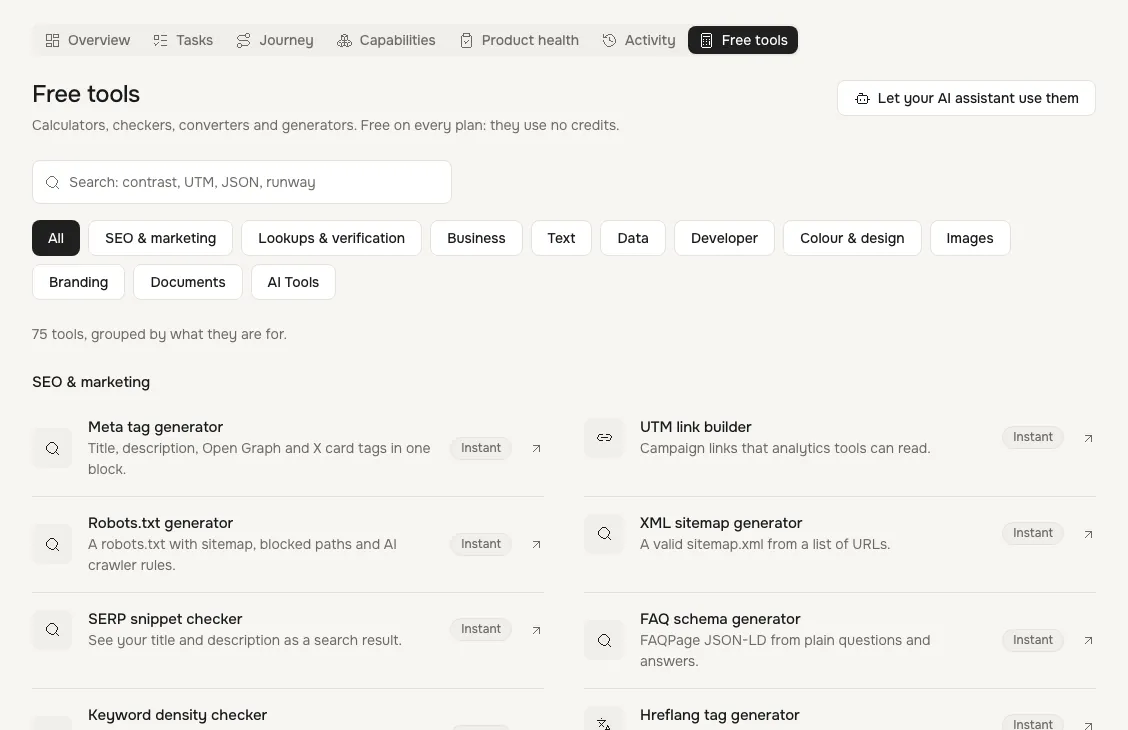
Open Integrations › Free tools. Every role can open it, viewers included: for a member or a viewer it is the one page of the Integrations group.
- Search the free tools filters the list as you type.
- The category buttons (All, SEO & marketing, Lookups & verification and so on) show one category at a time.
- Each row shows the tool's name, one line on what it does, and a badge that says where it runs.
- Click a row to open the tool inside the workspace. All free tools at the top takes you back to the list.
If nothing matches, the page says No tool matches that search; choose Show all tools to clear the search and the filter.
A tool page
Every tool page has the same parts: the form of the tool and its result, How it works (the steps in order), and Related tools. Results can be copied or downloaded, depending on the tool.
What it costs
Nothing. The free tools are free on every plan and running one does not use credits. Signed in, every tool is open: there is no email form and no upgrade step.
The only limit is on the two AI Tools: each has a small number of free runs a day. See The daily runs of the AI tools.
Where a tool runs and what is kept
The badge on each tool tells you where the work is done:
| Badge | Where it runs | What happens to what you enter |
|---|---|---|
| In your browser | Entirely in your browser | Nothing is uploaded |
| Instant | Calculated on Orkosi's servers | What you enter is not stored |
| Live lookup | Reads public records live (DNS, a page, a domain) | What you enter is not stored |
| Instant, online | Processed on Orkosi's servers | The file is discarded straight after |
| AI | Runs on Orkosi's AI pool, with the runs left today | Your text is not used for training |
Tools that take a file state the accepted formats and the maximum size on their own page.
The tools
The page shows how many tools there are. They are grouped in eleven categories.
SEO & marketing
| Tool | What it does |
|---|---|
| Meta tag generator | Writes the title, description, Open Graph and X card tags in one block |
| UTM link builder | Builds campaign links that analytics tools can read |
| Robots.txt generator | Writes a robots.txt with the sitemap, blocked paths and AI crawler rules |
| XML sitemap generator | Makes a valid sitemap.xml from a list of URLs |
| SERP snippet checker | Shows your title and description as a search result |
| FAQ schema generator | Makes FAQPage JSON-LD from plain questions and answers |
| Keyword density checker | Counts how often a keyword appears, and shows what the text is about |
| Hreflang tag generator | Links the language versions of a page correctly |
| Email subject line tester | Scores a subject line for length, clarity and spam words |
| Headline analyzer | Scores a headline and suggests how to make it stronger |
| Social post length checker | Tells you whether a post fits X, LinkedIn, Instagram and other networks |
| Meta tag checker | Reads the SEO and social tags of any live page |
Lookups & verification
| Tool | What it does |
|---|---|
| Email verifier | Says whether an address is real, a typo or a throw-away |
| Email list cleaner | Takes a pasted list of addresses and returns the ones that are safe to send |
| IP address lookup | Shows whose network an IP is on: a home line, a data centre or Tor |
| SSL certificate checker | Says whether a certificate is trusted and how long until it expires |
| Domain age checker | Shows when a domain was registered, when it expires and with whom |
| Website technology lookup | Shows what a site is built with: CMS, framework, analytics, payments |
Business
| Tool | What it does |
|---|---|
| MRR and ARR calculator | Recurring revenue today, and where churn and growth take it |
| Startup runway calculator | How many months of cash you have left |
| Break-even calculator | How many sales cover your costs |
| Profit margin calculator | Margin, markup and profit from a cost and a price |
| LTV to CAC calculator | Customer lifetime value, the ratio to acquisition cost, payback |
| Churn rate calculator | Monthly churn, retention, and what it costs over a year |
| ROI calculator | Return on investment, with the yearly rate |
| VAT calculator | Adds VAT to a price, or takes it out |
| Loan calculator | Monthly payment, total interest and a yearly schedule |
| A/B test significance calculator | Says whether variant B is really better, or whether it is chance |
| Percentage calculator | Percent of a number, share of a total, percent change |
| Freelance rate calculator | The hourly and day rate your target income needs |
| Ad metrics calculator | CTR, CPC, CPM, CPA and ROAS from campaign numbers |
| Startup dilution calculator | What a funding round leaves the founders with |
Text
| Tool | What it does |
|---|---|
| Word counter | Words, characters, sentences and reading time of a text |
| Case converter | UPPER, lower, Title, camelCase, snake_case and more |
| URL slug generator | Clean, readable URL slugs from any title |
| Lorem ipsum generator | Placeholder text by paragraphs, sentences or words |
| Text diff checker | Compares two texts and shows every added and removed line |
| Sort and dedupe lines | Sorts a list and removes duplicates and empty lines |
| Markdown to HTML | Converts Markdown to clean HTML |
| Readability checker | Reading ease, grade level and what to fix |
| Text cleaner | Strips HTML, extra spaces, curly quotes and line breaks |
Data
| Tool | What it does |
|---|---|
| JSON formatter | Formats, validates and minifies JSON, with the error line |
| JSON to CSV | Turns a JSON array into a CSV ready for a spreadsheet |
| CSV to JSON | Turns a CSV export into a JSON array |
| YAML to JSON converter | Converts YAML to JSON and JSON to YAML |
| Base64 encoder and decoder | Encodes text to Base64 or decodes it back |
| URL encoder and decoder | Percent-encodes or decodes a URL or a query value |
| URL parser | Splits a URL into host, path and query parameters |
| HTML entity encoder | Escapes text for HTML, or decodes entities back |
| Number base converter | Binary, octal, decimal and hexadecimal |
| JWT decoder | Reads the header, claims and expiry of a JSON Web Token |
Developer
| Tool | What it does |
|---|---|
| UUID generator | Random or time-ordered UUIDs, several at once |
| Hash generator | MD5, SHA-1, SHA-256 and SHA-512 of any text |
| Password generator | Strong random passwords with an entropy estimate |
| Unix timestamp converter | Epoch seconds to a date and back, in any time zone |
| Regex tester | Tests a regular expression and shows every match and group |
| Cron expression explainer | Says what a cron schedule means and when it runs next |
| IP subnet calculator | Network, mask, host range and size of a CIDR block |
| DNS lookup | A, AAAA, CNAME, MX, NS and TXT records of a domain |
| SPF, DKIM and DMARC checker | Checks whether your domain's email can be forged |
The last two are useful when you connect a domain or a sender: see Custom domains.
Colour & design
| Tool | What it does |
|---|---|
| Colour converter | HEX, RGB, HSL and CMYK of any colour |
| Colour contrast checker | The WCAG contrast ratio of text on a background |
| Colour shades generator | A full scale of shades from one brand colour |
| CSS gradient generator | Linear and radial gradients, with the CSS to paste |
| Placeholder image generator | An SVG placeholder of any size, with your label |
Images, Branding and Documents
| Tool | Category | What it does |
|---|---|---|
| Bulk image resizer | Images | Resizes many images at once, in your browser |
| Image compressor | Images | Shrinks JPG, PNG and WebP files without visible loss |
| Colour palette from image | Images | Extracts a colour palette from a photo |
| QR code generator | Branding | QR codes in your brand colour, as SVG or PNG |
| Favicon generator | Branding | Every favicon size and the manifest, from one image or letter |
| OG image maker | Branding | Social sharing cards from clean templates |
| PDF to Word | Documents | Turns a PDF into an editable .docx |
| Word to PDF | Documents | Exports a .docx to a PDF |
AI Tools
| Tool | What it does |
|---|---|
| AI brand name generator | Proposes names with the reasoning behind each and ideas for a domain |
| AI business idea validator | Returns a candid scorecard: market, moat, risks and first experiments |
The daily runs of the AI tools
The two AI tools call a model, so each has a small number of free runs a day. The number is on the tool's badge, and the tool page shows how many runs are left today and when they open again.
- The runs are counted for your account. Using the tool in the workspace, on the public site while signed in, or through an API key of the same account all draw on the same count, and switching workspace does not add more.
- An account whose email address is not verified yet shares its runs with other new accounts on the same network. Verify your email to have your own.
- When the runs are used up, the tool says so and they open again the next day. Nothing is charged, and there is no way to buy more runs.
The same tools on the public site
The tools are also public at orkosi.com/tools, one page per tool, for people without an account.
- A visitor types an email address once in the form on a tool page. Every tool is open from then on in that browser.
- That step sets a signed cookie named
orkosi_tool_pass, which is what keeps the tools open for the following months, and a visitor cookie namedorkosi_vid. Neither is set by only viewing a page. Clearing the cookies, or another browser, brings the form back. - By entering the address the visitor agrees to receive occasional emails from Orkosi, with an unsubscribe link in each.
- Someone who already has an account does not need the form: the tools are open as soon as they sign in.
- The AI tools have the same daily runs there, counted per email address and browser.
Let your AI assistant use them
Every tool is also an API call and an MCP tool, so ChatGPT, Claude or your own agent can run it for you at no charge. The Let your AI assistant use them button on the Free tools page opens the page where you connect an assistant. See AI agents for the connection and Free tools in the API for the calls. Each public tool page also has a section for agents with the names of its fields and a call that works.
When something does not work
- A lookup returns nothing. The Live lookup tools read public records. Check the spelling of the domain or the address, and that the site is reachable from the internet.
- A file is refused. Check the accepted formats and the maximum size on the tool page.
- An AI tool says the runs are used up. They open again the next day; the tool shows when.
- An AI tool asks for a verified email. Open the email sent when you signed up and click its link, then run the tool again.
- The AI is unavailable right now. Try again in a few minutes.
- The public page asks for your email again. The cookie was cleared or you changed browser. Enter the address again, or sign in.
- Anything else: contact support.