No-Code vs AI-Generated Software: The Ceiling Test
Orkosi Team · · 11 min read

Pick a no-code platform or let an agent write you a real codebase, and within a week you will have something a customer can click. That is the uncomfortable truth about the no-code vs AI-generated software debate in 2026: build speed is a tie. The interesting question is not which one gets you to a demo faster, it is where each one stops. Every tool has a ceiling. The only decision that matters is whether your product's differentiator sits below it or above it.

No-code vs AI-generated software: two different bets, not two speeds
These are not two points on a speed continuum. They are two different bets about what you will need eighteen months from now.
What 'no-code' means in practice
A no-code platform is a visual builder that runs your application on the vendor's hosted runtime. You compose screens, data types and workflows from pre-built blocks; the vendor owns the execution engine, the database, the deployment pipeline and the uptime. Bubble, Glide, Softr, Airtable interfaces and Webflow plus a logic layer all fit this shape.
The bet: everything your product needs is expressible in the blocks the vendor ships, and the vendor stays in business and keeps shipping blocks.
What 'AI-generated software' means in practice
AI-generated software means an agent writes an actual codebase (React, Node, Python, Postgres, whatever fits) and deploys it to real cloud infrastructure that you control. There is a Git repository. There are dependencies with version numbers. There are environment variables and a cloud bill in your name or your vendor's, and the application runs the same way a hand-written one would because it is one.
The bet: you can live with the responsibility that comes with owning software, either because someone technical is involved or because something keeps taking maintenance tasks after launch.
The ceiling is a feature, not a bug
No-code platforms are deliberately constrained, and that constraint is the product. By limiting what you can express, the vendor can guarantee that what you do express will work, scale within known bounds, and not fall over because you wrote a bad database query. The box is why a non-technical founder can ship a working marketplace in a fortnight without learning what an index is.
So the argument "no-code can't do X" is usually a bad argument. The right question is narrower and more personal: is my differentiator inside the box or outside it?
A booking tool whose value is a clean interface over familiar scheduling logic is entirely inside the box. A booking tool whose value is a pricing engine that reprices inventory every fifteen minutes against three external feeds is outside it, and no amount of clever workflow nesting changes that. Both founders will have a working demo by Friday. Only one of them will still be inside the box in month nine.
This is the real content of no-code vs custom code as a decision: not capability in the abstract, but the location of your moat.
Where no-code ceilings actually show up
Four failure modes account for most of the migrations I see. Each has a workaround. The workaround is itself the warning sign.
The data model you can't reshape
The most common of all no-code platform limitations is a data model that was easy to create and is now expensive to change. Visual builders encourage you to attach logic directly to data types. Six months in, you have 40 workflows referencing a User type, and you discover you need five permission levels with per-field visibility, plus organisations that can contain other organisations.
In code this is a migration and a refactor of an authorisation module. In a visual builder it is often a manual audit of every workflow and every page element that reads the changed field, because there is no "find all references" and no compiler to tell you what broke. The workaround is a parallel shadow table plus conditional visibility rules everywhere. It works. It also means your permission model now lives in 200 places instead of one.
Background jobs, queues and retries
Request-response work is what visual builders are good at. Durable background work is where they strain. A nightly reconciliation that pulls 50,000 rows from an external ledger, compares them, retries the 1.2% that time out, and alerts a human if the third retry fails is an ordinary piece of software. Expressing it as a recurring workflow with scheduled sub-workflows, a custom "retry count" field and a manual dead-letter list is possible, and it is a hand-rolled queue with no observability.
The same applies to webhooks. Payment providers will deliver the same event twice; you need idempotency keys and a deduplication store. You can build that in most no-code platforms. You will be building infrastructure inside a tool chosen specifically so you would not have to build infrastructure.
Pricing that moves with usage, not seats
This one surprises people because it has nothing to do with capability. Leading no-code platforms price by plan tier plus consumption: Bubble's pricing layers workload units on top of the monthly plan, so a successful launch or a crawler hitting your public pages consumes capacity. Glue-layer tools price the same way: Zapier charges per task, and each workaround for a missing feature adds tasks.
The structural problem is that these costs scale with traffic, not revenue. A content-heavy product with free users and a thin paid tier has a cost curve pointing the wrong way. Owning the runtime does not make hosting free, but it does mean a 10x traffic increase costs you compute at cloud rates rather than workload units at platform rates. Model it before you commit, not after a Product Hunt feature.
The integration that has no connector
Every no-code platform has an HTTP connector, so technically nothing is unintegrable. In practice the ceiling is specific: a legacy point-of-sale system that speaks SOAP over a VPN, an insurer API that requires mutual TLS with a client certificate, an SFTP drop of fixed-width files at 2am, a partner who sends you XML and expects a signed response within 500ms.
Each of these is a normal afternoon in a real codebase. In a visual builder each becomes an external microservice you now maintain anyway, glued in through a webhook. At that point you are running a hybrid system with two deployment models and one of them is invisible to your team.
Where AI-generated software hits its own ceiling
Everything above is an argument for owning code. Here is the argument against it, which is at least as strong for most teams.
A codebase nobody on the team can read
Ownership means responsibility. A no-code vendor patches its runtime without asking you; when you own a codebase, nobody patches anything unless someone decides to. If your team cannot read the code, every incident becomes a procurement exercise: find a contractor, onboard them to an unfamiliar architecture, hope the tests exist.
Developers themselves are blunt about this. The Stack Overflow Developer Survey 2024 found very high adoption of AI coding tools alongside strikingly low trust in the accuracy of their output, with the most common complaint being code that is almost right, which is the expensive kind of wrong. That is a review problem, and review requires someone who can review.
Security defaults and the quiet mistakes
Generated applications will cheerfully ship the classic failures in the OWASP Top 10: broken access control (an endpoint that trusts a client-supplied user_id), injection through string-built queries, secrets committed to a repository, and overly permissive CORS or storage buckets. None of these break the demo. All of them break you later.
A mature no-code platform, whatever else you think of it, gets authorisation primitives and transport security right by default because it is their core liability. If you generate code, you need an explicit check against these categories before launch, not after.
Drift: dependencies, models and the 6-month mark
Software rots on a schedule. Dependencies publish security advisories, major versions break interfaces, runtimes reach end of life, cloud providers deprecate instance types, and the model that wrote your code is superseded by one with different conventions. DORA's State of DevOps research has consistently shown that delivery performance is defined by deployment frequency and recovery time, not by how quickly version one appeared. A codebase that is never deployed again is not stable, it is accumulating risk silently.
Which leads to the uncomfortable conclusion for anyone selling AI app builders, including the one I write for: AI-generated code with no maintenance plan is worse than a no-code app with one. AI-generated code maintenance is the entire ballgame, and it is the part nobody demos.
The ceiling test: five questions before you commit
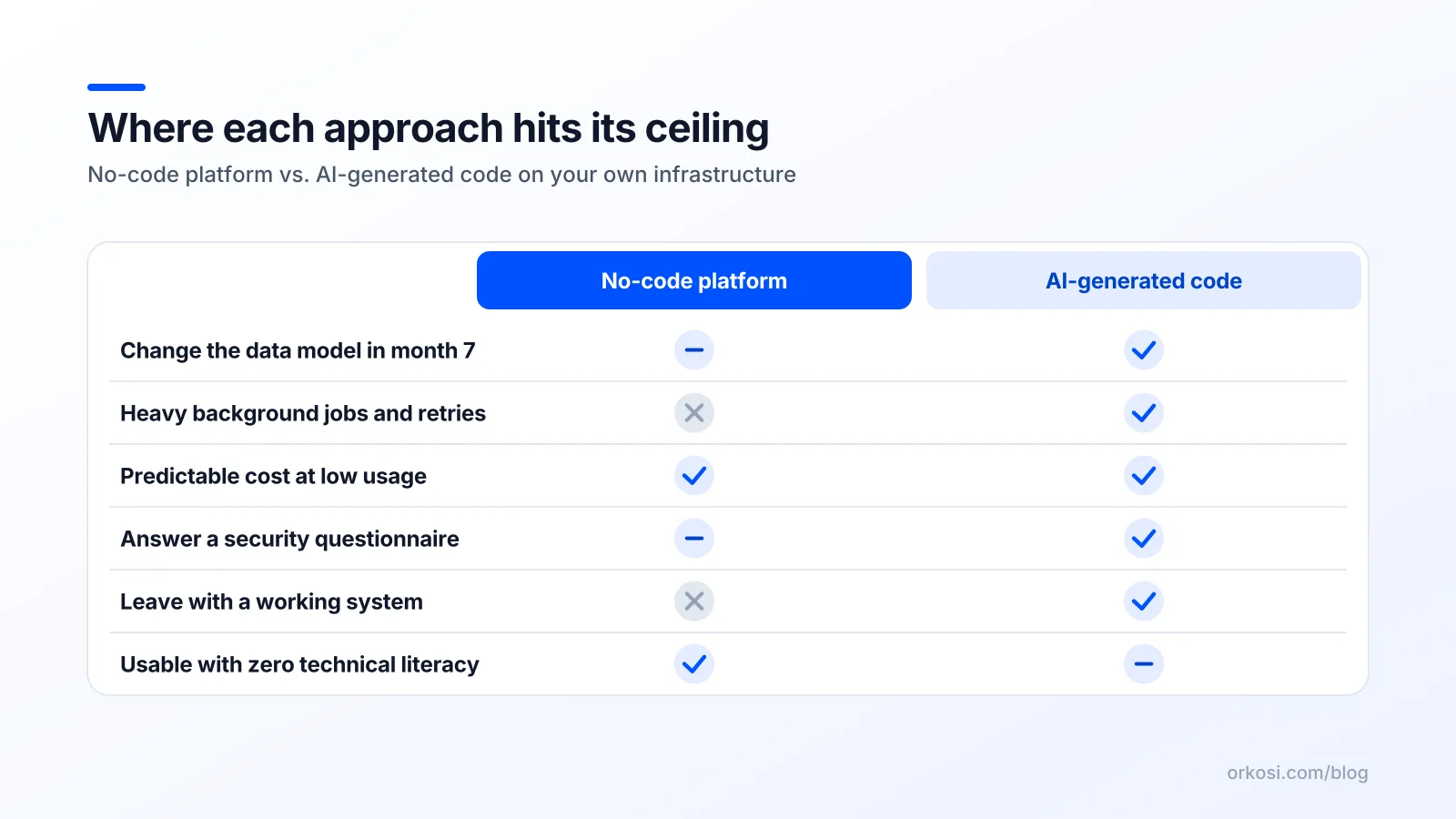
Ask these in order. A clear "no-code is fine" on all five is a genuine result, not a consolation prize.
| # | Question | If the answer worries you |
|---|---|---|
| 1 | Does my core differentiator need logic the platform does not expose? | Lean to code. The moat cannot be a workaround. |
| 2 | At 10x traffic, what does this cost and who pays? | Model workload/task pricing against revenue per user. |
| 3 | Can I export something that still runs elsewhere? | A CSV export is not portability. Logic lock-in is the real cost. |
| 4 | Who ships the fix on a Tuesday afternoon? | If the answer is "nobody", you need a maintained option, either vendor-hosted or agent-maintained. |
| 5 | Will an auditor, insurer or acquirer need to see source code? | Enterprise procurement, SOC 2 scoping and due diligence all assume a repository exists. |
Run it on your top three features, not your homepage
Every builder handles a marketing page, a signup form and a dashboard with a chart. Those are table stakes and they tell you nothing. Take the three features a customer would actually pay for, write them as one-sentence specifications, and test those against the five questions.
Concretely: "Partners upload a CSV of 20,000 rows; we validate, dedupe against existing records, and email a per-row error report within ten minutes." Build that one first, in whichever tool you are evaluating. You will learn more in two days than from a month of comparison tables, including ours at Orkosi compared with other builders.
When no-code is simply the right answer
Choosing code for the following is its own kind of overengineering:
- Internal tools used by fewer than 50 colleagues who will tell you in Slack when it breaks.
- Forms-and-approvals workflows where the hard part is the process, not the software.
- Directories, event signups and community hubs with a known end date.
- Anything under roughly 100 non-paying users where the cost of being wrong is a weekend.
- Prototypes you intend to throw away, which requires actually throwing them away.
Validating in no-code and rebuilding later is a legitimate, cheap strategy. It becomes expensive only when it happens by accident, when "we'll migrate when we need to" quietly becomes "we have 4,000 paying users and 300 workflows nobody documented". Decide the migration trigger up front: a revenue number, a user count, a specific feature request. Write it down.
The third option: generated code with someone still on it
The middle ground is the one most comparisons skip: a real codebase on real cloud infrastructure, where something keeps taking tasks after launch. That combines the portability and ceiling-free logic of custom code with the "I do not have to hire a DevOps engineer" property of a hosted platform.

This is the shape Orkosi takes. You describe the product, agents write the code and deploy it to AWS, and you keep iterating by filing tasks, the same way you would with a development team. Hosting, a brand kit, billing, and SEO and marketing tooling come with it, and the code is yours: templates cover SaaS and web apps, online stores, websites, image studios, mobile apps, desktop apps and video channels, with examples in the showcase and specifics in the Orkosi docs. Plans start at Starter ($25/month, 2,000 credits) and Pro ($100/month, 6,000 credits); see Orkosi pricing for the full range.
Be clear about what this does and does not solve. It removes the maintenance ceiling, because dependency bumps, security fixes and infrastructure changes can be handled as tasks rather than waiting for a contractor. It does not remove the specification work. Someone still has to decide what the five permission levels are and what should happen on the third failed retry. No builder, visual or agentic, will make that decision for you, and a vague task produces vague software in any medium.
FAQ
Is AI-generated software cheaper than no-code?
It depends on your usage curve, not the sticker price. No-code plans look cheaper at low volume and get more expensive as traffic grows, because workload and task consumption scale with usage rather than revenue. Owned code front-loads build effort and adds a cloud bill, but that bill grows roughly with compute rather than with platform units. If you have many free users and few paying ones, model both curves at 10x before choosing.
Can I migrate a no-code app to real code later?
Yes, and it is usually a rewrite of the logic with reuse of everything else. Your database schema, copy, design decisions, email templates and validated user flows all transfer; the workflows do not, because they exist only as configuration in the vendor's runtime. Budget for re-implementing business logic from scratch, which is faster than the original build because the requirements are now known. Export your data early and often so the decision stays yours.
Do I own AI-generated code the same way I'd own a developer's work?
Ownership depends on the platform's terms, so read them. Some builders give you the repository outright; others host the output and grant you a licence to use it rather than the code itself. Current practice generally treats the output as yours to use commercially, but the practical test is simpler: can you clone it, read it, and deploy it somewhere else tomorrow? If not, you have a hosted product with a code-shaped interior.
Which is safer for a product handling customer payment data?
Neither, by default. Safety comes from using hosted payment flows such as Stripe Checkout or Elements so that card data never touches your servers, which keeps you out of the heaviest PCI scope on either approach. A no-code platform gives you safer transport and authorisation defaults; owned code gives you the ability to audit, log and fix issues yourself. Whichever you pick, check it against the OWASP categories before you take real money.
Pick the three features you would actually charge for and build one of them this week, in whichever approach you are leaning towards. You can start free and check the plans and credit costs before you commit to anything.