Cost of Running a SaaS on AWS: The AI Token Line Item
Orkosi Team · · 13 min read

Most founders model the wrong line item. When you estimate the cost of running a SaaS on AWS, you probably reach for instance sizes, an RDS bill and some S3 storage, then add 30% for surprises. That model worked fine for a CRUD app. It falls apart the moment a single button in your product sends a 9,000-token prompt to a language model, because that button has a unit cost, and unit costs are cost of goods sold, not infrastructure.

The old AWS bill was fixed. The AI one isn't.
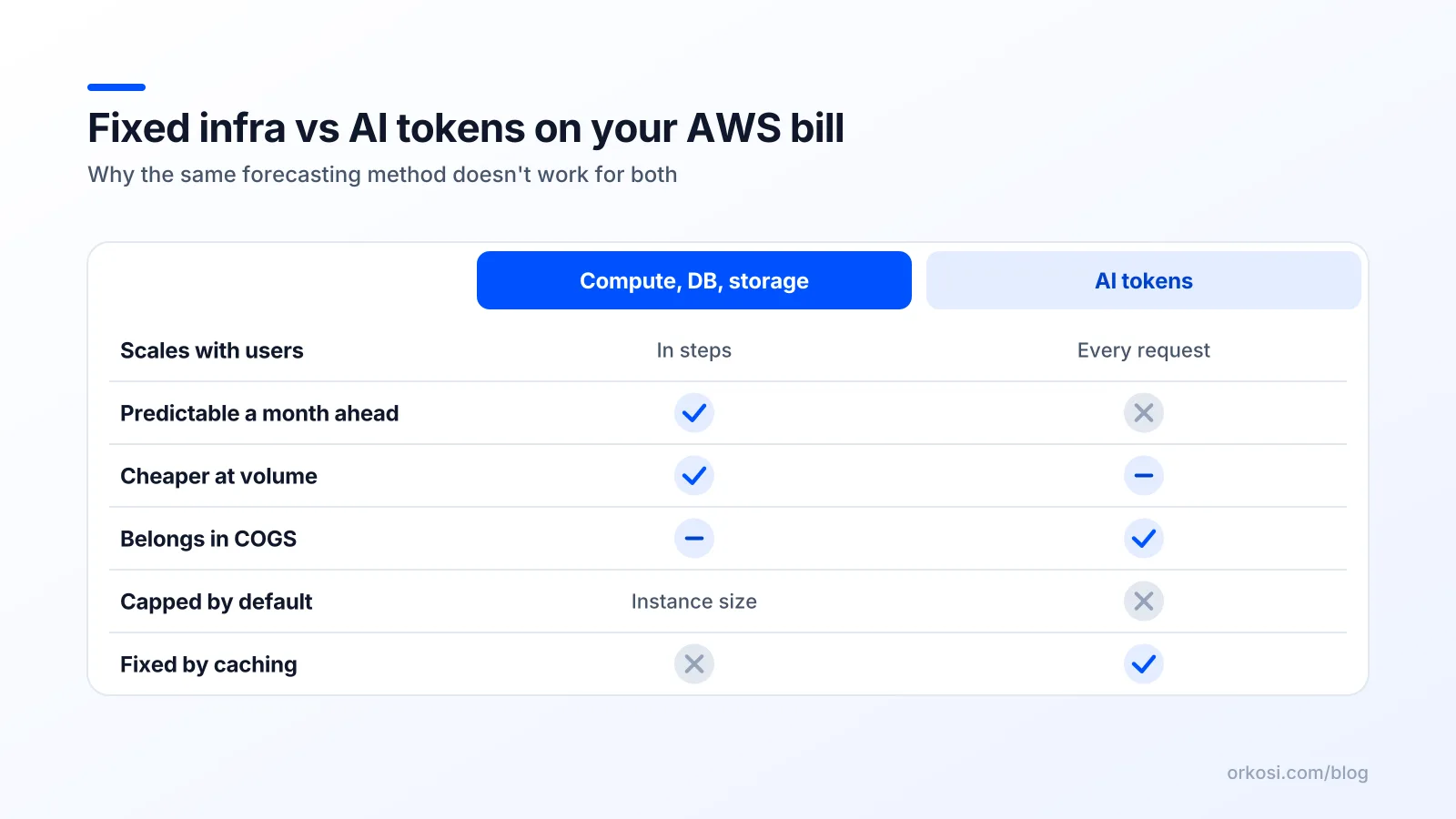
Traditional SaaS infrastructure scales in steps. You run a t3.medium until it hurts, then move to a t3.large, and the bill jumps once and sits still. A thousand extra users on an efficient Rails or Next.js app might cost you nothing until a database connection pool starts complaining. Even serverless, where AWS Lambda pricing is genuinely per-request and per-GB-second, gives you a cost per API call measured in microdollars.
AI features behave differently. Every request has a marginal cost large enough to see, denominated in tokens, and it does not get cheaper when you add users. It gets cheaper only when you change the model, the prompt, or the number of calls.
That means part of your product now has COGS: the direct cost of delivering one unit of your service. AI feature COGS sits between your revenue and your gross profit, and if you price a plan without knowing it, you are guessing at your AI SaaS gross margin.
What the cost of running a SaaS on AWS actually breaks into
Split the bill into three buckets: the predictable part, the variable part, and the part nobody budgets.
The predictable part: compute, database, storage, egress
App servers or containers, a managed database, object storage, a CDN, load balancer hours, data transfer out. For an early-stage product with a few hundred users, this realistically lands between $50 and $400 a month, depending on whether you run a NAT Gateway (expensive, often unnecessary), how many environments you keep warm, and whether your database is Multi-AZ.
The useful property of this bucket: it is step-wise and capped by your own architectural choices. You decide when it increases.
The variable part: input tokens, output tokens, embeddings, images
This bucket is priced per million tokens. Amazon Bedrock pricing publishes separate on-demand rates for input and output tokens per model, and the asymmetry matters more than founders expect: a model that charges X per million input tokens often charges 4 to 5 times that per million output tokens. Anthropic's API pricing and OpenAI's API pricing follow the same shape, so this is structural, not a quirk of one vendor.
Practical consequences:
- A long document in the prompt is cheaper than a long answer out of it, token for token.
- Embeddings (vector representations of text used for search and retrieval) are priced per million tokens too, but at a tiny fraction of generation rates, which is why pre-computing beats re-reasoning.
- Image generation is priced per image, not per token, so one image feature can cost more than a hundred summaries.
- Bedrock also offers batch inference at a discount and provisioned throughput sold in model units by the hour, which flips a variable cost into a fixed one — a trade worth making only under specific conditions, covered below.
The part nobody budgets: retries, evals, and background jobs
Here is where token costs for AI apps quietly double. Your observed token count is almost never your billed token count, because of:
Retries. A timeout, a malformed JSON response, a refusal, or a content filter trip means you pay for the failed attempt and the successful one. A 10% retry rate on a feature with strict output schemas is normal.
Prompt caching misses. Caching discounts only apply when the cached prefix matches exactly. Inject a timestamp, a user name, or a shuffled retrieval order near the top of the prompt and every request is a full-price cache miss.
Background jobs. Nightly summarisation, re-embedding on document updates, digest emails, auto-tagging on ingest. No user triggered them, so they appear in no per-user mental model, and they can exceed foreground usage.
Evals. If you test prompt changes against a 500-case suite, every deploy costs real money. That is money well spent, but it belongs in the budget.
A reasonable planning multiplier is 1.2 to 1.5 on top of your clean per-request estimate. Measure it, then replace the guess.
Do the per-user math before you write the pricing page
Cost per action, not cost per month
Stop thinking in monthly averages and start with one action:
cost per action = (input tokens ÷ 1,000,000 × input price)
               + (output tokens ÷ 1,000,000 × output price)

monthly LLM cost per user = cost per action
                          × actions per user per month
                          × overhead multiplier (retries, evals, jobs)
That overhead multiplier is the one everybody drops. Keep it.
A worked example: a document summariser at 100 and 10,000 users
Check current rates on the Bedrock pricing page before you commit to anything; these are illustrative mid-market figures, not quotes.
| Variable | Assumption |
|---|---|
| Average input | 8,000 tokens (roughly a 12-page document plus instructions) |
| Average output | 600 tokens |
| Input price | $3.00 per million tokens |
| Output price | $15.00 per million tokens |
| Actions per user per month | 20 |
| Overhead multiplier | 1.3 |
Input: 8,000 ÷ 1,000,000 × $3.00 = $0.024 Output: 600 ÷ 1,000,000 × $15.00 = $0.009 Cost per summary: $0.033 Per user per month: $0.033 × 20 × 1.3 = $0.86
At 100 users that is $86 a month in tokens, against maybe $150 of fixed AWS infrastructure. Your LLM cost per user is under a dollar and a $29 plan looks magnificent. At 10,000 users the token line becomes $8,580 and fixed infrastructure might reach $2,500, against $290,000 of revenue: gross margin still roughly 96%. The naive math says AI is cheap.
Now change one assumption. Replace the single-shot summary with an agentic feature: eight tool calls, each resending a growing context, a 2,000-token final answer. Cost per action goes from $0.033 to something closer to $0.40. Same 20 actions a month, same overhead, and you are at $10.40 per user per month against a $29 plan. Gross margin on the AI portion has gone from 96% to around 64%, before support, payment fees and your own salary.
The heavy-user problem
Averages hide the thing that actually kills you. Usage in SaaS is a power-law distribution, not a normal one. Assume 5% of users do 50 times the actions of a median user.
On the agentic feature at $0.40 per action, a heavy user doing 1,000 actions a month costs you $520 in tokens against $29 of revenue. Five hundred such users on a 10,000-seat base cost $260,000 a month while paying $14,500. The other 9,500 users cannot subsidise that; they are only generating $275,500 in total revenue.
This is not a pathological edge case. It is what happens when a customer wires your API into their own automation, or discovers that your "analyse" button is the cheapest way to process their backlog.
Opinion: flat-rate pricing for AI features is a trap
Unlimited AI on a flat plan transfers 100% of usage variance from your customer to you. You are selling an option with no strike price: the customer pays the same whether they run three requests or thirty thousand, which means your gross margin is set by the most aggressive user you ever acquire.
Take a position early: meter the expensive thing.
| Model | Protects margin | Friction | Build cost |
|---|---|---|---|
| Flat plan, unlimited AI | No | None | None |
| Flat plan + hard monthly cap | Mostly | Low, until someone hits it | Low (counter + gate) |
| Usage tiers with overage | Yes | Medium, requires forecasting | Medium (metering + invoicing) |
| Credits | Yes | High, needs explaining | High (ledger, top-ups, refunds) |
The honest trade-off: credits are genuinely worse for onboarding. They add a mental conversion step ("how many summaries is 500 credits?"), they create support tickets when a user runs out mid-task, and they require a real metering ledger with idempotency and refund handling. Plenty of companies have won by eating the variance and keeping pricing dumb-simple. That is a defensible bet, but make it on purpose, with a hard spend cap behind it.
Orkosi prices its own build work in credits, where 1 credit equals $0.01, precisely because agent work is variable in exactly this way: some tasks are a one-line config change, some are a week of refactoring. The current plan structure is on the Orkosi pricing page.
Six levers that actually move the number
Ranked roughly by impact per hour of engineering effort.
Route cheap requests to cheap models
The single biggest win. Classification, tagging, short rewrites, schema extraction and intent detection all run acceptably on a small model at a fraction of the price. The gap between tiers in Anthropic's pricing and OpenAI's pricing is often 10x to 20x per token.
Implementation: a router that picks a model by feature, with the ability to escalate on low confidence. Expect a 40% to 70% reduction in token spend. Trade-off: two quality bars to maintain and an eval suite to prove the cheap path is good enough.
Cache prompts and cache answers
Two separate things. Prompt caching, offered as a discount on cached input tokens, helps when a long system prompt or document prefix repeats. It requires keeping volatile content out of the cached prefix, which is a real refactor.
Answer caching is cruder and often more valuable: hash the normalised input and store the result. For FAQ-style features with repeated queries, hit rates of 20% to 40% are achievable. Trade-off: invalidation. Stale answers after a data change are a support problem, so cache with a TTL and a version key tied to the underlying content.
Shorten outputs, not just inputs
Output tokens cost multiples of input tokens, so trimming them pays more per token saved. Set max_tokens deliberately for each feature rather than inheriting a default. Ask for structured output instead of prose. Drop "explain your reasoning" where it does not improve the answer.
Cutting a 1,200-token response to 400 tokens can remove a third of a feature's total cost, in an afternoon of work. Trade-off: terse answers sometimes feel less trustworthy, so test with users rather than assuming.
Pre-compute with embeddings instead of re-reasoning
If you are sending the same 40-page document into a model on every question, stop. Chunk it, embed it once, retrieve the three relevant chunks per query. Input tokens drop from 40,000 to maybe 2,500, embedding is priced at a tiny fraction of generation rates, and latency improves too.
Trade-off: retrieval quality becomes a new failure mode, and you now own a vector store and a chunking strategy. A week of work, not an afternoon, but often a 10x reduction on document-heavy features.
Hard per-user and per-key spend caps
Not a cost optimisation, a blast-radius control. Track accumulated spend per user and per API key, refuse requests above the ceiling with a clear error, and alert yourself at 80%. This is what stops one customer's runaway integration from producing a five-figure surprise. Build it before launch; retrofitting a spend ledger after your first incident is a bad week.
Only consider provisioned capacity once demand is boring
Bedrock sells provisioned throughput by the hour in model units, converting variable token cost into fixed capacity cost. The arithmetic only favours it when utilisation is high and predictable: sustained, round-the-clock volume against a single model you are not planning to change.
Early-stage products fail all three tests. Traffic is spiky, you switch models every eight weeks, and nights are empty. Stay on-demand, use batch inference for anything asynchronous, and revisit when your usage graph looks flat and dull.
Instrument it on day one or you'll be guessing in month three

Minimum viable cost observability is three things, all of which take less than a day.
Log tokens per request. Every model call writes a row: timestamp, user ID, organisation ID, feature tag, model, input tokens, output tokens, cached tokens, retry count, computed cost. Feature tag is the field people forget and the one that answers every later question. Without it you know your bill went up and nothing else.
Tag AWS resources. Apply cost allocation tags for environment, service and feature, then activate them so they appear in Cost Explorer. The AWS cost management documentation walks through tag activation and grouping; the payoff is separating staging from production, routinely 30% of an early AWS bill spent on environments nobody is using.
Set budget alerts before launch. A monthly budget with alerts at 50%, 80% and 100% of expected spend, delivered somewhere you actually read, plus an anomaly detector. These are free and they are the difference between noticing a problem on day two and noticing it on the invoice.
Then treat cost per feature as a product metric, on the same dashboard as activation and retention, reviewed by whoever decides what gets built. "Cost per successful summary" changes product decisions. "AWS bill" changes nothing, because nobody knows which prompt caused it.
What this means if agents are building the product
If you are using an agent platform to build and run the product, metering is just another task. Orkosi agents write code, deploy it to AWS and keep iterating through tasks you file, so "log input and output tokens per request with a feature tag", "add a monthly credit ledger per organisation", "cache summariser responses with a 24-hour TTL keyed on document version" and "refuse requests above a configurable per-user spend cap" are ordinary tickets rather than a separate infrastructure project. The SaaS / Web App template already includes billing, which is the hard half of usage pricing.
Because deployment goes to an AWS footprint you can see, your token bill and your infrastructure bill both stay visible rather than being wrapped in someone else's opaque per-seat charge. That is a real advantage for margin work.
The honest limit: the spec still has to say "cap this at X". An agent will not invent your margin target, decide that a 20% retry rate is unacceptable, or know that you intend to sell to enterprises who will bulk-process 50,000 documents in a weekend. You own the pricing position; the agent implements it, quickly and without arguing, which is most of the value. Orkosi's feature list and the documentation cover what the task loop can and cannot do.
FAQ
How much does it cost to run a small AI SaaS on AWS per month?
For a few hundred active users, expect roughly $50 to $400 in fixed AWS infrastructure (compute, managed database, storage, CDN, load balancer) plus a token line that depends entirely on your feature design. A lightweight summariser at a dollar per user per month means $300 at 300 users; an agentic feature at $10 per user means $3,000. The fixed part is predictable within 20%; the variable part can swing 20x based on model choice and output length alone, which is why the per-action formula matters more than any benchmark figure.
Is Amazon Bedrock cheaper than calling OpenAI or Anthropic directly?
Usually comparable rather than cheaper. Published per-million-token rates on Bedrock and at the providers directly tend to land close for equivalent models, so pick on other grounds: Bedrock keeps data and billing inside your AWS account, consolidates with existing spend commitments and offers provisioned throughput; direct APIs often get new models first. Where Bedrock can win materially is batch inference discounts for asynchronous workloads. Compare the specific model you intend to ship, not the vendor in general.
Should I pass AI costs to customers as credits or build them into the plan price?
Build it into the price if your usage distribution is tight and the per-action cost is a few cents. Move to credits or usage tiers when either the cost per action is high or your heaviest 5% of users do more than 20x the median. The deciding question: can a single customer plausibly consume more than their subscription revenue in a month? If yes, meter it. Orkosi uses credits for build work at 1 credit = $0.01 for exactly this reason; see pricing for how the plans are structured.
At what point does provisioned throughput or a reserved instance make sense?
When demand is boring. For compute, Savings Plans and Reserved Instances pay off once you have had a stable baseline for three or more months and are confident you will not re-architect, typically after product-market fit rather than before. For provisioned model throughput, you need sustained high utilisation against a model you have committed to, because you pay for the capacity whether you use it or not. Early on, on-demand plus batch is almost always correct, and the flexibility is worth more than the discount.
Ready to put numbers behind your own feature? Start free and file metering, caching and spend caps as tasks on day one rather than after your first surprise invoice. Plan details and credit rates are on the pricing page.