Launch a SaaS Product Checklist: Verify the AI's Work
Orkosi Team · · 13 min read

Most advice you'll find when you search for a launch a SaaS product checklist was written for software a human typed. Those checklists assume the founder, or someone sitting near them, knows which parts are held together with tape. When agents wrote the code, that assumption breaks: the code is complete, formatted, tested-looking, and nobody in your company has read it. The scarce resource is no longer effort, it is knowledge of what actually shipped. So the useful checklist is not 60 tasks, it is five verification gates and one dry run.

Why your launch a SaaS product checklist changed when the agent started writing the code
Agent-built code fails differently from hand-written code. A tired developer writes code that looks wrong: half-finished functions, a TODO where the permission check should be, commented-out blocks. An agent writes code that looks right and is sometimes wrong, because its objective is plausibility. That defeats skim-reading, which is the only review technique most founders have.
The evidence lines up. DORA's 2024 State of DevOps report found that as AI adoption rose, developers reported faster individual work, but delivery stability went the other way: a 25% increase in AI adoption was associated with a roughly 7% reduction in delivery stability. More shipped, more broken. A pre-launch checklist for AI-generated code exists to absorb exactly that gap.
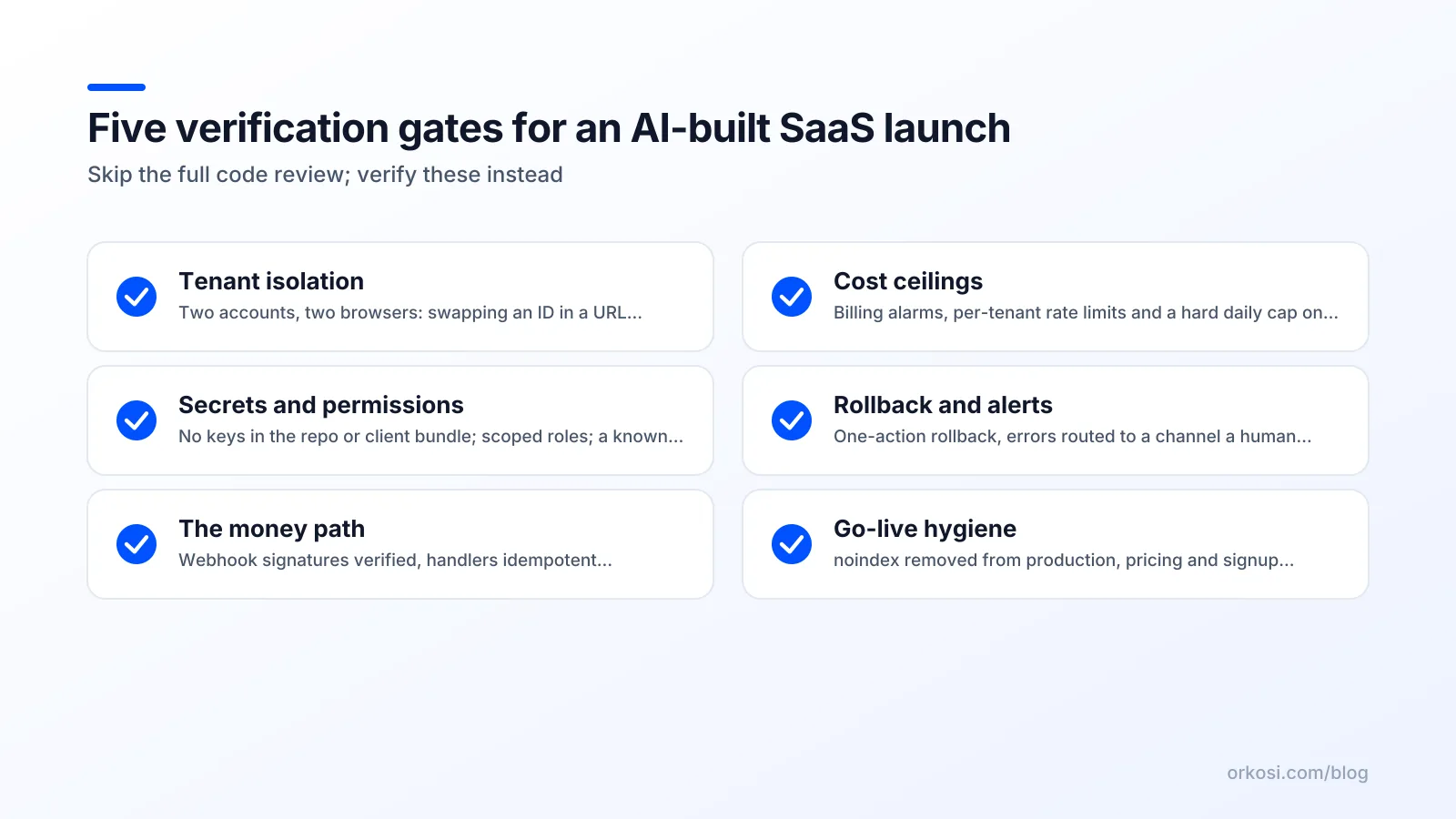
Five gates, in order of how much damage a failure causes:
| Gate | What fails | The test |
|---|---|---|
| 1. Tenant isolation | Customer A reads customer B's rows | Two accounts, two browsers, swap the IDs |
| 2. Secrets and blast radius | One leaked key unlocks production | Grep the repo, read the IAM policies |
| 3. The money path | Webhook retry double-provisions | Pay, cancel, fail, refund, re-subscribe |
| 4. Cost ceilings | One user burns the month's budget | Billing alarm, rate limit, token cap |
| 5. Rollback and alerting | Bad deploy stays live for six hours | Roll back on purpose, restore a backup |
And the honest part: several traditional items are now noise. Cross-browser pixel checks, load testing for traffic you do not have, a press kit, a 40-point SEO audit on a product with no users. More on what to cut below.
Read the data layer, not the diff
Why reading 20,000 lines is the wrong move
You will not complete an AI-generated code review before launch by reading the code. A modest SaaS is 15,000 to 40,000 lines once you count migrations, API routes and the front end. Even developers do not review that volume cold; they review diffs against code they already understand. You have no such baseline.
The alternative is to review the four places where an error becomes a breach rather than a bug. A broken signup flow costs you a morning. A missing tenant filter costs you the company.
The four files that decide whether you're safe
Ask your agent to show you these, one at a time, and read them like a contract:
- The schema and migrations. Does every table that holds customer data carry a tenant or organisation column? If
ordershas auser_idbut noorg_id, isolation is being enforced somewhere else, which means it is being enforced inconsistently. - The auth middleware. Where does a request become a known user? Is it one function, or did the agent inline checks in each route? One function is reviewable. Twelve are not.
- The query layer. Where do reads happen, and is the tenant filter applied by default or by remembering?
- Environment and config. What is in
.env, what is baked into the client bundle, and what defaults apply when a variable is missing. A config that silently falls back to permissive behaviour is a production incident waiting for a deploy.
Useful prompts, phrased so the answer is checkable rather than reassuring:
- "List every query that reads the
orderstable, with the file and line, and show me the tenant filter on each. Flag any that have none." - "Show me every API route that does not pass through the auth middleware, and explain why."
- "Which values from the server config are included in the client bundle?"
If the agent returns a list with two unfiltered queries, you have learned more in 90 seconds than a weekend of reading would have taught you. On Orkosi you can file the fix as a task immediately and watch the follow-up diff on the same files, which is narrower and more readable than the original build. The docs cover how to scope a task so the agent touches one layer.
Gate 1: tenant isolation, go test as customer two
This is the highest-value hour in your entire SaaS launch readiness checklist. Broken object level authorisation sits at number one in the OWASP API Security Top 10, and it is the exact failure mode generated code produces: the route fetches by ID, returns the record, and never asks whose record it is.
Run the multi-tenant data isolation test like this:
- Create two accounts that look like real paying customers, with different names, different organisations, real-looking data in each. Call them Acme and Globex.
- Open Acme in Chrome and Globex in a Firefox or private window. Two sessions, simultaneously live.
- In Acme, open a record and copy the ID from the URL, for example
/orders/8841. - Paste that URL into the Globex window. You should get a 404 or 403. If you see Acme's order, stop the launch.
- Repeat against the API, not just the UI. Use dev tools to copy a request, swap the ID, and replay it with Globex's session.
- Try sequential IDs,
/orders/8840,/orders/8842. Try the export endpoint. Try the file download link.
The four places isolation leaks in agent-built code, in descending frequency:
- List endpoints with filters. The default list is scoped correctly, but
?customer_id=or?status=bypasses the scope. - File and download URLs. Uploads land in an S3 bucket or a
/uploadspath where the URL is the only access control. - Search. Search was built later, often against a separate index, and the index has no tenant field.
- Background jobs and webhooks. A nightly digest or an inbound webhook runs without a user session, so the agent used an admin-level client to make it work.
The rule to hold onto: a record ID in a URL must never be sufficient to fetch a record. The session must be. If you can only test one thing before launch, test this.
Gate 2: secrets, permissions and blast radius
Assume one credential will leak. Phishing, a committed .env, a dependency with a post-install script, a screenshot in a support ticket. Then ask what that credential unlocks. If the answer is "everything", you are not ready to launch, regardless of how good the product looks.
- Nothing sensitive in the repo. Search history, not just the current tree. A key removed in a later commit is still in the history.
- Nothing sensitive in the client bundle. Open dev tools, search the JavaScript for
sk_,AKIA,secret. Front-end code is public code. - Live and test keys separated. Staging must not be able to charge a real card, and a local script must not be able to delete production rows.
- Scoped IAM roles, not one admin key. The AWS Well-Architected security pillar puts least privilege at the centre: each service gets permission to the specific buckets, tables and queues it needs. Agents default to broad permissions because broad permissions always work.
- A rotation path you have written down. Where does each key live, who issues the replacement, what breaks while it is rotating.
Managed platforms help by removing the chance to get it wrong by hand. Orkosi provisions the AWS side and keeps credentials out of the repo by default, which eliminates the most common leak, but it does not excuse you from reading which role each service got. Compare how different builders handle hosting and infrastructure before assuming any of them scope permissions tightly out of the box.
Gate 3: the money path has to be boring
Billing is where agent-built SaaS most reliably ships a genuine, money-losing bug. The reason is structural: the happy path is easy to generate and easy to demo, while the failure paths are asynchronous, arrive out of order, and never appear in a prompt.
Webhooks, retries and duplicate charges
Stripe's webhook documentation is explicit that endpoints may receive the same event more than once, that handlers must be idempotent, and that signatures must be verified before the payload is trusted. Generated handlers frequently do neither. They parse the body, credit the account, return 200, and assume one event equals one delivery.
Your Stripe webhook idempotency check is three questions:
- Is the signature verified before anything else happens? If not, anyone who finds the endpoint can grant themselves a subscription with a
curlcommand. - Is the event ID recorded, and does a repeat ID exit early? Store
evt_...with a unique constraint and let the database refuse the duplicate. - Does provisioning happen once per subscription state, not once per event? Setting "plan = pro" is safe to run twice. Adding credits is not.
Test it by replaying the same event twice with the Stripe CLI, then checking the user's row. Same state means pass. Double credits means you found the bug before your customers did.
The cancellation and refund paths nobody tests
Run this sequence against test mode and verify app state after each step, not just at the end:
| Step | Expect |
|---|---|
Subscribe with 4242 4242 4242 4242 |
Plan active, limits applied, receipt sent |
| Cancel | Access until period end, no immediate lockout unless that's your policy |
Attempt payment with 4000 0000 0000 0341 |
Dunning email, grace period, no silent data deletion |
| Refund from the dashboard | Entitlement revoked, no orphaned access |
| Re-subscribe on the same account | One customer record, not two, and no double entitlement |
The re-subscribe step catches more bugs than the first three combined, because it is the one no one prompts for.
Gate 4: cost ceilings before traffic, not after
An uncapped AI feature is a launch blocker, not a post-launch optimisation. If your product calls a model on a user's behalf, a single enthusiastic user or a scripted abuser can spend four figures while you sleep.
Minimum guardrails:
- A billing alarm at a number that would hurt, wired to a phone, not an inbox you check weekly.
- Per-tenant rate limits on any endpoint that costs money per call.
- A hard cap on token spend per user per day, enforced server-side, that returns a clear message rather than failing open.
- An inventory of what bills while idle. Load balancers, NAT gateways, provisioned databases and reserved IPs charge whether or not anyone signs up. Agents choose resilient defaults, and resilient defaults are the expensive ones.
Know your own cost structure too. Orkosi bills in credits where 1 credit = $0.01, so the agent's build and iteration work sits in a predictable monthly line while your AWS and model usage sit separately; see pricing for the current tiers. The trade-off is real: a platform that provisions infrastructure for you also makes it easy to stand up services you would not have chosen by hand, so the idle-cost inventory matters more, not less.
Gate 5: rollback, logs and who answers at 2am
For software you did not hand-write, the ability to undo matters more than the ability to debug. You cannot read your way out of an incident in code you have never read, so the first move must always be "go back to the version that worked".
- One-action rollback. Not "ask the agent to revert the change". A previous build you can redeploy, and you have done it once on purpose to prove it works.
- Error reporting to a channel a human reads. Sentry or equivalent into Slack or email. Logs that only exist in a console nobody opens are archaeology, not monitoring.
- An uptime check from outside your infrastructure, hitting a real endpoint that touches the database, not a static health page.
- A verified restore. A restore you have not tested is not a backup, it is a hope with a file size. Restore last night's snapshot into a scratch database and count the rows.
- A documented stop-the-bleeding step. A feature flag to disable the broken feature, or a maintenance mode, written down where a co-founder can find it at 2am.
The 90-minute dry run and the items to cross off
Two browsers, one real card, one notebook
Everything above collapses into one sitting. Block 90 minutes, open two browsers, keep a notebook with a pass or fail per line. No fixing during the run; write the failure down and keep going, or you will spend the whole window on the first bug.
| Minutes | Step | Pass means |
|---|---|---|
| 0-10 | Sign up as Acme and Globex, populate both with data | Both accounts work from a cold start, confirmation emails arrive |
| 10-30 | Swap IDs between sessions across URLs, API calls, downloads, search, exports | Every cross-tenant attempt returns 403 or 404 |
| 30-40 | Grep repo and client bundle for keys, read the IAM policies | No secrets client-side, no wildcard admin role |
| 40-60 | Subscribe, replay the webhook twice, cancel, fail a card, refund, re-subscribe | App state correct after every step, no double provisioning |
| 60-70 | Trigger the billing alarm threshold, hit the rate limit, exhaust a token cap | Alarm fires, limits return a clean error, nothing fails open |
| 70-85 | Deploy a trivial change, roll it back, restore a backup to scratch | Rollback in one action, restored row counts match |
| 85-90 | Remove noindex, load the pricing page, send yourself a password reset |
Public pages indexable, reset email arrives and works |
That last row matters because staging environments are usually blocked from search with a robots meta tag, and launching with it still in place quietly costs you months of indexing. Google's robots meta tag documentation covers the exact directive to remove; check the rendered HTML of the live site, not the template you think you edited.
What to skip: polish that pretends to be readiness
Cut these from your launch a SaaS product checklist entirely until you have paying users:
- Load testing. You do not have the traffic. Write down the number at which you would worry, set an alarm at it, move on.
- Cross-browser pixel checks. Safari and Chrome, current versions, on a phone and a laptop. Stop.
- The press kit and launch video. Neither influences whether the product works.
- A full accessibility audit. Do the free 80%: keyboard navigation, form labels, contrast. Defer the rest.
- Rewriting the agent's code for style. Readability you have not purchased with understanding is decoration.
- A third onboarding redesign. Ship it, watch five real users, then redesign with evidence.
Founders reach for that list because it is comfortable, and because every item produces a visible artefact. The five gates produce nothing visible at all, which is exactly why they get skipped. Look at what other people have shipped and you will notice the launches that went badly were never the ones with imperfect onboarding copy. Every unchecked gate is a bet you are making with a customer's data, placed on their behalf.
FAQ
Do I need a security audit before launching an AI-built SaaS?
A formal paid audit, no, not for a pre-revenue launch. A structured self-check, yes, and the five gates above cover roughly 80% of what an auditor would flag first: tenant isolation, credential scope, webhook verification, spend limits and rollback. Book a real audit when you start storing regulated data, when you sign an enterprise customer who asks for one, or when revenue makes the cost rational.
How do I check AI-generated code for vulnerabilities without being a developer?
Test behaviour instead of reading code. Create two accounts, swap record IDs between their sessions, and confirm every cross-tenant request is rejected; search the repository and client bundle for key prefixes like sk_ and AKIA; replay a payment webhook twice and check nothing double-counts. Then ask the agent for specific, checkable lists, such as every query that reads a given table and the tenant filter on each, rather than asking whether the code is secure.
What is the single most important item on a SaaS launch checklist?
Multi-tenant data isolation. Broken object level authorisation is the number one API risk in the OWASP API Security Top 10, it is the most common failure in generated code, and it is the only failure on this list that is unrecoverable: a leak between customers cannot be rolled back or refunded. Everything else, including billing bugs and outages, you can fix and apologise for.
How long should pre-launch verification take?
Ninety minutes for the dry run, plus however long it takes to fix what the run surfaces, typically a day or two of agent tasks for a first launch. Resist expanding it past a week. Verification is bounded work with a definite end; polish is unbounded, which is why it swallows launch dates.
Ready to build something worth verifying? Start free and ship your first version, then run the five gates against it. Check pricing to see which tier matches the iteration pace you expect after launch.