Cost of Running a SaaS on AWS: The Staging Tax
Orkosi Team · · 11 min read

The staging tax is the share of your AWS bill spent on environments no customer ever touches: staging, dev, preview branches, the demo you spun up for an investor call in March and never deleted. Most founders estimating the cost of running a SaaS on AWS budget for production traffic and then get surprised by the second line item that looks almost identical to the first. Here is the uncomfortable thesis: for a pre-scale SaaS, non-production environments can rival or exceed production spend, because cloud bills at small scale are dominated by fixed hourly resources rather than usage. Your staging environment serves zero requests and still pays the same rent.

The staging tax, defined
Staging tax: the recurring AWS spend attributable to environments that exist only for development, testing or review. It includes the obvious clones and the invisible residue: orphaned EBS volumes, snapshots of databases you deleted, CloudWatch log groups with infinite retention, an Elastic IP nobody claims.
The tax is not inherently bad. Reviewing a running application beats reading a diff, and a staging environment that catches one bad migration pays for itself. The problem is that almost nobody measures it, so it compounds silently until someone opens Cost Explorer during a cash crunch and finds that 45% of the bill belongs to environments with no users.
Why a clone of prod costs almost as much as prod
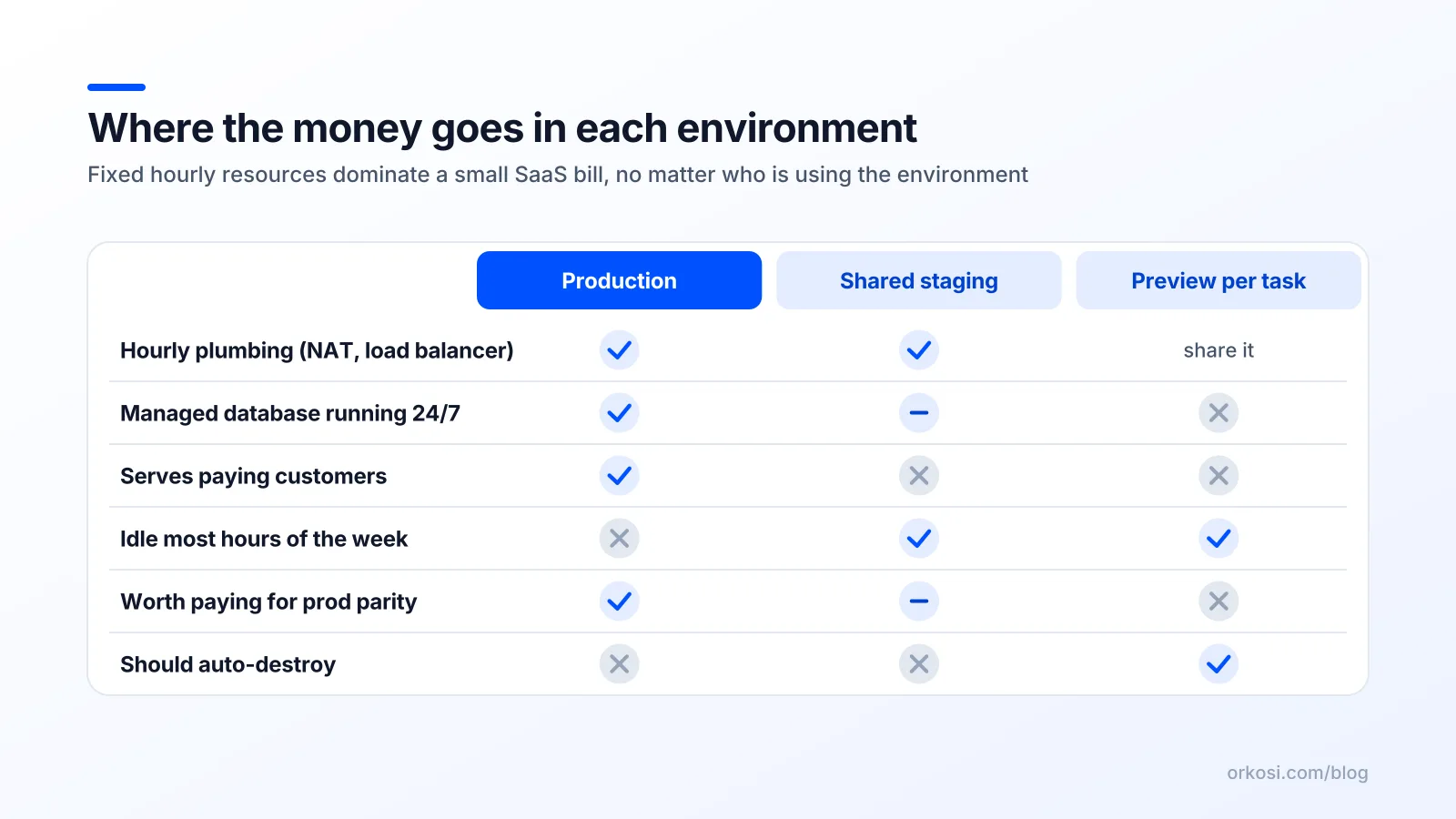
Your production environment has two kinds of charges: the ones that scale with traffic and the ones that bill by the hour regardless of whether anything is happening. In a staging clone, only the first kind shrinks. The second kind is identical, byte for byte, because an idle NAT gateway costs what a busy one costs.
The hourly meters that don't care about traffic
Three line items do most of the damage. A NAT gateway bills an hourly charge for every hour it exists, plus a per-GB data processing fee, as set out in Amazon VPC pricing. An Application Load Balancer bills an hourly charge plus Load Balancer Capacity Units, and the hourly portion applies to a load balancer handling one health check a minute exactly as it does to one handling production, per Elastic Load Balancing pricing.
Add an EBS volume for each instance, billed on provisioned GB rather than bytes read, and you have a baseline that does not care about your usage at all. Spin up three private subnets in three availability zones with a NAT gateway each because you copied the production Terraform module, and you have tripled the most expensive idle component in the stack.
Managed databases are the biggest offender
The single largest non-production line item is usually the database. Amazon RDS pricing is instance-hours plus provisioned storage plus backup storage above the free allocation. An db.t4g.medium running Postgres for a staging environment nobody has queried since Tuesday bills every one of the 168 hours in the week.
Multi-AZ makes it worse by design: you are paying for a standby replica to protect data that is fake. Provisioned IOPS, enhanced monitoring and Performance Insights all get copied along with the module. A staging database is frequently the most expensive piece of infrastructure in a startup's account measured per unit of business value delivered, which is zero.
Logs, backups and snapshots in triplicate
CloudWatch Logs charges for ingestion and for storage, and the default retention in many setups is "never expire". Non-production environments generate noisy debug logs precisely because that is what they are for, so a staging environment can out-ingest production. Then there are automated RDS snapshots, manual snapshots taken before a risky migration and never deleted, and EBS snapshots from an AMI pipeline.
| Cost driver | Scales with traffic? | Cost in an idle clone |
|---|---|---|
| NAT gateway hours | No | 100% of production |
| Load balancer hours | No | 100% of production |
| RDS instance-hours | No | 100% of production |
| EBS provisioned storage | No | 100% of production |
| Snapshot and backup storage | No | Often higher, nobody prunes |
| Data transfer, LCUs, S3 requests | Yes | Near zero |
| CloudWatch Logs ingestion | Partly | Sometimes higher than prod |
The pattern is clear. Roughly the only thing that gets cheaper in staging is the part that was already cheap.
How AI agents quietly multiply the problem
This is where the arithmetic turns against you. When an agent ships ten tasks a week and each task wants its own preview environment so you can click through the change before merging, a naive implementation gives you ten full-stack clones humming simultaneously. Each with a load balancer, a NAT gateway and a database.
The productivity win is real, and I would defend it hard. Reviewing a running app catches layout breakage, slow queries and broken auth flows that a code review never will, especially when a human is not the one who wrote the code. The failure is architectural, not conceptual: previews should be cheap and disposable by design, not miniature productions that happen to have a different DNS name.
The fix is to decide, once, that a preview environment is allowed to be worse than production. Slower cold start, shared plumbing, seeded fake data, seven-day log retention, no multi-AZ, no read replica. If the preview is a faithful clone, the cost of running a SaaS on AWS scales with your development velocity instead of your revenue, which is exactly backwards.
The environments a small SaaS actually needs
My position: most SaaS products under roughly $10k MRR need production plus short-lived previews, and nothing else. A permanently-on staging environment is a legitimate purchase, but it is a purchase, and it should be justified rather than assumed.
Production: pay for parity
Production is where you do not economise. Multi-AZ database, sensible backup retention, real log retention, right-sized instances rather than minimal ones. Every cost optimisation in this article should be read as "non-production only", because a saved dollar that causes an outage is the most expensive dollar in the business.
One shared staging: optional, not sacred
A permanent shared staging environment earns its keep in three situations: you have paying customers who would notice a bad deploy, you handle regulated or sensitive data and need a safe place to rehearse migrations, or you integrate with third parties that cannot be mocked faithfully (a payment processor's webhook retry behaviour, an enterprise SSO provider, a bank feed). Absent those, a shared staging box is often a place where stale branches go to rot and nobody trusts the data in it anyway.
Ephemeral previews: minutes, not months
The useful unit is a per-branch or per-task environment that exists for the length of the review and then disappears. Life measured in hours rather than months changes the economics entirely: ten previews that each live four hours cost less than one staging environment that lives a month. This is the pattern worth investing engineering time in.
Per-developer clones: almost never
A dedicated long-lived AWS environment per engineer was a reasonable 2015 practice and is hard to defend now. Local development with Docker Compose plus on-demand previews covers the same ground for a fraction of the non-production AWS costs. If your stack genuinely cannot run locally, that is a signal about the architecture, not a reason to buy more environments.
Six ways to cut the staging tax without flying blind
Each of these works. Each breaks something, so I have said what.
1. Scale the non-prod database to zero or stop it on a schedule
Aurora Serverless v2 lets you set a low minimum capacity in Aurora Capacity Units so a non-production cluster costs little while idle; check current ACU minimums and rates on the RDS pricing page before you commit. For provisioned RDS and EC2, the supported route is Instance Scheduler on AWS, which stops and starts resources on a tag-driven schedule. What it breaks: cold starts, and RDS instances stopped for seven days restart automatically, so the schedule needs to be real rather than aspirational.
2. Share expensive plumbing across non-prod environments
One VPC, one NAT gateway (or none, if non-prod workloads reach the internet through VPC endpoints and public subnets), one shared load balancer with host-based routing for all preview environments. What it breaks: isolation. A test that saturates the shared NAT or misconfigures a listener rule can affect another branch's preview, and you lose the ability to say "staging is exactly like prod".
3. Set a TTL on every preview environment
Give every ephemeral preview environment an expiry: auto-destroy on branch merge or branch delete, plus a hard sweep of anything older than 48 or 72 hours. The sweep matters more than the merge hook, because the environments that cost you money are the ones attached to abandoned branches. What it breaks: a reviewer who comes back on Monday to a dead URL, which is a mild annoyance compared with a surprise invoice.
4. Shrink non-prod log retention
Set CloudWatch log group retention to one to seven days in non-production and turn off debug-level logging by default. What it breaks: forensics. If a flaky test only reproduces once a fortnight, a one-day retention window means you will never catch it, so make retention a per-group decision rather than an account-wide sledgehammer.
5. Mock third parties instead of paying for sandbox infrastructure
Many integrations do not need real infrastructure in non-production: a stub service or recorded HTTP fixtures covers the common paths without a second message queue, a second search cluster or a second analytics pipeline. What it breaks: realism around money and webhooks. Mocks hide signature verification bugs, retry storms and idempotency failures, which is why payment flows deserve a real sandbox even when everything else is faked.
6. Tag every environment and alert on the non-prod share
Apply AWS cost allocation tags such as Environment=prod|staging|preview and Owner, activate them in Billing, then set an AWS Budget per environment with an alert at a threshold you would actually act on. The Cost Optimization pillar of the AWS Well-Architected Framework treats expenditure awareness and decommissioning unused resources as first-class practices for exactly this reason. What it breaks: nothing, except that untagged resources will embarrass you for a month until the backfill is done.
Do these six and the cost of running a SaaS on AWS stops tracking the number of environments you have ever created and starts tracking the number you are using right now.
The honest trade-offs
None of this is free. A database that scales to near-zero means the first request against a fresh preview is slow, sometimes several seconds, which reviewers will interpret as "the app is broken". Shared plumbing means one bad load test can degrade a colleague's preview, and debugging that costs engineering hours worth more than the NAT gateway you saved.
Mocked integrations are the sharpest trade-off. They hide real payment failures, webhook ordering problems and OAuth token refresh bugs, and those are the bugs that generate support tickets and refunds. Aggressive log retention makes post-mortems harder, and the incident you most want logs for is always the one from nine days ago.
My rule of thumb: pay for parity on anything that touches money, authentication, or a customer data migration. Everything else can be cheap, shared, slow to start and short-lived. If you cannot tell which category a change falls into, treat it as the expensive one for that one deploy and go back to cheap afterwards.
What this looks like when agents own the infrastructure
Environment hygiene is the classic job that never gets done, because it is infrastructure work with no customer-visible output. It is also exactly the kind of work that fits a task-based agent workflow, where "add a TTL sweep for preview environments" or "set non-prod log retention to three days" is a task like any other.
On Orkosi, hosting on AWS is included and agents deploy and iterate through tasks, so the environment lifecycle sits inside the normal workflow rather than being a side project a founder postpones. Plans are credit-based: Starter is $25/month with 2,000 credits and Pro is $100/month with 6,000 credits, where 1 credit = $0.01; see pricing for the rest. The honest trade-off is less control. If you want bespoke VPC topology and your own Terraform state, a managed agent platform is the wrong shape, and running your own AWS account with the six tactics above is better. If you would rather not own that work at all, see what people have built or how Orkosi compares with other builders.
FAQ
How much does a staging environment on AWS actually cost?
If it is a faithful clone, budget for roughly 60% to 90% of production's hourly cost, because NAT gateways, load balancers, RDS instance-hours and EBS volumes bill by the hour whether or not anyone uses them. Only traffic-based charges shrink. Price your specific stack against VPC, ELB and RDS pricing, counting hours rather than requests. A scheduled, single-AZ, shared-plumbing staging environment can land well under a quarter of that.
Can I run a SaaS with no staging environment at all?
Yes, and plenty of profitable products do, provided you have ephemeral preview environments per change, real automated tests, migrations you can roll back, and feature flags for risky work. The point at which that stops being defensible is when a bad deploy costs you a customer, when you handle regulated data, or when an integration cannot be mocked faithfully. Then buy a shared staging environment and keep it on a schedule.
Is it cheaper to use a separate AWS account per environment?
It is rarely cheaper and usually still right. Separate accounts give you hard blast-radius isolation, clean per-environment billing without relying on tag discipline, and simpler quota management. The cost downside is losing some shared-resource efficiency and paying for duplicated baseline services such as GuardDuty or Config. Use AWS Organizations with consolidated billing so volume tiers still aggregate, then apply Instance Scheduler to the non-production accounts.
What's the fastest single change to cut non-production AWS spend?
Stop or scale down the non-production database, then delete environments nobody is using. Those two actions usually account for most of the staging tax, and both are reversible within minutes. Instance Scheduler on AWS handles the schedule with tags, and a 48-hour TTL sweep handles the orphans. Add cost allocation tags the same week so the next cleanup takes an hour instead of an afternoon.
Want this handled as part of shipping rather than as a quarterly cleanup? Start free and see the plans and credit costs.