Custom App for Small Business: Kill the Per-Seat Tax
Orkosi Team · · 11 min read

Most small businesses discover per-seat pricing the same way: a new hire starts, and three weeks later the card statement is $180 heavier before that person has closed a deal or shipped a ticket. Building a custom app for small business operations used to be the expensive option. It is now, for a narrow and specific set of tools, the cheaper one. The trick is knowing which tools qualify, and running the arithmetic before you build anything.

The seat tax: what you're actually paying for
A definition
Per-seat pricing means software billed per named user per month. Twelve people, twelve seats, twelve multiples of the list price, whether one of them lives in the tool eight hours a day and another opens it twice a quarter to find a file.
The effect is a tax on headcount. Your software bill tracks your org chart rather than your usage, your revenue or the value any individual extracts. monday.com's pricing shows the mechanic clearly, with tiers quoted per seat and minimum seat counts that round your team size up. HubSpot's pricing stacks the same logic twice, per seat and per product hub.
Why vendors price per seat
Because it works, and not cynically. Seats are a legible proxy for value, they produce predictable annual recurring revenue, and they generate expansion revenue when a customer grows without the vendor shipping a single new feature. An account that signed at 5 seats and now runs 40 has octupled in value with zero additional sales cost.
Here is the position this article argues: per-seat pricing is entirely fair for software you would never build, and a quiet tax on everything else. Email, payroll and payments are worth every seat. The spreadsheet-shaped workflow that nobody sells, and the client portal where you pay for logins your customers did not ask for, are not.
Audit your stack before you build anything
The per-seat spreadsheet
Do this before any build-vs-buy small business software debate. Export twelve months of card and bank statements, filter for recurring software charges, and build one table: tool, job it does, seats paid, seats with a login in the last 30 days, price per seat, annual cost. Thirty minutes, and it is usually the highest-return half hour of the quarter.
A realistic line-up for a 12-person services business, using illustrative rates rather than current list prices:
| Tool | Job | Seats paid | Active in 30d | $/seat/mo | Annual |
|---|---|---|---|---|---|
| Project management | Delivery workflow | 12 | 7 | 19 | $2,736 |
| Helpdesk | Client support | 6 | 3 | 25 | $1,800 |
| Design tool | Marketing assets | 8 | 3 | 15 | $1,440 |
| Time tracking | Billable hours | 12 | 12 | 8 | $1,152 |
| CRM | Pipeline | 5 | 5 | 20 | $1,200 |
| E-signature | Contracts | 3 | 3 | 25 | $900 |
| Accounting | Books, VAT | 3 | 3 | 20 | $720 |
| Client portal add-on | File sharing | flat | - | 49/mo | $588 |
| Password manager | Credentials | 12 | 12 | 4 | $576 |
| Total | $11,112 |
That is roughly $925 of small business software costs per employee per year, which is unremarkable. It is also a number most owners have never calculated.
Seats you pay for but nobody opens
Look at columns three and four. In this example, 5 dormant project management seats, 3 dormant helpdesk seats and 5 dormant design seats cost $2,940 a year, about 26% of the bill, for nothing. In audits I have seen the dormant share run as high as half.
Cancel those first. Licence sprawl is not a build-vs-buy problem, and building a custom app to escape seats you were not using is an expensive way to avoid an admin task.
Where per-seat pricing is honestly a bargain
Commodity infrastructure
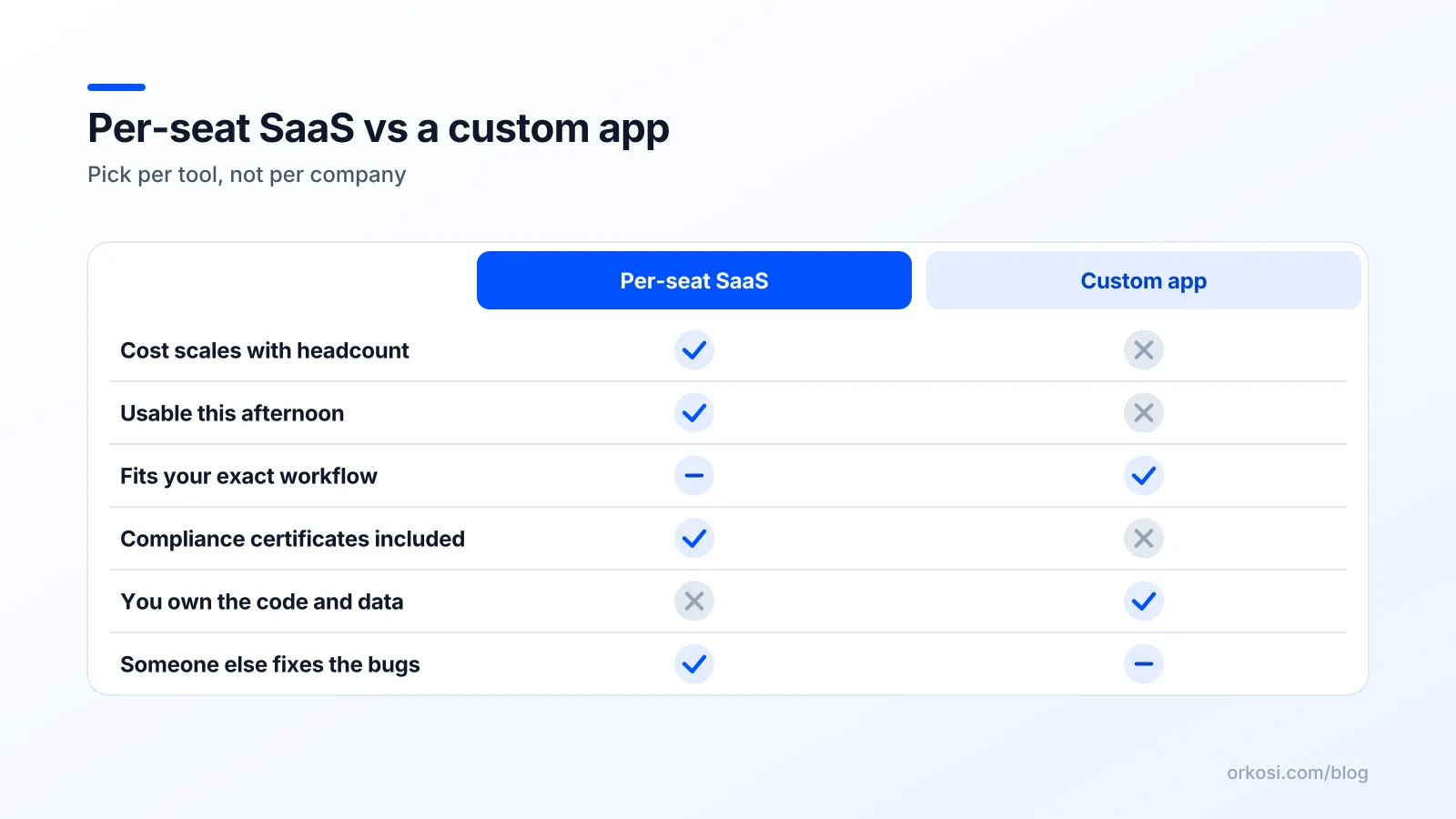
Do not rebuild email, calendars, accounting, payroll, payments, e-signature or password management. The reason is amortisation: your email provider spreads the cost of deliverability engineering, spam reputation and twenty years of edge cases across millions of accounts. You would spread it across one.
Anything with a compliance certificate
If a tool's value rests on a certification, a regulator's sign-off or an audit trail that must stand up in court, buy it. SOC 2 reports, PCI DSS scope, HIPAA business associate agreements and eIDAS-compliant signatures are products in themselves, and the vendor's real moat is the compliance apparatus, not the UI.
The rule worth taping to the wall: if the hardest part of the tool is certification, buy it; if the hardest part is matching your workflow, build it. Payments clearing is certification. Your six-stage job-costing process is workflow.
The three apps actually worth building custom
The workflow nobody sells
Pattern one is the operational process that lives in a spreadsheet because no vendor models your trade. Kiln firing schedules, multi-site equipment hire, patient referral triage, freight consolidation: the generic project tool gets you 60% of the way and then you maintain the other 40% by hand.
The signal you have crossed the threshold: someone on the team maintains a shadow spreadsheet that is the real source of truth, and the paid tool is where data goes to be re-typed. Browse what people build on Orkosi for the shape of these.
The customer-facing portal
Pattern two is a client, patient or supplier portal, where per-seat pricing stops making any sense at all. External users are not your employees; you cannot predict how many there will be, they log in four times a year, and paying $19 a month for each of them to download an invoice is absurd economics.
The signal: you are either paying for external seats, or you are emailing PDFs because you refuse to. A custom portal priced on infrastructure rather than headcount turns a variable per-user cost into a near-flat one.
The glue between systems
Pattern three is integration. You keep your accounting package, your CRM and your payment processor, and you build the thin layer that moves data between them so nobody re-keys invoices at month end.
The signal: you are paying an automation platform per task or per operation, and your monthly task count is climbing faster than revenue. Glue is also the safest first build because the hard parts, the certified systems, stay bought.
What a custom app for small business costs in 2025, honestly
Build cost
One number is the wrong model. Split custom cost into build, run and change, because people budget the first and get ambushed by the third.
Build is agent credits or developer hours. With AI agents the figure has fallen by an order of magnitude against agency quotes, which is exactly why this article is possible; a focused internal tool for small business use that would have been a $25,000 project in 2019 is now measured in weeks of a subscription.
Run cost
Run is the AWS bill behind the app: compute, database, storage, logs, domain and transactional email. For a tool with a dozen internal users the numbers are small. AWS Lambda charges $0.20 per million requests plus a per-GB-second rate for duration, so an app serving a few thousand actions a day lives in single-digit dollars of compute; the database and logs usually dominate.
The AWS Well-Architected cost optimization pillar is the right framework for estimating and capping this before you ship, not after.
Change cost
Change is the line nobody budgets: the tasks you file every month because the business moved. New status in the workflow, a field the accountant needs, a report for a lender, an integration the new supplier requires.
Orkosi prices for exactly this shape of work. Agents write the code, deploy it on AWS and keep iterating through tasks you file, with hosting, a brand kit, billing, SEO and marketing tooling included. Plans start at Starter $25/month with 2,000 credits and Pro $100/month with 6,000 credits, where 1 credit equals $0.01; check current pricing rather than trusting a figure in a blog post. How many credits your specific build consumes depends on scope, so treat the first month as discovery.
Change cost, not build cost, decides whether custom wins. A cheap build that nobody can modify becomes the most expensive thing you own.
The break-even model, worked out
The formula
Annual seat cost      = seats × price per seat × 12
Annual custom cost    = build + (run × 12) + (change × 12)
Break-even month      = build ÷ (monthly seat cost − monthly custom cost)

A 12-seat example
Take the audit above. The project management tool does not fit, so the custom app replaces it plus the client portal add-on plus time tracking: $2,736 + $588 + $1,152 = $4,476 a year, or $373 a month.
Assumptions for the custom side: three months on Pro at $100 to build and harden it ($300 of build), then $100 a month ongoing to cover change requests, with hosting included in the plan. Parallel running for the three build months, so you pay both.
| Month | SaaS only (cumulative) | Build path (cumulative) |
|---|---|---|
| 3 | $1,119 | $1,419 |
| 5 | $1,865 | $1,619 |
| 12 | $4,476 | $2,319 |
Crossover lands in month 5, and year one saves $2,157. Year two, with no build cost and no parallel run, saves $3,276. Those are real numbers for a 12-person firm, roughly a month of a junior salary.
When it never breaks even
Now the version that fails. Three people on a $15 per seat tool is $540 a year. Even if the custom replacement cost nothing to build, the cheapest plan plus your own attention eats the entire saving, and you have traded a vendor's roadmap for your own backlog.
The threshold worth quoting: below roughly $3,000 a year of seat spend on a tool that mostly fits, keep paying. Build when seat spend is high and fit is poor. One without the other is not a case.
The risks you're buying along with the savings
Security and data you now own
Replace SaaS subscriptions with custom software and you inherit patching, access control, backups, encryption and breach response. The vendor was doing that work; the invoice was partly for it.
Hold agent-written code to a published baseline. The OWASP Top 10 covers the categories that actually sink small apps: broken access control, injection, security misconfiguration, vulnerable dependencies. Ask for authorisation checks on every endpoint, parameterised queries, automated backups with a tested restore, and least-privilege IAM roles, then verify rather than assume.
Bus factor and handoff
A custom app with no documentation and no repository access is a liability dressed as an asset. Own the repository, keep infrastructure in an AWS account you control, insist the data is exportable in an open format, and keep a one-page runbook of how to deploy and restore. The Orkosi docs are a reasonable place to check how a platform handles ownership before you commit, and the same question should be asked of any builder you compare.
Feature drift
Your custom app gets no free roadmap. Nobody ships you a mobile view, an AI assistant or a new integration because the market expects one, and over three years that gap compounds.
Mitigation is a quarterly 30-minute review: what the app does versus what the business now needs, with three changes filed or the app deliberately frozen. Freezing is a legitimate choice; drifting without noticing is not.
How to actually do it with AI agents
Spec the workflow, not the screens
Pick the single highest seat-spend tool that does not fit. One. Then write the spec from the real process rather than from a screenshot: the states a job moves through, who can move it, what data each state requires, what must be notified, what must be reported.
Agents are good at turning that into a working app and bad at guessing the parts you left out. Ambiguity in the spec shows up as rework in the credits.
Ship one workflow, keep the rest on seats
Build narrow. One workflow, one portal or one integration, deployed to production and used by real people within weeks. Leave the CRM, accounting and e-signature exactly where they are.
Run both systems for one full business cycle, a month for most firms and a quarter if you bill quarterly. Then cancel the seats, which is the step people forget, leaving them paying for both indefinitely.
Measure the bill, not the demo
Launch day feels like success. The actual test is next quarter's card statement: did total software spend fall by more than the custom app costs to run and change, and did anyone go back to the spreadsheet?
If the answer is yes and no, repeat with the next tool on the audit. If the answer is no, you have learned something cheap, and the seats are still there.
FAQ
Is it cheaper to build a custom app than pay SaaS subscriptions?
Sometimes, and only above a threshold. Compare seats × price per seat × 12 against build plus twelve months of run and change; below roughly $3,000 a year of seat spend on a tool that broadly fits, paying is cheaper. Above that, with poor fit, builds commonly pay back within the first year, as in the month-5 example above. See pricing for the current plan figures to drop into the formula.
How many employees do you need before custom software pays off?
Headcount is the wrong variable; seat spend and fit are the right ones. A 4-person firm paying for 200 external client logins has a stronger case than a 40-person firm whose tools genuinely fit. That said, most businesses cross the arithmetic somewhere between 10 and 25 seats on a single ill-fitting tool.
What should a small business never build itself?
Anything whose hardest part is certification: payments, payroll, accounting, e-signature, password management, email infrastructure and anything carrying regulatory liability. The vendor amortises compliance and security review across thousands of customers and you cannot. Build the workflow layer on top, buy the certified layer underneath.
Who maintains a custom app once the AI agents have built it?
The agents do, if you keep a plan running and keep filing tasks; that is the point of an iterative model rather than a one-off project. On Orkosi, agents continue to deploy and change the product on AWS through tasks, which is why change cost, not build cost, drives the comparison. Whichever route you take, keep the repository and the AWS account in your own name so maintenance stays transferable.
Pick the one tool on your audit with the worst fit and the biggest seat count, and spec the workflow this week. Start free to see what agents produce against that spec, and check pricing before you put numbers in the break-even formula.