Launch a SaaS Product Checklist: Rehearse the Rollback
Orkosi Team · · 12 min read

Search for a "launch a SaaS product checklist" and you will get forty items pointing in one direction: write the copy, build the pricing page, schedule the Product Hunt post, wire up analytics, warm the email list. Every one of those items assumes the launch works. Almost none tell you what to do at 9:40pm when the signup flow is double-charging people and the new onboarding wizard is writing garbage into the accounts table. The second half of the checklist, the undo path, is what separates a bad week from a dead product.

The checklist everyone writes assumes the launch works
What a typical launch checklist covers
Open any standard pre-launch checklist and you will find the same forward-only sequence: domain and SSL, pricing page, terms and privacy policy, transactional email deliverability, error monitoring, uptime check, analytics events, social proof, launch-day comms. All of it is necessary. All of it is about getting traffic in the door and watching it arrive.
Google's SRE team runs launch checklists at a scale most of us never will, and treats the checklist as a coordination tool rather than a to-do list. Their launch review practice leans hard on rehearsed, reversible steps and staged rollouts. The interesting part is not the list of things to build; it is the insistence that each risky step has a defined way back.
What it leaves out
Three things in a SaaS product need an undo path, and most checklists cover none of them:
- Code. Can you get the previous version running in production, and how long does it take?
- Data. Can you recover from a migration or a buggy write that corrupted real rows?
- Money. Can you refund, credit and re-issue invoices without leaving customers in a half-entitled state?
They fail in increasing order of difficulty. Code rollback is mostly solved. Data rollback is genuinely hard. Money rollback is where you lose trust, because a customer will forgive ten minutes of downtime and will not forgive being charged twice and told to wait five business days.
Rollback is a product decision, not an infrastructure detail
Recovery time vs. recovery point, in plain English
Two numbers govern every rollback conversation, and the AWS Well-Architected reliability pillar defines them properly. In plain English:
- RTO (recovery time objective): how long the product can be broken before the damage is unacceptable.
- RPO (recovery point objective): how much recent customer work you can afford to throw away to get back to a good state.
RPO is the one founders skip, and it is the one that hurts. Restoring a database to its state 90 minutes ago means every signup, every uploaded file reference, every form submission in that window is gone. If a customer spent an hour building something in your app, you deleted their hour.
Pick your numbers before launch day
Write both numbers down now, in a document, with your name on it. "We can be fully down for 30 minutes. We can lose at most 5 minutes of writes." Those two sentences determine whether you need a feature flag kill switch, a read replica, continuous backups, or all three.
DORA's four keys make the case bluntly: elite and low performers are separated far less by change failure rate (the percentage of deployments that cause a degraded service) than by failed deployment recovery time. Everybody ships bugs. The difference is measured in minutes versus days.
| Question | Who decides | Why it is not a technical decision |
|---|---|---|
| How long can we be down? | Founder | Depends on contracts, churn risk, launch-day press |
| How much data can we lose? | Founder | Depends on what customers store and how irreplaceable it is |
| What do we tell customers? | Founder | Brand and trust, not engineering |
| How do we hit those targets? | Engineers or agents | Pure implementation |
The founder owns the first three rows. Your contractor, your agency or your AI agent cannot pick your RPO for you, because "we might lose two hours of customer uploads" is a business trade-off, not an architecture preference.
The four reversibility layers your launch a SaaS product checklist is missing
Code: can you redeploy the previous version?
The check: find the previous release artifact or commit SHA, and confirm there is a documented command or console action that puts it back in production.
The common failure mode: nobody can find the deploy history, or the "previous version" was never built as an artifact because the pipeline builds from main on every push. If rolling back means reverting a commit and waiting twelve minutes for CI, your RTO is twelve minutes plus panic.
The one-line test: deploy the current version twice, then roll back to the first build, and time it with a stopwatch.
Config and flags: can you turn the feature off without a deploy?
The check: every customer-facing change in the launch ships behind a flag that a non-engineer can switch off from a dashboard.
Feature flags beat code rollback for anything customers can see, and this is the strongest opinion in this article. A redeploy reverts everything in the release, including the three fixes you wanted to keep, and takes as long as your pipeline takes. A feature flag kill switch (a runtime toggle that disables one feature without changing the deployed code) reverts exactly one thing in under a second, and the founder can pull it from a phone.
The common failure mode: the flag only gates the UI, not the background job or the webhook handler, so turning it "off" leaves half the feature running against live data.
The one-line test: flip the flag off in production, reload the app, and confirm the feature is gone from the interface and from the logs.

Data: can you restore to a point in time?
The check: automated backups are enabled with a known retention window, and someone has actually performed a restore.
If you are on Amazon RDS or Aurora, point-in-time recovery lets you restore to any second within your retention window. Read the docs for two details that catch people out: the restore creates a new database instance rather than overwriting the old one, and the new instance comes up with default security groups and parameter groups unless you specify otherwise.
That is the safe design, not a flaw, but it means your real recovery time includes repointing the application, verifying connections and possibly reissuing credentials. A 20-minute restore can easily become a 50-minute outage.
The one-line test: restore yesterday's snapshot into a throwaway instance and run a query that counts rows in your three most important tables.
Money: can you refund, credit and re-issue invoices?
The check: you know how to issue a refund, how to void or credit an invoice, and what happens to the customer's access when you do.
The common failure mode: the refund goes through the payment processor but your application never hears about it, so the customer gets their money back and keeps the Pro plan forever. The mirror image is worse: a retry storm during a bad launch charges the same card four times because the payment call was not idempotent. Stripe's idempotency keys exist precisely for this, letting you safely retry a request that may or may not have succeeded, and any billing code written during a launch rush should use them by default.
The one-line test: in test mode, charge a card, refund it, and confirm the user's plan and entitlements revert in your own database.
The migration trap: the one rollback that usually fails
Expand, migrate, contract
Schema changes are not reversible by redeploying. If release 12 dropped the legacy_email column and you roll back to release 11, release 11 queries a column that no longer exists and the app is down harder than before. Code rollback and destructive migrations are mutually exclusive, and most teams discover this at the worst possible moment.
The discipline that keeps rollback possible is expand, migrate, contract:
- Expand. Add the new column or table. Deploy. Old code ignores it, new code can use it.
- Migrate. Backfill data and dual-write to both shapes. Deploy. Both versions of the code work.
- Contract. Only after the new version has been stable for days or weeks, drop the old column.
The trade-off is real: this turns one deploy into three, adds dual-write code you will later delete, and stretches a 20-minute change into a two-week sequence. For a launch where customers are about to write data you cannot regenerate, it is almost always worth it. For a pre-launch app with no users, it is ceremony.
Why 'just restore the backup' loses paying customers' work
Restoring to two hours ago is a last resort, not a rollback plan, once real users are writing data. You lose every signup, message, upload reference, payment record and settings change in that window. Worse, you create a split-brain problem: the payment processor still thinks those customers paid, your support inbox has conversations about accounts that no longer exist, and your analytics shows users who vanished.
Treat point-in-time recovery as the answer to "a migration corrupted a table" and never as the answer to "we shipped a bug". For bugs, the answer is a flag or a redeploy.
Run the drill: 45 minutes that changes your launch date
The staging rehearsal
Block 45 minutes this week. Pick one deliberate failure, break it in staging, and recover while someone holds a stopwatch.
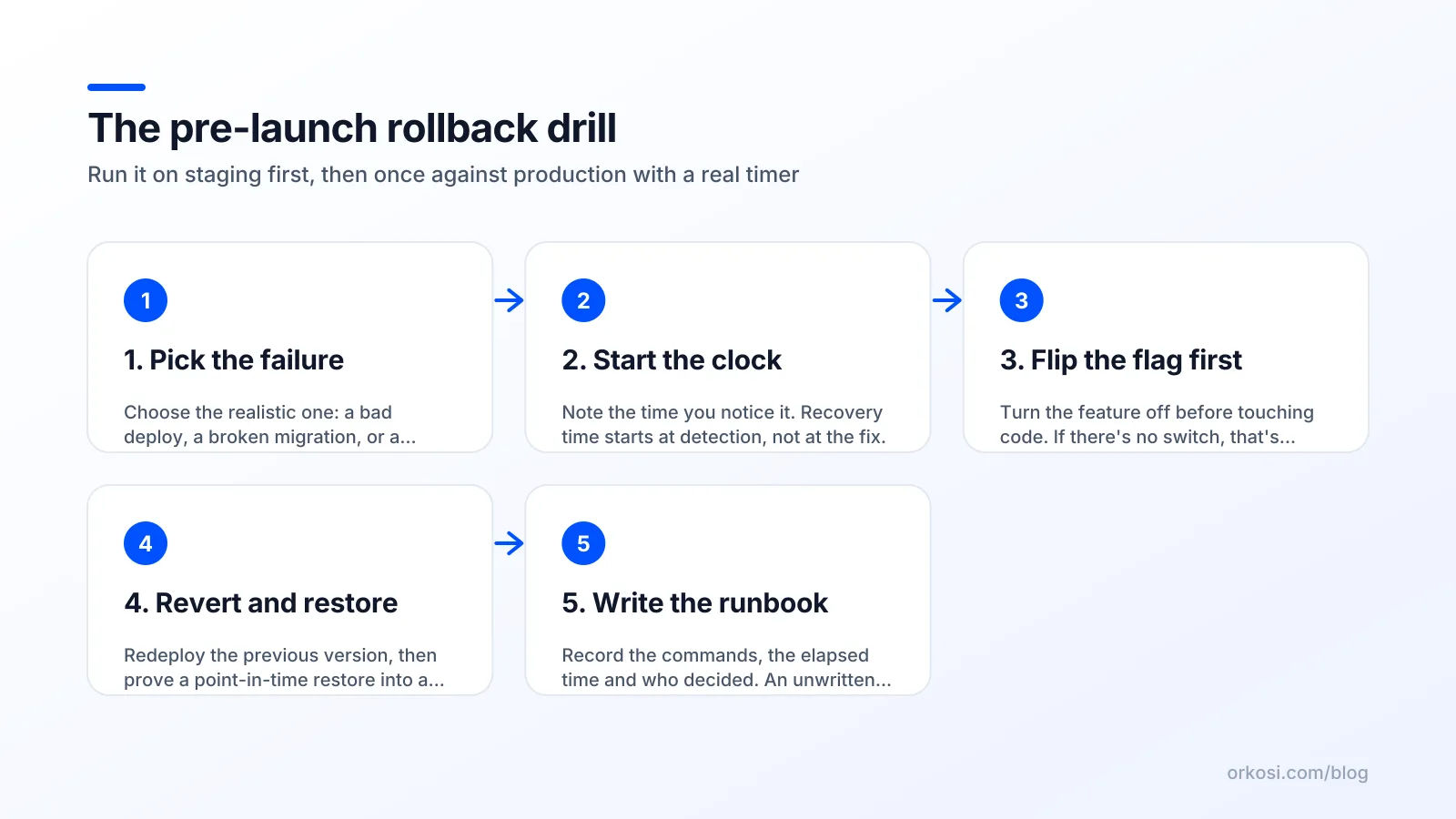
Good failures to rehearse, in order of value:
- Deploy a version that throws a 500 on the signup route, then roll back.
- Flip a feature flag off while a background job for that feature is mid-run.
- Run a migration that renames a column, then try to recover without dropping data.
- Restore the database to 30 minutes ago and point the app at the new instance.
The production dry run
Staging lies. Production has real DNS, real secrets, real security groups and real connection limits. Deploy twice and roll back once in production, and perform one real restore into a non-production instance using the actual production snapshot. This is the only window where you can break production with zero consequences, because nobody is using it yet. Spend it.
What to write down afterwards
An undocumented rollback plan is a rumour. After the drill, write a one-page runbook containing: the exact commands or console clicks, the measured time for each step, who has the credentials, where the deploy history lives, and the decision rule for "flag off" versus "roll back" versus "restore".
Honest trade-off: running the drill properly costs most of a day, and finding that your restore takes 50 minutes instead of 10 may push your launch by a week. That is usually the right call. A launch date is a guess; a 50-minute RTO you discovered during paid traffic is a refund queue.
Who pulls the lever when AI agents wrote the code
Agent-built systems still need a human decision
If agents wrote and deployed your app, nothing above changes. Someone still has to look at an error spike and decide whether this is a flag-off, a rollback or a restore, and that someone is you. Delegating the building does not delegate the judgement, because the judgement is about customers and money.
What does change is where the artifacts live. You need to know, before launch, where deploy history is recorded, whether automated backups are on, what the retention window is, and how a revert is requested.
On Orkosi, agents build the product, deploy it on AWS and keep iterating through tasks, which means rollback work is filed and tracked the same way as a feature: you ask for a kill switch on the new flow, or a restore drill, as a task in the spec. That is a real advantage over a black-box builder with no deploy log, and a real limitation compared with running your own platform team: you are asking rather than typing the command yourself. It shifts your job from executing rollbacks to specifying and verifying them, and the docs are where you check what the platform actually does before you trust it with paying customers.
What to ask your build platform before you launch
Ask any AI builder, agency or freelancer these five questions and keep the answers in writing:
- Where is the deploy history, and how do I revert to a specific previous version?
- Are automated database backups enabled, what is the retention window, and has a restore been tested?
- Which customer-facing features are behind flags I can switch off myself?
- What happens to a user's access when I issue a refund?
- Who has production credentials, and what is the process if they are unavailable at 2am?
This is a far better evaluation axis than template count. Weigh it alongside the usual criteria when you compare AI builders, and budget for it: reversibility work consumes agent tasks like any other feature, so check the pricing plans against the number of iterations your launch will realistically need.
The trade-offs: when not to build a rollback
Over-engineering reversibility before product-market fit is its own failure mode. A prototype with ten friendly users does not need a quarterly database restore drill or a blue-green deployment pipeline. Spending three weeks on disaster recovery for a product nobody has paid for is a very sophisticated way of avoiding customer conversations.
Use thresholds instead of absolutes:
| Layer | Becomes mandatory when |
|---|---|
| Code rollback | You have any user who did not give you their phone number |
| Feature flag kill switch | Your first paying customer |
| Point-in-time recovery and a tested restore | Your first customer-owned data you cannot regenerate |
| Money rollback and idempotency | Your first real charge |
| Documented runbook | Your first integration you do not control |
Before those thresholds, a daily snapshot and a written note saying "we can lose a day" is a legitimate, defensible plan. The failure is not having a weak plan early. The failure is crossing a threshold without noticing, which happens on launch day, which is exactly why this belongs on the checklist rather than in a later refactor.
FAQ
What should be on a SaaS launch checklist?
The standard items (domain, SSL, pricing page, legal pages, transactional email, error monitoring, analytics) plus a reversibility section covering four layers: code rollback, feature flags, database point-in-time recovery and billing refunds. A complete launch a SaaS product checklist also records two numbers before launch day: your acceptable downtime (RTO) and your acceptable data loss (RPO). Anything you cannot undo should be listed explicitly so you know where the one-way doors are.
How do you roll back a SaaS deployment safely?
Prefer the smallest reversal that fixes the problem: flip the feature flag first, redeploy the previous version second, restore the database only as a last resort. Safe code rollback requires that your migrations are additive, which is why expand/migrate/contract matters more than any deployment tool. Time each option during a rehearsal so you know on launch night whether a rollback takes 2 minutes or 40.
How often should you test database restores?
At minimum once before launch and then quarterly, plus after any change to your database engine, backup configuration or instance class. The AWS Well-Architected guidance is to test recovery procedures rather than simply configure backups, because an untested backup is an assumption. Record the measured restore time each run; if it grows as your data grows, your RTO is quietly drifting.
Do feature flags replace rollbacks?
No. Flags handle new behaviour you can switch off, which covers most customer-facing launch risk, but they do nothing for a bad migration, a dependency upgrade that broke a library, or a corrupted table. Keep both: flags as the fast path, code rollback and point-in-time recovery as the deeper layers, with a documented rule for when to escalate from one to the next.
Ready to build the product and the undo path together? Start free and put the kill switch and the restore drill in your spec from the first task, not after the first incident. Check the plans and credit allowances to size how many build iterations your launch will need.