Build a SaaS Product Without Code: Ship the Unhappy Path
Orkosi Team · · 12 min read

When you build a SaaS product without code, the first run-through is almost always perfect. You describe the product, an agent writes it, and twenty minutes later you are clicking through a signup, a dashboard and a checkout that all behave exactly as you imagined. That is the happy path: the single sequence where the user does the right thing, the card approves, the network holds and the data already exists. Every post-launch fire I have watched founders fight came from somewhere else, and specifying those somewhere-elses is now the founder's core job.

The demo is always the happy path
Why AI builders are brilliant at the first run-through
AI agents are trained on code that works. Given "a project management tool where teams create projects and assign tasks", they will produce the create-project form, the task list, the assignment dropdown and a reasonable-looking dashboard, because those are the artefacts that appear in every tutorial and repository on the subject.
What does not appear in your prompt is what happens when the project name is 400 characters, when two users assign the same task at the same moment, or when the Stripe webhook arrives twice. The agent is not being lazy. It is building precisely what was described.
The three weeks between 'it works' and 'it's a product'
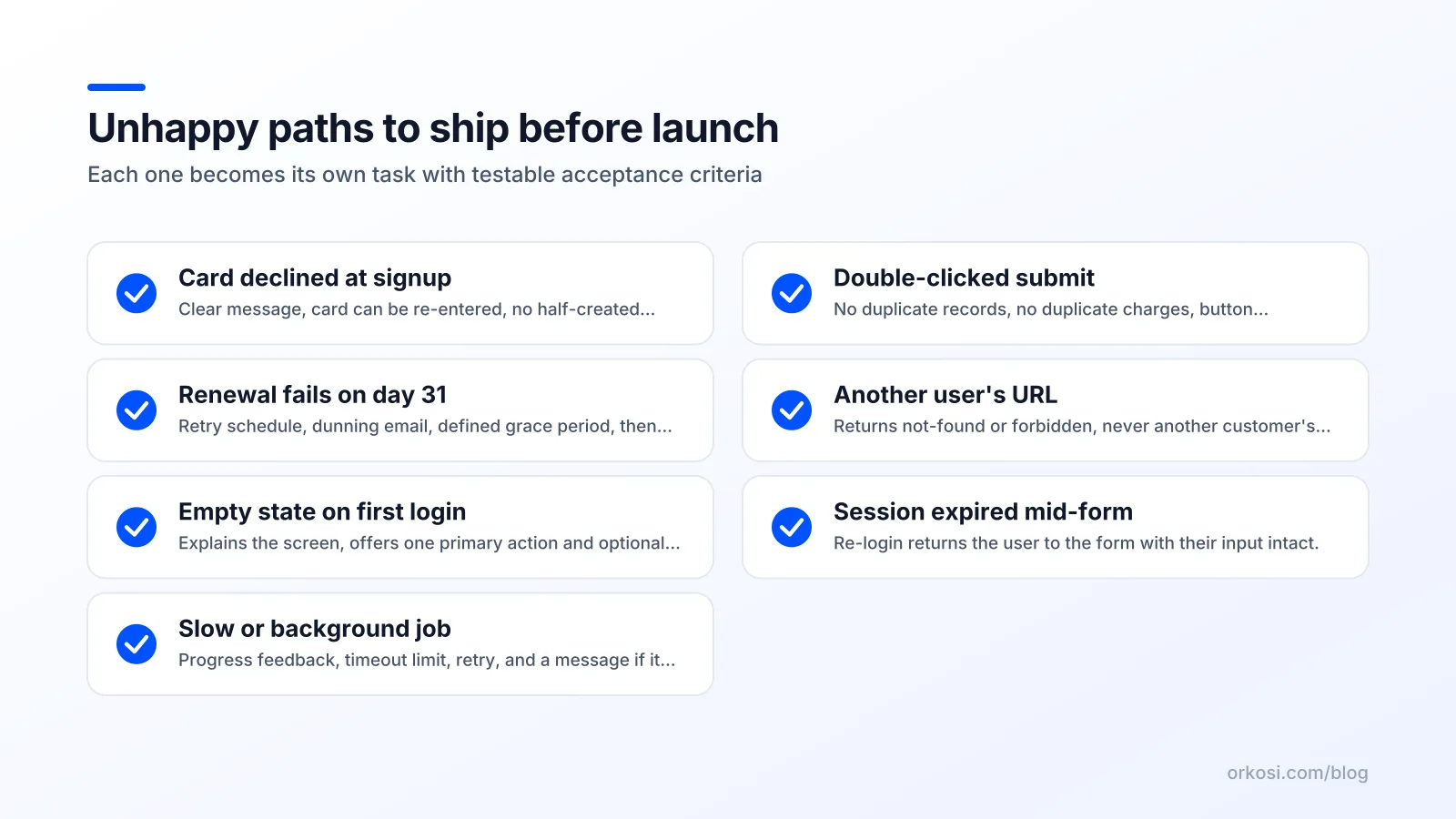
The gap between a working demo and something that can take money is not usually more features. It is roughly seven failure paths, each worth half an hour to an hour of agent work, plus the copy that tells a user what just went wrong.
Founders who skip that work still do it eventually — at 11pm on a Tuesday, in a support inbox, with a customer who has already churned.
What the 'unhappy path' actually means
A working definition
Unhappy path: every flow in which the user, the network, the payment processor or a third-party API does something other than what the demo assumed. Unhappy path testing is the deliberate exercise of walking those flows before a customer finds them for you.
The term matters because it reframes the work. These are not bugs to be discovered. They are features to be specified, and most of them are predictable enough to list on a single page.
Five categories: money, emptiness, latency, concurrency, permission
Almost every edge case in a no-code SaaS falls into one of five buckets. Use them as a planning framework rather than trying to imagine failures at random.
| Category | The question it answers | Typical symptom if ignored |
|---|---|---|
| Money | What happens when a payment fails or changes? | Silent churn, free access forever, angry refund threads |
| Emptiness | What does a brand new account see? | Users log in, see nothing, never return |
| Latency | What happens while something slow is running? | Repeated clicks, abandoned uploads, "is it broken?" tickets |
| Concurrency | What happens when the same action fires twice? | Duplicate records, double charges, overwritten edits |
| Permission | What can user A see of user B's data? | A data breach, and a disclosure email you have to write |
Work the list in that order. Money and permission carry real financial and legal cost; emptiness and latency cost you activation.
Money breaks first: declines, dunning and refunds
Card declines and 3D Secure challenges
Your checkout demo used a test card that always approves. Real cards get declined for insufficient funds, expired dates and bank fraud rules, and in Europe many cards trigger a 3D Secure challenge that pushes the user into a bank-hosted step and then back to your app.
Failed payment handling starts at the moment of first purchase. The minimum viable behaviour: show the processor's decline reason in plain language, keep the user's form data, offer another card, and do not create a half-provisioned account that thinks it is paid.
What happens on day 31 when renewal fails
This is the expensive one. Subscription renewals fail routinely, which is why Stripe ships a whole product area for it: Stripe's revenue recovery documentation covers smart retries, dunning emails and configurable rules for what happens when recovery fails.
A failed renewal is not an edge case, it is a monthly event at any scale. You need a written answer to four questions before launch:
- How many retry attempts, over how many days?
- What email does the customer get, and does it contain a one-click link to update their card?
- How long is the grace period during which they keep full access?
- On which day does access actually get revoked, and what do they see then?
Refunds, downgrades and mid-cycle changes
Someone will ask for a refund in week two. Someone will downgrade from your top tier on day 14 of a 30-day cycle. Someone will be over the row limit of the plan they are moving down to.
Decide the rules now, in one sentence each: refunds are pro-rated or not, downgrades take effect immediately or at period end, and over-limit data is read-only rather than deleted. No SaaS should launch without a written answer to "what does a customer see when their card fails?" and "what happens to their data when they downgrade?"
The empty state is your real onboarding screen
Zero rows, zero projects, zero data
The first screen every paying customer sees is empty, and your demo never showed it because you had already created three test projects. Empty states are where activation is won or lost, and AI builders default to either a blank table or the word "No data".
Treat each zero-data view as a designed screen, not a fallback. A good empty state contains three things: one sentence explaining what lives here, one primary button doing the single most useful next action, and an optional "load sample data" path for people who want to look before they build.
Seeding, sample data and the first-run script
Sample data is the cheapest activation feature you can ship. A "create example project" button that populates a realistic project with five tasks lets a new user understand the product in ten seconds instead of ten minutes, and gives them something to delete rather than a void to fill.
Ask for it explicitly. "For every list view, build an empty state with a heading, one explanatory sentence, a primary action button, and a secondary 'Load sample data' action that seeds one realistic example record owned by the current user" is a task an agent can complete in one pass.
Latency, duplicates and the double-click problem
Long jobs, uploads and timeouts
Anything that calls an external API, processes a file or generates a document will sometimes take fifteen seconds and sometimes fail. Without feedback, the user clicks again, then emails you.
Every slow action needs three visible states: in progress, succeeded, failed with a retry option. For third-party calls, the AWS Well-Architected reliability pillar is the standard reference for timeouts, retries with backoff and graceful degradation, and it is worth naming in your task description so the agent builds a bounded retry rather than an infinite hang.
Idempotency in plain English
Idempotent means doing the same thing twice has the same effect as doing it once. If a user double-clicks "Create invoice" and gets two invoices, the action is not idempotent and your data is now wrong.
The acceptance criteria to request: disable the submit button on click, show a spinner, and reject a duplicate submission server-side using a unique key so that two identical requests create one record. This is the most under-specified requirement in AI app builder error handling, and the one that produces double charges.
Session expiry and the half-filled form
Users leave tabs open for days. When they come back and hit save, a naive app logs them out and discards everything they typed.
Request this behaviour instead: on session expiry, preserve the form contents, show an inline re-authentication prompt, and resubmit the original data on success. If that is too much work for launch, the fallback is a warning before expiry plus a draft saved to local storage.
Permissions: the unhappy path that becomes a breach
Can user A open user B's URL?
Broken access control is the number one category in the OWASP Top 10 (A01:2021). In a multi-tenant SaaS, it means one customer can read another customer's data by changing a number in a URL.
AI agents frequently hide records correctly in the user interface while leaving the underlying endpoint open, because "show only this user's projects" was interpreted as a display rule. Authorisation must be checked on the server, on every request, for every record.
Deleted users, revoked invites, stale tokens
Three manual tests, run in two browser windows, catch most of it:
- Log in as user A, copy the URL of one of their records, paste it into a window logged in as user B. You should see a clear "not found" or "no access" page, never the data.
- Invite a teammate, then revoke the invite before they accept. The old link should be dead.
- Remove a team member while they have the app open in another window. Their next action should fail.
Add a fourth if you have an admin role: log in as a normal user and try every admin URL you know. Any one of these failing is a launch blocker, not a backlog item.
How to specify failure to an AI agent
Write the rule, not the vibe
"Handle errors gracefully" produces nothing useful. "If the payment processor returns a decline, show the decline reason above the card field, keep all other form values, and log the attempt against the account" produces code.
The pattern is one sentence per rule, written as a statement of fact about how the product behaves. Then hand the agent a standard for the words themselves: the GOV.UK Design System error message component specifies error text that names what went wrong and what to do next, and Nielsen Norman Group's error message guidelines back the broader point that error copy is product work, not polish.
Given / when / then acceptance criteria
Convert each rule into something you can personally verify in under a minute:
Given a logged-in user on the Projects page with zero projects When the page loads Then they see the heading "No projects yet", one sentence of explanation, a primary "New project" button and a secondary "Load sample data" link.
You do not need to know how it is built to confirm whether that is true. That is the whole point of writing criteria this way.
One task per failure mode
File each unhappy path as its own task. Bundling "fix all the error handling" into one request produces a sprawling change you cannot review; seven separate tasks produce seven deployments you can each click through and accept or reject.
The 45-minute sabotage session — and what to skip
A hostile-user script you can run before launch
Block out 45 minutes and try to break your own product. Every step maps to a real support ticket:
- Pay with the processor's "always declines" test card.
- Trigger a failed renewal in test mode and read the email that arrives.
- Create a fresh account and look at every screen with zero data.
- Start a long action, then turn off wifi halfway through.
- Double-click every submit button in the app.
- Copy a record URL into a second browser logged in as another user.
- Delete everything, then try to use the app.
- Upload a 50MB file to a field expecting an avatar.
- Leave a tab open for an hour, come back, and hit save.
Write down what happened in each case. Anything that showed a raw error, lost data or leaked another account's information becomes a task.
Trade-off: what genuinely can wait until customer ten
Not all of this is pre-launch work, and gold-plating failure handling is its own failure mode.
| Ship before customer one | Defer until there is demand |
|---|---|
| Decline and renewal failure handling | Bulk undo and version history |
| Server-side authorisation checks | Offline mode |
| Empty states on primary screens | Locale-specific date, currency and RTL support |
| Duplicate submission protection | Formal uptime targets and multi-region failover |
| Human-readable error copy | Accessibility audits beyond keyboard and contrast basics |
The right-hand column is real work, but it is work you should do once you know which customers you have. The left-hand column is what separates a prototype from a product you can charge for.
Where an agent platform fits when you build a SaaS product without code
The reason to run this work through a task loop rather than one heroic pre-launch sprint is that unhappy paths arrive in a long tail. On Orkosi, each failure mode is a task: you describe the rule and the acceptance criteria, agents write and deploy the change on AWS, and you verify it on the live app before moving to the next one. Task four can ship a week after launch without destabilising the first three.
The honest trade-off is that this is still your specification work. No platform, Orkosi included, will intuit your refund policy or your grace period length; agents are fast at implementation and bad at guessing commercial rules. Billing edge cases need you to make decisions a machine cannot make for you, and complex permission models deserve a second pair of human eyes before you store anything sensitive.
If you are comparing approaches, the builder comparison covers where agent platforms differ from template tools and traditional no-code, the documentation shows how tasks and deployments work in practice, and pricing lists what each plan includes. Credits consumed by a small "add an empty state" task look very different from a full billing overhaul, which is another argument for splitting the work up.
FAQ
How long does it take to build a SaaS product without code?
A working happy-path application can be generated in hours with an AI agent platform. Getting to something you can charge for takes most founders another one to three weeks, almost all of it spent on billing failure handling, empty states, permission checks and error copy rather than new features. Budget roughly 30 to 60 minutes of agent work per unhappy path, plus your own time writing the rules.
What is unhappy path testing?
Unhappy path testing means deliberately walking through every flow where something goes wrong: a declined card, an empty account, a dropped network connection, a double-clicked button, a user opening someone else's URL. It is distinct from feature testing, which confirms the intended sequence works. The practical method is a scripted sabotage session before launch, where you try to break the product the way a confused or hostile user would.
How should a no-code SaaS handle failed payments?
Define four things in writing: the retry schedule, the dunning email content, the grace period length and the exact point at which access is revoked. Payment processors supply most of the machinery, as Stripe's revenue recovery docs show, but the commercial rules are yours to set. The customer-facing requirement is an in-app banner plus an email, each with a one-click link to update the card.
Can AI-built apps be secure enough for real customers?
Yes for standard business applications, provided authorisation is checked on the server for every request rather than only hidden in the interface. Broken access control is the top category in the OWASP Top 10, and it is the most common weakness in AI-generated multi-tenant apps. Run the two-browser test on every record type before launch, and get a human review before storing payment, health or identity data.
Pick one failure path from the list above, write it as a single rule with given/when/then criteria, and ship it this week. You can start free and see what the plans include on the pricing page.