Custom App for Small Business: Own Your Exit Plan
Orkosi Team · · 11 min read

The question nobody asks before the kickoff call
A custom app for small business is only an asset if you can walk away with it. Most commissioning conversations cover scope, timeline and price, and almost none cover the thing that decides whether you have bought property or rented a dependency. The test is simple: if your builder, agency or platform vanished tomorrow, could you keep the app running, with your data, without asking anyone's permission?
That is what an exit plan means here. Not a lawsuit, not a clause, but a practical ability to redeploy and keep trading inside a week.
The short answer: you need four things in your own name. The source code in a repository you administer, the database plus a backup you have personally restored, the cloud account the app runs in, and the domain registered to your business. Own those four and every other argument about software vendor lock-in for small business becomes negotiable.

Four things you must own in a custom app for small business, and nothing else matters much
Ownership is not a feeling. For each artefact there is a specific administrative state that either exists or does not.
The repository, not a zip file
A zip file emailed at project close is a snapshot of a moment, not ownership. You want the live Git repository (the version-controlled history of every change) sitting under an organisation account where you hold the owner role.
The mechanics are well documented: GitHub's repository transfer process moves issues, pull requests, wiki, stars and watchers to the new owner, and redirects old URLs. What does not automatically follow are things like some Actions secrets and team-based permissions, which is exactly why you test the transfer rather than assume it.
Who holds it by default? The builder. That is fine during the build. It is not fine six months after launch.
The database and a restorable backup
The answer to "who owns the code the agency built for my app" matters less than who can restore the data. Code can be rewritten in weeks. Four years of customer records cannot.
Owned means: nightly logical dumps (a structured export of the whole database, not a disk snapshot tied to one provider) landing in storage you control, plus a documented schema, plus at least one restore you have watched succeed. A backup nobody has restored is a rumour.
The cloud account the app runs in
This is where most small businesses quietly lose control. The common failure is an agency running six clients inside one personal AWS account, with shared credentials and no separation of billing or permissions. When you leave, there is no clean line to cut.
The correct shape is one AWS account per customer, owned by the customer, with root credentials and the billing method in the business's name. If the builder manages it inside their own AWS Organization, insist on knowing the exit path in advance: AWS documents removing a member account from an organisation, but the account must have its own payment method, valid contact details and accepted agreements before it can stand alone. Those prerequisites take ten minutes to satisfy on day one and can take weeks when relations have soured.
The domain, DNS and email sender identity
The registrar login belongs to you. Full stop. ICANN's Transfer Policy treats the registered name holder as the party with authority to move a domain, which means if your developer is listed as registrant, they hold the asset your customers type into a browser.
Same for DNS records and the email sending domain. A transactional email sender identity (the verified domain that proves you are allowed to send from orders@yourshop.com) carries a deliverability reputation built over years. Rebuilding it from a cold IP is a slow, expensive tax that nobody mentions in the handover meeting.
The lock-in ladder: where each build option puts you
Not all lock-in is a mistake. Lock-in is a trade: you give up portability and you get back somebody else's operational burden. The error is making the trade without knowing you made it.
| Option | Code access | Data export | Infra portability | Can a stranger run it? |
|---|---|---|---|---|
| Off-the-shelf SaaS | None | CSV per module, usually partial | None, the vendor runs it | No, and that is the point |
| Closed no-code platform | None or an unusable export | Table exports, logic not portable | None | No |
| AI builder deploying to your own cloud | Full repo, your account | Full database dumps | High, standard AWS services | Yes, if docs exist |
| Freelance or agency codebase | Full repo, if contracted | Full, if you have DB access | Depends entirely on setup | Only with real handover docs |
Off-the-shelf SaaS scores worst on portability and best on operating burden, and for a large class of processes that is the right answer. Nobody should build their own payroll engine to avoid vendor lock-in.
Closed no-code platforms are the genuinely dangerous middle. You feel like you built something because you dragged the boxes yourself, but the logic lives in a proprietary runtime that exists nowhere else. Export the data and you still have to rebuild the behaviour from scratch.
AI builders that deploy into your own cloud account occupy a better position, because the output is ordinary code on ordinary infrastructure. Orkosi works this way: agents write the application and deploy it on AWS, with templates spanning SaaS and web apps, online stores, websites, mobile and desktop apps. The trade is that you are responsible for an AWS account, which is a real responsibility, not a formality. Worth comparing how different builders handle this before committing to any of them.
Ownership on paper vs ownership in practice
"All intellectual property created under this agreement transfers to the Client on final payment" is a necessary clause and close to worthless on its own. A source code ownership contract establishes who wins an argument. It does not get your app running on a Tuesday when the agency has stopped answering email.
Here is the practical test. Could a competent developer you have never met clone the repository, run one documented command, and reach a working local environment in under an hour? If yes, you own the app. If no, you own a legal position.
The artefacts that make the answer yes:
- A README with exact setup steps, written for someone with no context
- Infrastructure-as-code (Terraform, CDK or CloudFormation) so the environment can be rebuilt, not reverse-engineered
- An inventory of every environment variable and what it does
- Database migration scripts, in order, from empty to current
- A seed dataset that produces a usable app without touching production
- Credentials in a password vault your business owns, not in a Slack thread or a founder's notes app
That last point breaks more handovers than anything else. Secrets scattered across chat history are a single-person dependency wearing a trench coat.
Write the list into the contract as deliverables with acceptance criteria. "Handover documentation" is not a deliverable. "A new developer provisions a working environment from the README in under 60 minutes, witnessed" is.
Data portability is a contract term, not a feature request
Data portability for small business software should be specified before the first line of code, because retrofitting an export is always more expensive than designing one.
Article 20 of the GDPR gives individuals the right to receive their personal data in a structured, commonly used, machine-readable format and transmit it elsewhere. That is your legal floor, not your target. It covers the personal data of your customers; it says nothing about your orders, inventory, audit logs or application configuration.

What a real export looks like
Three requirements, stated plainly in the agreement:
- Nightly logical backups written to object storage in an account the customer owns, with a retention period you choose.
- A documented schema, kept current, so a stranger can read the dump and understand what
status = 3means. - Per-entity CSV or JSON export available from the admin interface, covering customers, orders, products, invoices and anything else that would hurt to lose.
If the builder says the third one is out of scope, that is useful information about the relationship rather than about the feature.
The third-party data you forget: payments, email, files
Payments feel like the hardest lock-in and are not. Stripe runs a formal data migration process that moves stored card data between PCI-compliant processors on request, in both directions. You never hold the card numbers yourself, which is the point, but the data can move. Ask any payment provider whether they support an outbound migration before you integrate, not after.
File storage is stranded more often. Customer uploads sitting in the builder's bucket, referenced by URLs baked into the database, are a migration project of their own. Keep files in your account from day one and store relative paths.
Email reputation, as covered above, is the asset with no export button at all. Warm the domain under your own name early.
The 90-minute exit drill
Run this every quarter. Put it in the calendar like a fire alarm test, because that is what it is.
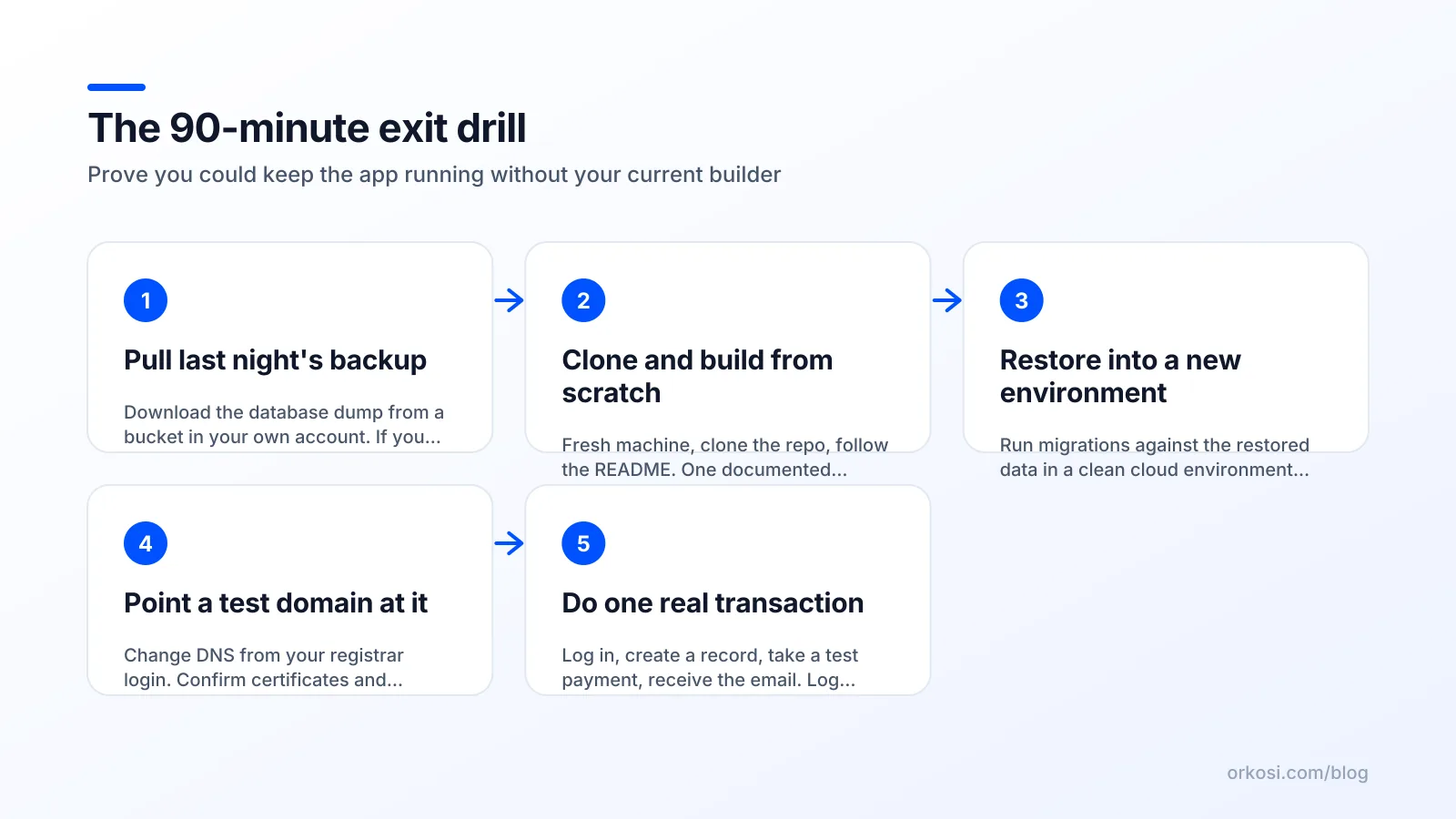
- Restore last night's backup into a fresh database. Failure reveals that backups are incomplete, corrupt, or that nobody knows the restore command.
- Redeploy the application from the repository into a clean environment. Failure reveals undocumented manual steps, missing infrastructure-as-code, or a build that only works on one laptop.
- Point a staging subdomain at it and issue a certificate. Failure reveals that DNS control sits with someone else.
- Log in as a real user. Failure reveals missing environment variables, secrets you cannot locate, or an auth provider configured under a personal account.
- Run one genuine end-to-end transaction in test mode: place an order, send the confirmation email, see the record appear. Failure reveals third-party dependencies nobody mapped.
The first time, it will take a day and three of the five steps will fail. The fourth time, it takes 90 minutes and you have a documented, rehearsed recovery procedure that also happens to be your disaster recovery plan.
What portability actually costs you
Honest accounting, because the pro-ownership argument is usually sold without one.
Owning the AWS account means owning the bill and the pager. Costs are usually modest for a small app, but they are variable and they are yours, including the month a misconfigured job runs 400,000 times. Portable code sometimes means declining a proprietary shortcut that would have saved a fortnight. And the quarterly drill costs a morning of someone's attention, four times a year.
Against that: a rebuild because nobody can locate the database is a five-figure event plus months of lost momentum, and it arrives at the worst possible time, which is when a relationship has already broken down.
Where managed lock-in is the rational choice: payroll, statutory accounting, card processing, identity verification. These are regulated, high-consequence, commoditised, and the compliance burden of owning them exceeds any benefit from portability. Buy those. Own the thing that makes you different.
How this works when agents build the app
Orkosi's model is worth examining through the ownership lens specifically. You describe the product, agents write the code, deploy it on AWS and keep iterating through tasks, with hosting, brand kit, billing and SEO tooling included. Templates cover SaaS and web apps, online stores, websites, image studio, mobile and desktop apps, and marketing workspaces.
The ownership-relevant properties are that the output is real code on standard AWS infrastructure, not a proprietary runtime, and that iteration happens through tasks rather than through a person who may or may not still be available. The trade-off is the same one any self-hosted approach carries: your cloud account, your bill, your responsibility to run the drill. The docs are where to check how deployment and environments are structured before you commit.
Ask any builder, Orkosi included, these questions before signing:
- Which AWS account will this run in, and whose name is on it?
- Can I be an owner on the repository from day one?
- Where do nightly backups land, and can I restore one myself this week?
- Who is listed as registrant for the domain?
- Can a developer I hire get a working environment from the README alone?
Pricing starts at Starter ($25/month) and Pro ($100/month), with details and the enterprise tier on the pricing page. The sensible sequence is to use the free trial to build something small, then run the exit drill on it before you move anything that matters.
FAQ
Who owns the code when an agency builds my app?
By default, the developer owns copyright in code they write unless a contract assigns it to you. A work-for-hire or IP assignment clause transfers ownership on paper, but you also need repository admin access, documentation and credentials for that ownership to be usable. Insist on both the clause and the artefacts, with the artefacts listed as named deliverables.
How do I transfer an AWS account from a builder to my business?
If the account sits inside the builder's AWS Organization, it can be removed as a standalone account once it has its own payment method, valid contact information and accepted customer agreement. AWS documents the prerequisites and the procedure. The cleaner approach is to create the account in your own name at project start and grant the builder scoped access instead.
What counts as real data portability in small business software?
A nightly logical database backup delivered to storage you control, a current documented schema, and per-entity CSV or JSON exports from the admin interface. GDPR Article 20 covers personal data in a machine-readable format and is the legal minimum, not a complete export. File uploads and third-party records such as payments need their own migration path.
Is vendor lock-in always bad for a small business?
No. For payroll, accounting and card processing, the compliance and operational burden of ownership outweighs the portability benefit, so managed lock-in is the correct trade. The mistake is accepting lock-in on the system that encodes your specific business logic, where switching costs compound every year and nobody else can rebuild it from your exports.
Build something small, then try to leave with it: start free and run the exit drill before you commit anything that matters. When you are ready to scale it, the plans and credit details are on the pricing page.