Custom App for Small Business: Build for One Tenant
Orkosi Team · · 12 min read

Most custom software for a small company is overbuilt on day one. A custom app for small business usually has exactly one customer, your own company, and will never have another, yet it gets built on the same architectural template as a product that hopes to serve ten thousand companies. That template has a real price: weeks of work on signup, plans, permissions and tenant isolation that nobody in your building will ever use. Scope it as software for one company instead and the same app becomes a fraction of the work, which is the difference between a project you finish and one you abandon.

The expensive mistake: building your internal app like a SaaS product
Most custom apps for small businesses carry the entire cost of multi-tenancy and get none of the benefit. Multi-tenancy is the ability for one running system to serve multiple separate customer organisations with their data kept apart. If your app serves one organisation, that whole capability is dead weight.
Why the default template is multi-tenant
Every tutorial, boilerplate repo and starter kit is written for SaaS, because SaaS is what developers blog about and what investors fund. AI coding tools inherit the same bias, since they learned from the same corpus. Ask for "a job management app" and you will get a landing page, a pricing table, a signup flow and an organisations table, because that is what the pattern looks like in the training data.
None of that is malicious. It is just the median shape of the examples, and the median example is a product for sale, not an internal business app for twelve people in a yard in Leeds.
The symptom: a six-week build that should have taken six days
You can spot the problem without reading code. Look for a signup screen that only you will ever use, a plan or subscription table with one row, a tenant switcher with one option, an admin panel that exists to manage customers you do not have, and a settings page with forty toggles that were set once in week one and never touched.
Each of those is a screen, a data model, an email template, a test and a bug surface. Strip them and a build quoted at six weeks often becomes a week of focused work on the five screens your staff actually open every morning. The remaining app is also easier to change, because there is less of it to break.
What 'one tenant' actually means (and when it stops being true)
A single tenant app serves exactly one organisation. One set of business rules, one brand, one database, one deployment, one release audience. Your staff log in as individuals, but they all belong to the same company, so the app never has to ask "whose data is this?" at the organisation level.
One company, many users
One tenant is not one user. A four-van HVAC firm might have an owner, an office manager, four engineers on phones and an accountant who logs in twice a month. Seven accounts, one tenant.
That distinction tells you what to keep. You still need logins, sessions and a sense of who did what. You do not need organisation scoping on every query, invite flows between companies, or per-tenant configuration.
The three events that break the assumption
Be honest about three specific futures, because each one invalidates the single-tenant choice:
- You acquire or open a second entity that must not see the first one's data. A second depot sharing one customer list is still one tenant. A separately owned company with its own clients is not.
- You franchise or license the operation. Franchisees need their own data, users and billing. That is multi-tenancy with extra steps.
- You decide to sell the software itself. The big one, and the rarest. Most internal tools owners daydream about selling never get a second customer, because the product was shaped by the quirks of one business.
If none of those is on a two-year horizon, build for one company. If one is genuinely planned and funded, pay for multi-tenancy now. Hedging, which usually means building half of it, is the worst option: you carry the complexity and still have to rework it.
The delete list: features you can skip with one tenant
Work through this list with whoever is building, including an AI agent, and get explicit agreement that each item is out of scope.
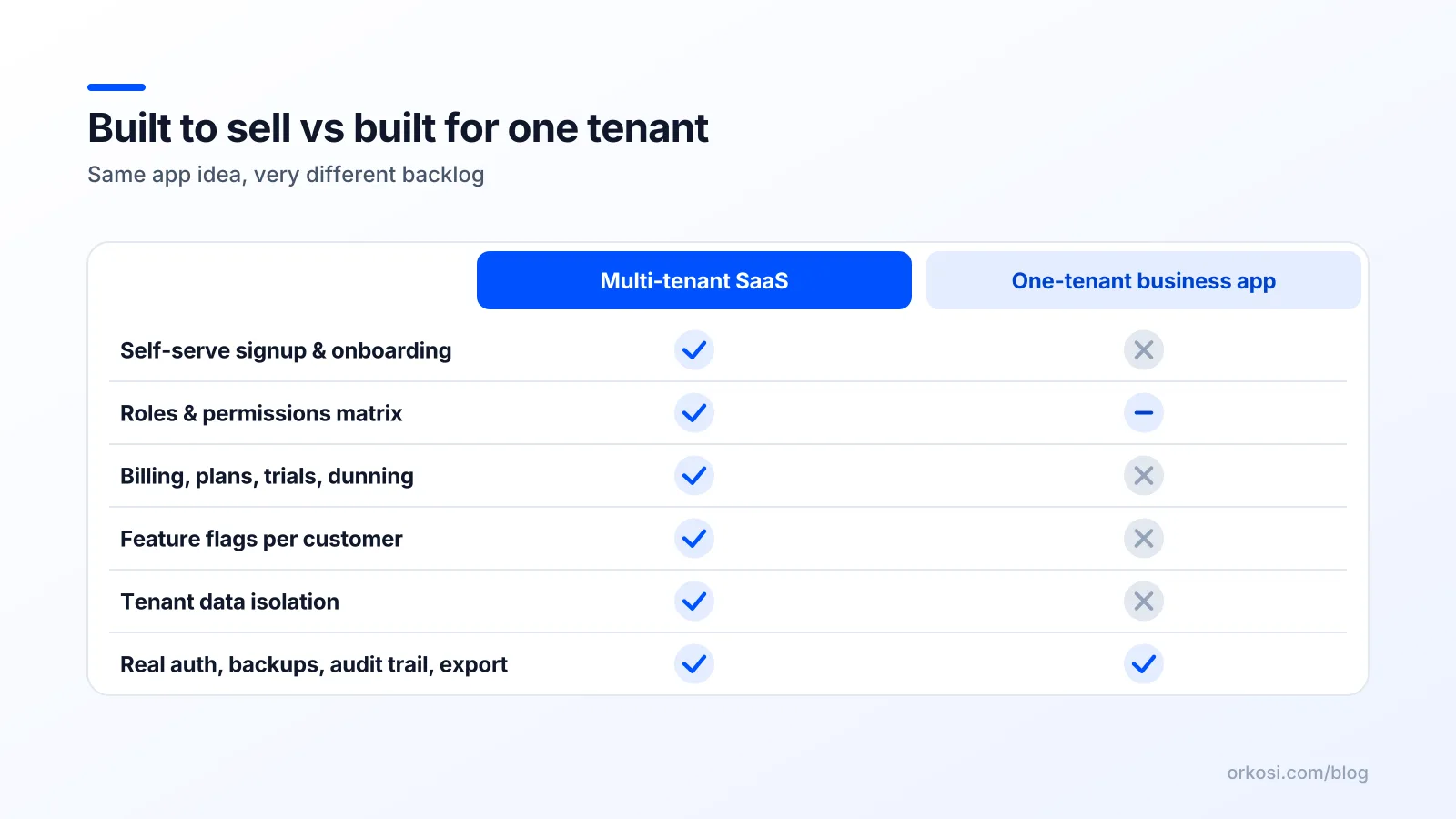
| Feature | Why you can skip it | Rough complexity removed |
|---|---|---|
| Self-serve signup | You create the accounts yourself | 2 to 4 screens plus email templates |
| Billing and plans | Nobody pays you to use it | A payment integration plus webhooks |
| Roles matrix | Five job titles, not a permission system | A data model plus checks on every route |
| Feature flags | One release audience | Flag infrastructure plus cleanup debt |
| Tenant isolation | One tenant | An architectural workstream |
Self-serve signup and onboarding emails
Replace the whole flow with an owner-only "add user" form, or a seeded list of accounts created at deploy time. Welcome emails, email verification, invite tokens and resend-invite edge cases all disappear. When someone joins the company, the office manager adds them in ten seconds.
The roles and permissions matrix
Do not build a role editor. Hardcode two or three fixed roles with the checks written directly into the code: owner, office, engineer. An engineer sees today's jobs and can upload photos; the office sees everything; the owner also sees margins.
A generic permissions system is one of the most expensive things in business software because it touches every query and every button. Three hardcoded roles cover the next five years of a seven-person company.
Billing, plans, trials and dunning
Skip all of it. No Stripe integration, no plan table, no proration, no failed-payment retries, no trial expiry logic. If you later need to invoice your customers that is a different feature, invoicing, and it is far simpler than subscription billing.
Feature flags, settings pages and multi-currency
Feature toggles are not free. As Martin Fowler notes in his write-up on feature toggles, toggles carry a real carrying cost and need deliberate retirement, otherwise you accumulate conditional logic nobody understands. With one release audience and one business, ship the change instead of flagging it. The same applies to settings pages and currency support: if you trade in one currency, store one currency.
Tenant isolation and noisy-neighbour defences
This is the largest deletion and the least visible. The AWS Well-Architected SaaS Lens treats tenant isolation, tenant onboarding, per-tenant metering and noisy-neighbour mitigation as substantial architectural workstreams with their own design decisions and failure modes. A single-tenant app skips the lot: no row-level tenant keys, no isolation tests, no per-tenant throttling, no usage metering pipeline.
That is not imaginary complexity you are avoiding. It is the part of SaaS engineering that senior architects write documents about.
The hardcoding rule: constants in code beat configuration tables
In a single-tenant app, business rules belong in code until they change more often than once a month. Price bands, VAT rate, opening hours, job statuses, service types, van names, escalation thresholds. Write them as constants, not as rows in a settings table with an admin UI on top.

Hardcode what one owner decides
A configurable value costs you a database column, a form field, validation, a migration, a default, and a screen someone has to find. A hardcoded value costs one line. When the owner is the only person who would ever change it, and they change it once a year, the settings page is pure overhead.
The honest trade-off: changing a hardcoded value requires a code change and a deploy. You cannot fix it from your phone at 7am.
Make configurable what changes weekly
Things that genuinely move week to week belong in the database as normal data: staff on shift, job priorities, customer records, parts in stock, engineer availability. Nobody argues those should be constants.
The grey zone is things like call-out rates. If you reprice twice a year, hardcode it. If you quote differently per job, that is data.
How to write this into a spec for AI agents
Put a section in the spec titled "Hardcoded constants" and list the values with their current settings. Then add a line: "Changing any of these is a change request, not a feature." That single sentence removes a dozen admin screens from the build.
Platforms where you file changes as tasks, including Orkosi, make this trade reasonable: an agent task to change a VAT rate and redeploy is cheaper than the settings UI you would have built to avoid it, especially when you fire that task twice a year. If you expect to tweak rules weekly, build the settings page instead and accept the cost.
What a custom app for small business must not skip, even with one tenant
Single-tenant is not a licence to skip security. It concentrates every customer record, price and photo your business holds into one system with one backup policy. Four things are non-negotiable.
Real authentication and session handling
No shared password on a sticky note, no "the app is only on the office wifi", no unauthenticated URLs that are hard to guess. Use a proper authentication library with hashed credentials, secure session cookies, logout that actually invalidates, and lockout on repeated failures.
The OWASP Application Security Verification Standard Level 1 is the right floor for an internal tool. It is a checklist, not a research project.
Automated backups and a tested restore
Backups you have never restored are a belief, not a system. Managed databases make this cheap: Amazon RDS automated backups support retention windows of up to 35 days with point-in-time recovery, so you can roll back to a moment before someone deleted the wrong customer.
Minimum acceptable standard: daily automated backups, a retention window you have consciously chosen, and one restore you have actually performed and timed.
An audit trail of who changed what
With three people editing the same jobs, "who marked this complete?" becomes a weekly question. A single append-only table recording user, timestamp, record and change covers most of it, and it is perhaps an hour of work. Skipping it is the deletion owners regret most.
Data export in a format you can open
You hold customer names, addresses and phone numbers, which means GDPR Article 20 expects you to be able to provide personal data in a structured, commonly used, machine-readable format on request. Build a CSV export per major table from the start. It also protects you commercially: an app you can export from is an app you can leave.
A worked spec: a four-van HVAC company's job scheduler
Four engineers, one office manager, one owner, around 60 jobs a week, currently run on a whiteboard and a WhatsApp group.
The 'build' list: eleven screens
- Login
- Today's board, jobs by van
- Week view, drag jobs between days and vans
- Job detail: customer, address, fault, parts, photos, notes
- Job create and edit
- Customer list with search
- Customer detail with job history
- Engineer mobile view: my jobs today, mark en route, mark complete, upload photo
- Parts used log per job
- Weekly report: jobs completed, first-time fix rate, revenue by van
- User admin: add or disable an account, assign a role
Hardcoded constants: four van names, three roles, six job statuses, standard call-out rate, VAT rate, working hours 08:00 to 17:00, two service types.
The 'delete' list and why
No signup, no password-reset emails (the owner resets accounts), no billing, no plan tiers, no permissions editor, no settings page, no multi-currency, no organisation switcher, no feature flags, no in-app chat (WhatsApp works), no custom report builder. Also no mobile app in version one: the engineer view is a responsive web page, which removes app store review from the critical path. You can see the kinds of apps this scope produces in the Orkosi showcase.
The first three agent tasks
Sequence matters more than completeness. Task one: data model plus login plus the job list and job detail screens, deployed with automated backups on. Task two: the week view with drag-and-drop and the engineer mobile view. Task three: customers, parts log and the weekly report.
Three tasks, three deploys, and the office manager is off the whiteboard after task two. Everything else is iteration.
Why one-tenant apps are cheap to run (and where the cost actually goes)
Twelve users do not need a cluster
Sixty jobs a week and seven users is a traffic level that fits comfortably on the smallest instance class your host offers. There is no autoscaling drama, no read replicas, no caching layer, no queue workers. The AWS bill for an app like the HVAC scheduler is usually dominated by the database and a bit of storage for photos.
This is the quiet advantage of custom software for one company: the hard parts of scaling never arrive. You will hit a wall on features long before you hit one on load.
The cost moves from hosting to change requests
Your real recurring cost is change. The seasonal rate change, the new report the accountant wants, the field the engineers keep asking for. That is why the small business software build vs buy calculation turns on iteration speed rather than licence fees: off-the-shelf software is cheap until you need the one workflow it refuses to support.
Credit-based platforms price this honestly. On Orkosi's plans, you pay for the work done per change rather than per seat, so a quiet month costs less than a month of three new reports. Compare that model against hiring a contractor or using a no-code tool on the builder comparison page; the trade-off with agent-built software is that you are specifying in writing rather than talking a developer through it, which rewards precise specs and punishes vague ones.
FAQ
Is a single-tenant app harder to turn into a sellable SaaS later?
Yes, and you should price that in rather than pretend otherwise. Retrofitting multi-tenancy means adding tenant keys to your data model, scoping every query, building signup and billing, and doing isolation testing. In practice that is often a partial rewrite. The counter-argument is that most internal tools never get a second customer, so paying for multi-tenancy up front usually buys an option you never exercise.
Should I hardcode prices and tax rates in a custom app?
For a one-tenant app, yes, if they change less than monthly. A constant in code costs one line; a configurable rate costs a column, a form, validation and an admin screen. The trade-off is that you need a developer or an agent task to change it, so you cannot adjust it yourself at midnight. If your pricing changes weekly, make it data instead.
Do I still need logins if only five people use the app?
Yes. Five users means five people who can be phished, five laptops that can be stolen, and a weekly question about who changed a record. Use real authentication with hashed passwords, proper session expiry and a per-user identity so your audit trail means something. OWASP ASVS Level 1 is the minimum bar, and it is a few hours of work, not a project.
What does it cost to build and run a custom app for one small business?
Hosting for an internal app with a dozen users is close to trivial, often a few dollars a month of AWS resources. The real spend is the build and then the stream of changes afterwards. On Orkosi that is credit-based, with Starter at $25 per month for 2,000 credits and Pro at $100 per month for 6,000, where one credit is one cent; see current plans and credit costs for the full breakdown and the trial options.
Write the delete list before you write the build list, then hand both to whoever is building, human or agent. You can start a free trial and scope your first app today, and check what the plans include before you commit to a monthly spend.