Cost of Running a SaaS on AWS: Idle Is the Enemy
Orkosi Team · · 10 min read

The cost of running a SaaS on AWS before you have customers is mostly a fixed number, and that number is usually between $100 and $400 a month if you followed a standard reference architecture. Almost none of it is driven by requests. It is driven by components that bill per hour, every hour, whether anyone visits your product or not. That is the core problem with the cost of running a SaaS on AWS at the pre-launch stage: your bill is set by architecture choices you made in week one, not by traffic you will get in month six.

The cost of running a SaaS on AWS when nobody is using your product
What 'idle cost' means on AWS
Idle cost is the portion of your bill that does not change when traffic goes to zero. AWS markets itself on pay-as-you-go, and for compute-by-the-millisecond and storage-by-the-gigabyte that is true. But a large class of AWS services are billed per provisioned hour: you reserve a thing, the thing exists, the meter runs. A month is roughly 730 hours, so every $0.01 per hour component is $7.30 a month at zero usage.
The direct answer: a typical pre-launch baseline
Here is an illustrative breakdown for a conventional containerised SaaS in us-east-1, with no customers, single availability zone, list prices at the time of writing:
| Line item | Mechanism | Monthly at zero traffic |
|---|---|---|
| Application Load Balancer | ~$0.0225 per hour plus LCUs (ELB pricing) | ~$16 |
| NAT gateway (one) | ~$0.045 per hour plus $0.045/GB (VPC pricing) | ~$33 |
| Aurora Serverless v2 at 0.5 ACU minimum | ACU-hours (Aurora pricing) | ~$44 plus storage |
| ECS Fargate task, 0.25 vCPU / 0.5 GB, always on | vCPU-hours and GB-hours | ~$9 |
| CloudWatch Logs ingestion and retention | $0.50/GB in, $0.03/GB-month stored | $2 to $6 |
| Public IPv4 address, Route 53 hosted zone | hourly and per-zone | ~$4 |
| Total | ~$110 to $115 |
Make it multi-AZ with two NAT gateways, two tasks and a 1 ACU database floor and you are past $200 before a single user signs up. My position: pre-product-market-fit cost control is an architecture decision, not a negotiation with AWS. There is no support ticket that removes a load balancer you chose to deploy.
Why default architectures bill you 730 hours a month
The three defaults that cost you: ALB, NAT gateway, provisioned database
An Application Load Balancer charges a fixed hourly rate plus Load Balancer Capacity Units, and the hourly rate does not drop at zero requests. A NAT gateway, which lets private-subnet containers reach the internet to pull packages or call Stripe, charges per hour and per gigabyte processed, which is the combination that makes AWS idle costs so persistent. A provisioned RDS or Aurora instance bills per instance-hour; Aurora Serverless v2 bills per ACU-hour against whatever minimum capacity you configured.
Those three decisions account for roughly 85% of the baseline table above. None of them are wrong. They are simply priced for a company that already has load.
Copy-pasted reference architectures assume traffic
Most tutorials, well-architected diagrams and off-the-shelf Terraform modules were written by and for teams running real traffic across multiple availability zones. They optimise for availability and operational familiarity, which are the right goals at 10,000 users and the wrong goals at zero. When you copy one of those modules you inherit its assumptions, including two NAT gateways and a multi-AZ database.
The honest version of that advice is: deploy the production architecture when you have production. Until then, every always-on component is a subscription you pay out of a runway that has no revenue behind it.
The services that genuinely never scale to zero
Load balancers and NAT gateways
An ALB or NLB has no zero state. If you want HTTPS in front of a serverless backend, API Gateway (HTTP APIs bill per million requests) or a Lambda Function URL behind CloudFront costs effectively nothing at zero traffic. For NAT, the two fixes are to run your Lambda functions outside a VPC entirely when they only need to reach AWS APIs and the public internet, or to use VPC gateway endpoints for S3 and DynamoDB, which carry no hourly charge. Interface endpoints do have an hourly charge, so check whether you actually need one before adding four.
Provisioned databases and the Aurora Serverless v2 minimum
Aurora Serverless v2 scales capacity automatically but historically floored at 0.5 ACU, which is about $44 a month of Aurora Serverless v2 pricing you pay for an empty database. AWS has since added the ability to set a minimum of 0 ACUs so an idle cluster can pause, which changes the calculus if you can tolerate a resume delay on the first query. The alternatives are a single small instance, a db.t4g.micro at roughly $12 a month plus storage, or a non-AWS Postgres with a genuine free tier.
Quiet extras: logs, snapshots, Elastic IPs, hosted zones
These are small individually and annoying collectively. CloudWatch Logs set to "Never expire" keeps charging for storage forever, so set retention to 7 or 14 days on day one. Unattached Elastic IPs and all public IPv4 addresses now carry an hourly charge, automated snapshots accumulate, and every Route 53 hosted zone is $0.50 a month including the three you created while testing DNS.

Scale-to-zero stack vs always-on stack
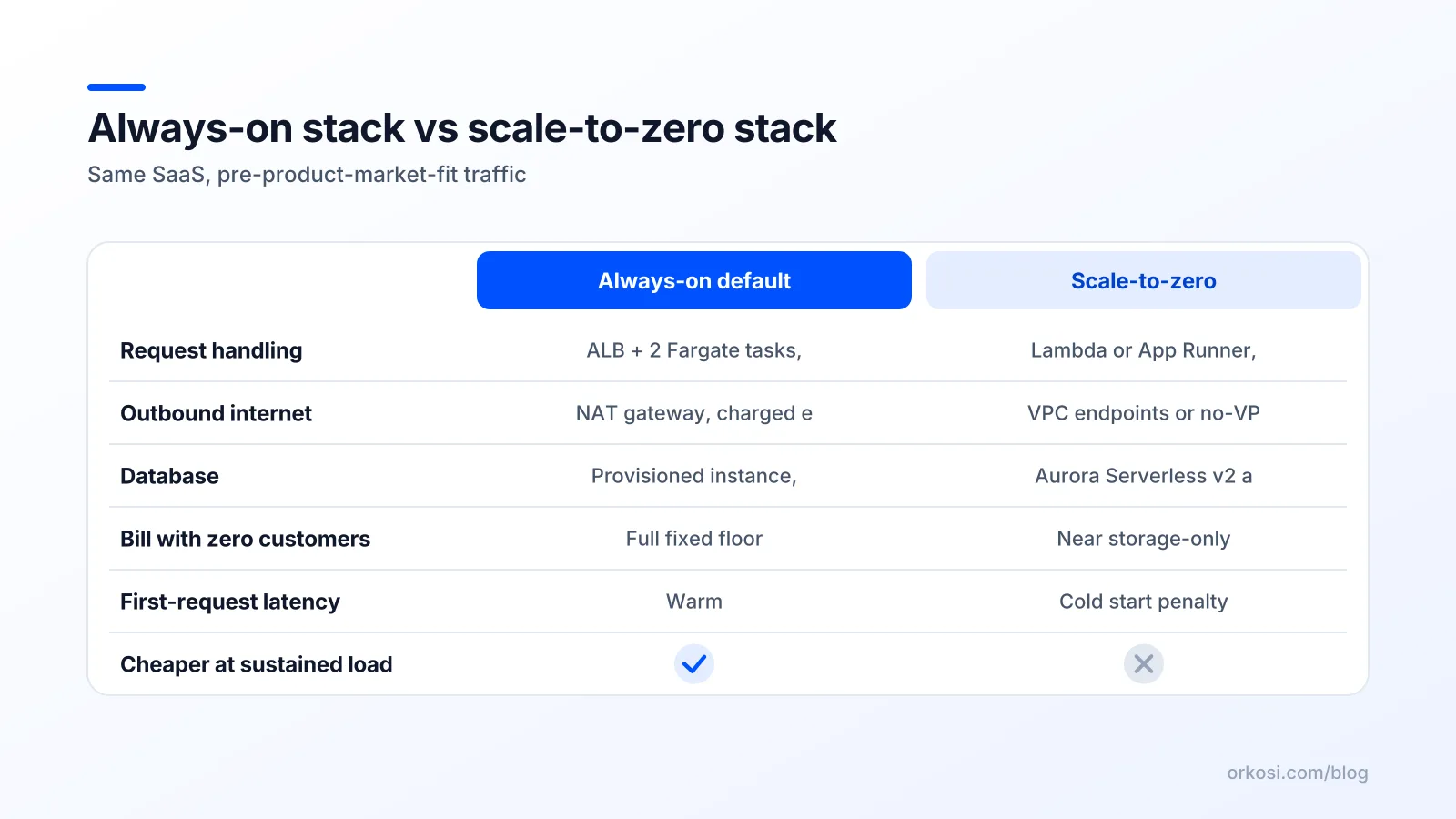
What each costs with zero customers
Same product, a B2B SaaS with a React frontend, a JSON API and a relational database. Two architectures:
| Always-on stack | Scale-to-zero stack | |
|---|---|---|
| Edge | ALB, ~$16/mo | CloudFront + S3, pennies |
| Compute | Fargate task 24/7, ~$9/mo | Lambda, $0 at zero requests (Lambda pricing) |
| Egress | NAT gateway, ~$33/mo | No VPC, $0 |
| Database | Aurora SSv2 at 0.5 ACU, ~$44/mo | Aurora SSv2 with 0 minimum or DynamoDB on-demand, $0 to $5 |
| Observability | Logs, no retention set, $5+/mo | Logs, 7-day retention, ~$1/mo |
| Zero-traffic total | ~$110 | ~$2 to $7 |
That is the entire argument for a scale to zero AWS architecture before launch: it converts a $1,300 annual commitment into a rounding error.
What each costs with your first hundred
At 2 million API requests a month with 200ms average execution at 512MB, the serverless side lands around $4 of Lambda compute, $2 of API Gateway, a few dollars of CloudFront and data transfer. If you kept a paused Aurora cluster it wakes up and bills ACUs during business hours, call it $20 to $30. Total: $30 to $45. The always-on stack is still roughly $110 plus some LCUs.
Now be honest about the other end. At sustained load, serverless loses. Once a single small instance would run above about 20% average CPU continuously, per-request pricing starts costing more than per-hour pricing, and by the time you are serving 50 million requests a month with steady throughput a $40 EC2 instance or Fargate service will beat several hundred dollars of GB-seconds. The crossover is not a number of users, it is a utilisation ratio: always-on wins when the capacity you rent is actually busy.
The trade-offs nobody puts in the pricing post
Cold starts and the latency tax
A cold Lambda on a JVM or a fat Node bundle can add 300ms to 2 seconds to the first request. A paused Aurora Serverless v2 cluster takes seconds to resume. Provisioned concurrency fixes cold starts and reintroduces an hourly charge, which defeats the purpose.
Connection limits and database proxies
Lambda and Postgres are a bad marriage without a pooler, because hundreds of concurrent invocations each want their own connection. RDS Proxy solves it and adds a per-vCPU-hour charge that can land in the same range as the small database it fronts. A serverless-native data store, an HTTP data API, or an external pooler are the ways out; pretending the problem does not exist is not.
Portability and the lock-in argument
A Lambda plus DynamoDB plus EventBridge application is harder to lift off AWS than a container and a Postgres URL. That critique is correct and mostly irrelevant before product-market fit. You will rewrite this codebase anyway, probably twice.
Position: 400ms of cold-start latency on a pre-PMF product is a feature request you can schedule. A $400 monthly burn with no revenue is a deadline you cannot move.
When to stop optimising for zero
The signals that idle no longer matters
Stop optimising when monthly recurring revenue exceeds the infrastructure bill by roughly 20 times and traffic is continuous rather than bursty. At that point engineering hours are scarcer than dollars, and a predictable always-on architecture that your team can debug at 2am is worth more than the $80 you would save. Another signal: your cost per customer is falling as you add customers, which means fixed cost has become a small share of total cost.
Savings Plans and reserved capacity are a post-PMF tool
Compute Savings Plans and reserved instances can cut 30 to 70% off compute, in exchange for a one or three year commitment. Do not buy one before your usage is stable. Founders routinely commit to an instance family, then change architecture two months later and spend the next 34 months paying for capacity they no longer use.
A pre-launch cost control checklist
Tag everything on day one
Apply cost allocation tags for environment, service and feature before you create the first resource, then activate them in Billing. Retrofitting tags across 60 resources is an afternoon you will not enjoy, and untagged spend is unattributable spend.
Budgets and anomaly alerts before traffic
Set an AWS Budget with email alerts at a threshold that would actually alarm you, plus a forecasted-spend alert. The AWS Budgets documentation covers thresholds, actions and notifications; two budgets and one anomaly detector take about 15 minutes and are the cheapest insurance in cloud computing. Add Cost Anomaly Detection so a misconfigured cron job that calls a paid API 40,000 times does not surface three weeks later.
Read the bill by service, weekly, for the first month
Open Cost Explorer, group by service, look at daily granularity. Fifteen minutes a week for four weeks will teach you more about your own AWS cost before first customer than any blog post, including this one. You are looking for lines that are flat and non-zero: those are your idle costs, and each one is a decision you can revisit.
How Orkosi handles the idle problem
Hosting included, agents that change the architecture when the numbers change
Orkosi takes a different approach to the cost of running a SaaS on AWS: agents build and deploy your product onto AWS, and hosting is included in the plan, so what you see is a monthly plan price rather than a cloud invoice you have to forecast. Starter is $25 a month with 2,000 credits, Pro is $100 with 6,000, Enterprise is $245, and 1 credit equals $0.01; the current detail lives on the Orkosi pricing page. The practical effect for a pre-launch founder is that the idle-cost problem becomes somebody else's architecture problem.
The second half matters more over time. Because iteration happens through tasks, you can ask an agent to swap an always-on component for a scale-to-zero one, or the reverse once traffic is continuous and per-request pricing stops being the cheaper option. See what other founders have built for the kinds of products this fits, and the docs for how deployment works.
Honest trade-offs: if you have a platform engineer who enjoys Terraform, running your own AWS account gives you more control and a lower marginal cost at scale. If you need an unusual architecture or strict data residency, a managed plan is a constraint rather than a convenience. And a credit-based plan means heavy iteration months cost more than quiet ones. How Orkosi compares with other builders lays out where it fits against the alternatives.
FAQ
What does it cost to run a small SaaS on AWS with no customers?
A conventional stack with a load balancer, a NAT gateway, an always-on container and a managed database costs roughly $100 to $150 a month in us-east-1 at zero traffic, and $200 to $400 if you deployed multi-AZ. A scale-to-zero stack using CloudFront, Lambda and an on-demand or pausable database costs under $10. Check current rates on the VPC, ELB and Aurora pricing pages.
Is serverless actually cheaper than a small EC2 instance?
Only at low or bursty utilisation. Lambda bills per request and per GB-second, so at zero traffic you pay nothing, while an EC2 instance bills every hour. Once that instance would run above roughly 20% average CPU continuously, the always-on option becomes cheaper per request, and at high sustained load it is dramatically cheaper. Model it with the AWS Lambda pricing page.
Why is my AWS bill high when I have almost no traffic?
Because most of it is hourly, not usage-based. Open Cost Explorer, group by service and look for flat daily lines: typically a load balancer, one or two NAT gateways, a provisioned database instance or ACU minimum, public IPv4 addresses and CloudWatch Logs with no retention policy. Those five categories explain the large majority of low-traffic AWS bills.
Should I buy a Savings Plan before launch?
No. Savings Plans and reserved instances require one or three year commitments, and pre-launch usage is the least stable usage you will ever have. Wait until you have three to six months of steady consumption and a stable architecture, then commit to a conservative baseline rather than your peak. Discounting idle capacity still leaves you paying for idle capacity.
Want to skip the VPC diagrams entirely and find out what your product actually needs? Start free and see what the plans cover on the pricing page.