No-Code vs AI-Generated Software: Read the Diff
Orkosi Team · · 11 min read

The dividing line in no-code vs AI-generated software isn't speed, it's whether you can read the change
The honest answer to no-code vs AI-generated software in 2025 is that speed no longer separates them. A no-code builder and a coding agent will both get you a working app with auth, a database and a payment flow inside a weekend. The durable differentiator is narrower and less exciting: can you see exactly what changed, compare it with what was there before, and undo that one change without undoing everything else?
That is the test. Not "is it real code", not "is it scalable", not "does it have an API". Every other concern is downstream of whether the system will show you its own work. Tools that show you a change can be reviewed, audited, handed to a contractor and fixed. Tools that only show you a current state cannot.

What 'the diff' actually means (and why non-developers should care)
A plain-English definition
A diff is a line-by-line comparison between two versions of the same thing. The git-diff documentation describes it as showing changes between commits, between a commit and the working tree, or between two arbitrary points in a project's history. In practice it renders as red lines (removed) and green lines (added), with surrounding context so you can see where in the file the change sits.
You do not need to write code to read a diff. You need to recognise words. If a diff shows trial_days = 14 turning into trial_days = 30, that is legible to anyone who runs a business.
The three questions a diff answers
A good diff answers three things at once:
- What changed? Specific lines, specific files, nothing else.
- Who or what changed it? A commit author, a timestamp, usually a message explaining intent.
- What was the previous state? The old version is still there, right next to the new one.
Most tooling arguments collapse once you ask which of those three a platform gives you. Answering one out of three is common. Answering all three is the bar.
The no-code equivalent: version history vs audit log
No-code version control is usually snapshot-based. The platform saves the whole application state at intervals or on publish, and "restore" means reverting to one of those snapshots. That answers question three for the entire app, roughly answers question two, and barely touches question one.
An audit log is different and better: it records discrete events such as "user X edited workflow step 7 at 14:02". A no-code platform audit trail tells you something happened. It rarely tells you what the field contained before. The gap between "a workflow was edited" and "this condition changed from >= 100 to > 100" is where a week of debugging lives.
Where no-code platforms hide the work
Logic buried in GUI panels
The core problem with no-code is not that it generates bad logic. It is that the logic lives inside nested interface elements. A pricing rule might be a formula in a field inside a conditional branch inside step 23 of a workflow, visible only when you click through four panels.
Concrete scenario: your discount logic breaks. Annual plans are being charged the monthly rate. You have 40 workflow steps across six workflows, and the rule could be in any of them, in a visible formula, a hidden conditional, or a database field default. There is no list of recent changes to narrow it down. You click.
You can't grep a canvas
grep is the command developers use to search every file in a project for a string. Searching a codebase for stripe or is_admin takes under a second and returns every occurrence with file and line number.
A node canvas has no equivalent. Many no-code platforms offer limited search across element names, not across the values inside configuration panels. You also cannot open two versions of a flow side by side and ask what differs. The comparison is done by memory, by screenshots, or not at all.
Restore-the-whole-app rollbacks
The ability to rollback a no-code app is real, and it is genuinely useful during a crisis. But the unit of rollback is the app. If you shipped a pricing fix on Monday, a copy change on Tuesday and a broken permissions rule on Wednesday, restoring Tuesday's snapshot removes Wednesday's break and Wednesday's good work together.
DORA's research has found consistently that small, independently reversible changes correlate with both throughput and stability. Snapshot rollback is the opposite shape: large, coupled and all-or-nothing. It works, and it costs you the good changes alongside the bad.
Where AI-generated code hides its own problems
Being fair about no-code requires being equally blunt about the other side. A diff you never open is exactly as opaque as a GUI panel. Real code plus zero review discipline is not an upgrade, it is the same blindness with more surface area.
Plausible code is not correct code
The most useful piece of evidence here is Perry et al., Do Users Write More Insecure Code with AI Assistants?. Participants with access to an AI assistant wrote less secure solutions than those without, and were more confident their code was secure. That is the failure mode in one sentence: generated code reads as competent, so it gets waved through.
The Stack Overflow Developer Survey 2024 adds the other half. Adoption of AI coding tools is high, and professional developers' trust in the accuracy of the output is distinctly mixed, with a substantial share reporting low or no trust. Professionals use these tools heavily and still verify them. Founders often do the first part and skip the second.
Silent dependency and schema changes
Two categories of change deserve more suspicion than the rest.
Dependencies. A single prompt can add three npm packages you have never heard of, each pulling in dozens of transitive dependencies. The code looks fine. The supply chain just grew.
Schema and migrations. A database migration that drops a column or changes a type is three lines long and irreversible once it runs against production data. It looks like nothing in a 400-line diff. It is the single most expensive line in it.
The reviewer who never reads
Scale is the hidden variable. A prompt like "add team accounts" can legitimately touch 20 files: schema, API routes, permissions, UI, tests, seed data. Nobody reads 20 files on a Friday evening.
So they do not read any of it. At that point the fact that the change was inspectable is trivia. The advantage of AI-generated code over no-code is conditional on a review habit existing, and most of the gap in practice is habit, not architecture.
The reviewability test: five questions before you commit to either tool
Run this during the trial, with a real change, not a demo. Make one small, specific edit (change a price, add a required field), then try to find it, explain it and undo it.
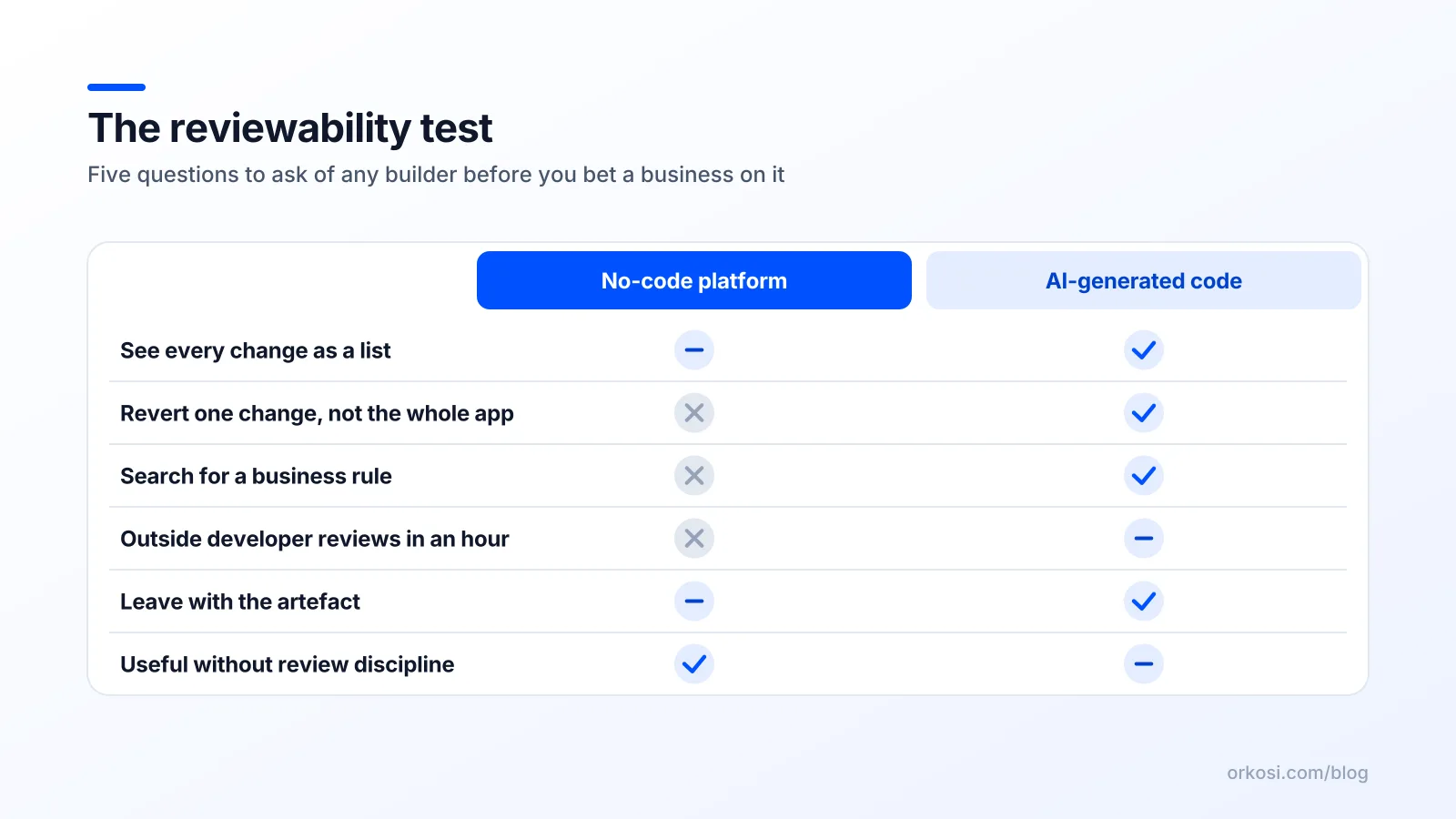
Can I see every change as a list?
Test: make your small edit, then look for a chronological list of changes with enough detail to tell what each one did. Pass: a list of discrete changes, each with a description and a before/after. Fail: a list of save points, or "last edited 3 minutes ago".
Can I revert one change without reverting ten?
Test: make three small edits in sequence. Undo the middle one and keep the other two. Pass: the middle edit reverts cleanly. Fail: the only option is restoring a snapshot, which also removes edits one and three.
Can an outside developer review it in an hour?
Test: send a contractor or technical friend a link or export and ask what changed this week. Pay them for the hour; it is the cheapest due diligence you will ever buy. Pass: they come back with a list and at least one question. Fail: they ask for screen-share access, or say "I'd have to click through it".
Can I search for a business rule?
Test: search your project for the word refund, or for a price you know is hardcoded somewhere.
Pass: results with locations.
Fail: no results, or results limited to element names.
Can I leave with the artefact?
The most common search in this whole category is whether you can export code from a no-code platform. Sometimes yes, often partially, and the partial cases are the dangerous ones. An export that gives you a frontend bundle without the workflow logic, the database rules or the integrations is a souvenir, not a migration path.
Test: export on day two of the trial and ask whether the result runs somewhere else. Pass: it builds and runs outside the vendor. Fail: it exports, but the business logic stayed behind.
| Question | Typical no-code answer | Typical AI-generated code answer |
|---|---|---|
| See every change as a list | Snapshots and edit events | Commit history with full diffs |
| Revert one change only | Usually no, whole-app restore | Yes, revert a single commit |
| Outside developer reviews in an hour | Needs platform-specific expertise | Any developer in that stack |
| Search for a business rule | Limited or none | Full-text search across files |
| Leave with the artefact | Partial export at best | Repository is the artefact |
The right-hand column is a capability, not an outcome. It only becomes an outcome if somebody reads the thing.
When not reading the diff is the right call
There are situations where review discipline is pure overhead, and pretending otherwise is how founders burn three weeks on process for a product nobody wants.
Skip it for: throwaway prototypes, internal tools with five colleagues using them, demos for a pitch meeting, and anything you are building purely to find out whether the idea has legs. If the worst case of a bug is "I fix it on Tuesday", ship first and read nothing. No-code is often the faster and genuinely better choice in exactly these cases, and it should not be argued out of them.
Four triggers flip the calculation:
- Money moves. A charge, a payout, a subscription, a refund.
- Customer data is stored. Especially anything that would be unpleasant in a breach notification.
- A second person edits. Two editors without a change log means "who changed this" becomes unanswerable.
- A questionnaire arrives. SOC 2, a security review, an enterprise procurement form, due diligence. These ask for change management evidence, and screenshots of a canvas do not satisfy them.
Hit any one of those and reviewability stops being a preference.
A review habit that takes ten minutes a week
Read change summaries, not every line
Open the list of changes from the past week and read the descriptions, not the code. You are looking for surprises: a change you did not ask for, a change bigger than the request justified, a change touching files unrelated to the request. Ten changes take four minutes to skim at this level.
If a description says "refactor" and touches 30 files, that is the one to ask about. Vagueness plus volume is the signal.
Flag three things: money, auth, data
Open the actual diff for three categories only:
- Money: anything near payments, pricing, plans, invoices, webhooks from a payment provider.
- Auth: login, sessions, roles, permissions, anything deciding who can see what.
- Data: migrations, schema changes, deletions, exports, anything handling personal information.
The OWASP Top 10 is the right reference for what goes wrong in these areas, and broken access control sits at the top of it for a reason. You are not performing a security audit. You are asking one question per change: does this let the wrong person see or do the wrong thing?
Keep a one-line decision log
For every change you approve, write one line: date, what changed, why you approved it. A plain text file is fine.
This costs about 90 seconds a week and pays off in three places: debugging ("when did this start?"), handover to a developer, and the compliance questionnaire that asks how changes are authorised. It also forces you to articulate the reason, which is where you catch the ones you do not actually understand.
How this works on Orkosi
On Orkosi, agents work through tasks against a real codebase deployed on your own AWS footprint. The output of each task is a change to code and infrastructure, which means the five questions above have answers rather than workarounds: there is a change history, the artefact is a repository, and any developer who knows the stack can review it without learning a proprietary canvas.
That is the trade-off stated plainly. You get inspectability and portability; you also carry a real application with real dependencies, which is more surface area than a hosted builder. If your product is an internal form for four people, that extra surface area buys you nothing and a no-code tool will be faster.
Templates cover SaaS and web apps, online stores, websites, mobile and desktop apps, plus image studio, marketing workspace and video channel, so the starting point is close to the shape of the product rather than a blank repository. Plans start at Starter $25/month for 2,000 credits and Pro $100/month for 6,000 credits, with details and the other tiers on the pricing page. The documentation covers how tasks, deploys and rollbacks work, and the comparison page sets Orkosi against other builders if you are evaluating several at once.
FAQ
Is AI-generated software safer than no-code?
Not inherently. Research by Perry et al. found participants using AI assistants wrote less secure code while believing it was more secure. AI-generated code is more reviewable, which only becomes safer if somebody reviews it. Action: before trusting any AI-built app with payments, have a developer read the payment and permissions code once.
Can I export my app from a no-code platform?
Sometimes, and rarely completely. Many platforms export frontend code while keeping workflows, database rules and integrations inside the vendor, which leaves you with a shell rather than a working application. Action: run the export on day two of your trial and check whether the result actually builds and runs somewhere else.
Do I need to know how to read code to review AI changes?
No, but you need to recognise words. Diffs show removed and added lines in context, so a change from trial_days = 14 to trial_days = 30 is legible to anyone. Action: start by reading only change summaries, and open the full diff only for payment, permissions and database migration changes.
What should I test during a free trial to judge reviewability?
Make three small edits in sequence, then try to undo only the middle one. If the only option is restoring a whole-app snapshot, you have found the tool's real limit. Action: also search the project for a term like refund and see whether you get locations or nothing.
Pick one tool, run the five-question test on a real change this week, and let the answers decide rather than the landing page. You can start free and check the plan details on pricing before committing a credit card.