Custom App for Small Business: Survive the Cutover
Orkosi Team · · 13 min read

A cutover is the moment your business stops recording real work in the old place and starts recording it in the new one: the last order typed into the spreadsheet, the first order typed into the app. For a custom app for small business, that moment is the actual launch. The demo was theatre. The cutover is where you can lose an order, a customer's deposit, or the goodwill of the one staff member who already thought this was a bad idea.
Plan the cutover before you plan the announcement. Most founders do the reverse.

The launch that matters is the cutover, not the demo
Two different launch days
There are two launch days in every software project. The first is the day the app works: you click through it, the numbers add up, everyone says it looks great. The second is the day the business depends on it, when a customer is standing at the counter and the till screen is the only record of what they just bought.
The gap between those two days is where projects die. An app can pass every click-through test and still fail on day two because nobody decided who enters the Tuesday deliveries, or because the import dropped 340 rows with blank phone numbers and nobody counted.
Why founders skip cutover planning
Cutover planning is unglamorous. It produces no screenshots and nothing to show investors. It is also the only part of a small business app rollout plan that directly protects revenue.
The other reason is structural: when you hire a freelancer or agency, the contract usually ends at delivery. Cutover sits after delivery and before support, in nobody's scope. If you are using an agent platform like Orkosi, where you keep queuing tasks after launch, that gap closes a bit, but you still decide the sequence yourself. No tool decides for you which Thursday you freeze the spreadsheet.
Position: if you have under 20 staff, never big-bang the switch
A big bang (everyone stops using the old system at 5pm Friday, everyone starts on the new one at 9am Monday) is the default because it is the easiest to describe and the hardest to survive. With fewer than 20 staff you have no slack: one person out sick during cutover week removes 10% of your operational capacity and probably 100% of your institutional knowledge about how discounts actually work.
Big bang vs parallel run vs phased
| Pattern | What happens | Defensible when | Main risk |
|---|---|---|---|
| Big bang | Old system off, new system on, one date | Single-user tool, no historic data, no money flowing through it | A bad import is discovered after the old system is already cold |
| Parallel run | Both systems record the same work for a fixed window | Orders, payments, stock or client records are involved | Staff do real work twice and resent it |
| Phased | One location, one product line or one workflow at a time | Multi-site, multi-team, or genuinely separable workflows | Two sources of truth for longer; integration seams get messy |
Google's SRE team makes the general case well in its chapter on release engineering: small, reversible changes with verification gates beat one large irreversible change. A five-person bakery is not Google, but the arithmetic of risk is the same, and a bakery has less margin for a bad week.
A big bang is genuinely fine for an internal dashboard, a quoting calculator, or a marketing site. The test is simple: if the app goes dark for six hours, does money stop moving or do customers get a wrong answer? If no, big bang away.
The honest trade-off: double entry is annoying, lost orders are fatal
A parallel run costs real money. Two weeks of double entry for three counter staff might be 45 minutes a day each, roughly 22 hours of labour, and your team will complain on day four.
Weigh it against the alternative: a single lost week of order data in a service business is usually several thousand pounds of unbilled work plus the customers you have to phone and ask "what did you order?" Double entry is a known, bounded, annoying cost. A failed cutover is an unbounded one.
Decide what moves, what gets archived, and what dies
The three-bucket migration rule
Before anyone writes an import script, sort every table and column in your spreadsheet into three buckets.
| Bucket | Contents | What you do |
|---|---|---|
| Migrate | Open, live records: unfulfilled orders, active customers, open invoices, current stock levels, active subscriptions | Import into the new data model, verified row by row |
| Archive | Closed history: completed orders, paid invoices, past years | Export to CSV or PDF, store read-only, do not import |
| Kill | Columns nobody has filled in since 2022, the three "notes" fields, the colour-coding nobody can explain | Document the decision, then leave it behind |
The instinct to migrate spreadsheet data to app in full ("might as well bring it all, it's only data") is the single most common cause of a messy launch. Five years of inconsistent history forced into a clean schema produces thousands of records with null required fields, duplicate customers, and totals that do not reconcile, and your staff will conclude the new app is broken when the real problem is 2021.
Open items vs historic records
The rule of thumb: you need history to be findable, not operational. Nobody updates a 2022 invoice. They occasionally look it up.
A searchable archive export plus the old spreadsheet in read-only mode covers the lookup case. If after three months staff are searching history daily, that is the moment to import it, with the benefit of a data model proven by real use.
Legal retention: don't delete the old file
Keep the old system. The IRS guidance on recordkeeping expects supporting business records to be retained for as long as they may be material to a tax return, which in practice is years, not weeks. UK businesses have equivalent obligations: HMRC requires VAT records to be kept for 6 years.
So: archive, don't delete. Export the old sheet to a dated, read-only copy in cloud storage on freeze day, and write the date in your plan. If payments are moving too, treat that as its own project; Stripe documents data migrations as a supported, deliberate process precisely because customer and payment-method data cannot be copy-pasted.
The two-week parallel run, in practice
Choose a reconciliation metric
Pick exactly one number that both systems must agree on every day. Not five. One.
Good candidates: the day's takings, the count of open jobs at close, the physical stock count of your top-selling SKU, the total value of unpaid invoices. The best metric is one someone already checks daily, because then reconciliation adds thirty seconds rather than a new habit.
Log every mismatch in a shared sheet with four columns: date, old system value, new system value, cause. The cause column is the entire point. "Staff forgot to enter it" and "the app rounds VAT differently" are completely different problems.
Who enters twice, and for how long
Name the people. Not "the team": Sam enters counter sales in both, Priya enters phone orders in both, for 14 days starting Monday the 6th.
Two weeks is the right default because it captures two of every weekday, one payroll or invoicing cycle, and at least one weird event (a refund, a cancellation, a delivery short by three units). One week is too short to catch the monthly rhythm. A month is long enough that people quietly stop doing it.
The exit criteria you write down in advance
Write the exit condition before day one, as a number. For example: three consecutive trading days with zero unexplained mismatches on the daily takings figure, and all open orders present in the new app.
Without a written number, the parallel run ends when someone gets tired of it, which is the worst possible stopping rule. Note what you are testing: the data model and the workflow, not the interface. UI problems surface in the first hour. Data model problems ("we have no way to record a part payment") surface on day nine, which is exactly why the window needs to be that long.
Cutover week: the order of operations
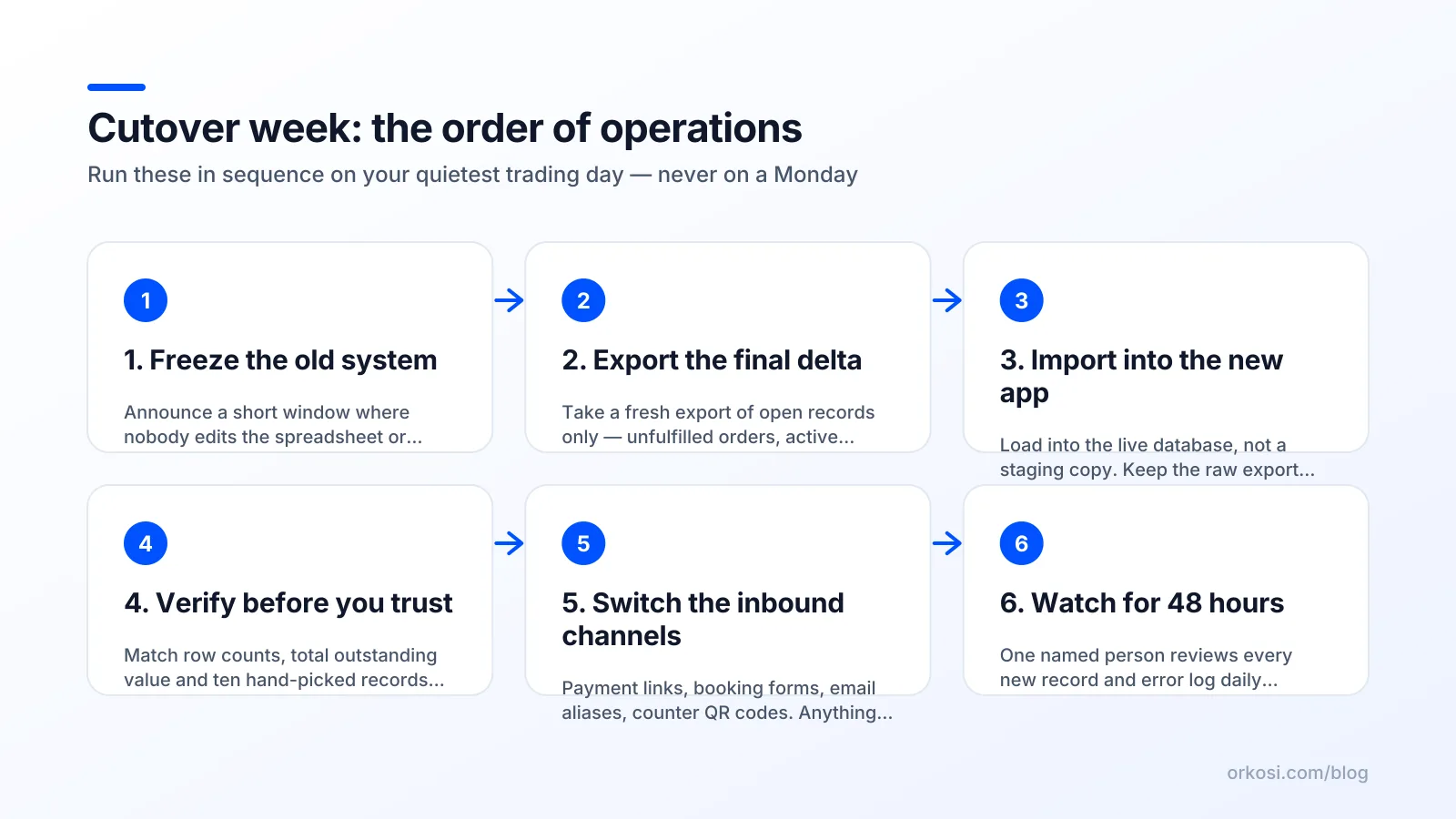
Freeze, export, import, verify, switch, watch
This is the go-live checklist small business owners can run without a project manager:
- Freeze. Announce a window (typically 2 to 12 hours) where nobody edits the old system. Pin a note to the spreadsheet. If a sale happens during the freeze, it goes on paper and gets entered after.
- Export. Take the final delta: everything created or changed since your last test import. Save it with a timestamped filename.
- Import. Run the import into the new app. Keep the raw export file untouched so you can re-run it.
- Verify. Row counts first (old export: 1,284 customers, new app: 1,284 customers), then spot checks: the newest record, the oldest migrated record, the biggest invoice, the one customer with an apostrophe in their name, one record with every optional field blank.
- Switch. Redirect inbound channels. This is the step people forget: payment links, website forms, the booking widget, email aliases, the QR code taped to the counter, the link in your Instagram bio, any automation pointed at the old sheet.
- Watch. Someone technical is reachable for 48 hours and actively checking error logs and the reconciliation metric twice a day.
Pick the quietest trading day, not Monday
Monday is the worst day to go live: the weekend backlog lands, inboxes are full, and everyone is already behind. Go live on your quietest trading day with a working day after it. For most retail and hospitality that is Tuesday or Wednesday. For B2B services it is often Thursday. Never the day before a public holiday, before a sales peak, or on the last day of your billing cycle.
On a platform where agents do the work, you queue these as tasks rather than booking a developer's weekend. With Orkosi you might queue the import script, the verification query and the channel redirects as separate tasks and run them in sequence while you stand at the counter. That reduces scheduling pain, but it does not remove the need for a human to verify row counts. Nothing does.
The rollback plan you hope to never use
What 'rollback' means when money has moved
Before the first real transaction, rollback is a switch: go back to the spreadsheet, delete the imported data, try again next week. After the first real transaction, rollback is reconciliation. You now have four orders and a refund that exist only in the new app, and getting back to the old system means re-entering them by hand.
So a rollback plan has to answer three questions, in writing:
- Trigger: what specifically forces the decision? "Orders cannot be recorded for more than 60 minutes" or "two customers charged the wrong amount" are triggers. "It feels buggy" is not.
- Window: how long after go-live does rollback stay available? For most small businesses, 72 hours. After that, forward-fix only.
- Owner: one named person who calls it. Not a committee at 7pm.
Point-in-time restore and backups
Know your restore capability before you need it. If your app runs on a managed database, check the retention period: Amazon RDS automated backups support restoring to a specific point in time within the retention window, typically to within seconds.
Two things matter. Test a restore once before go-live, so you know how long it takes (often 20 to 40 minutes, not two). And understand that restoring the database does not un-send emails or un-charge cards. Those reconcile by hand.
The one-page fallback sheet at the counter

Print one laminated A4 sheet and keep it by the till: how to take an order on paper, where the card reader backup lives, who to call, and where to put the paper slips for entry afterwards. Five lines, no jargon.
This costs nothing and it is the difference between "the app is down, we're closed" and "the app is down, we're writing it down." Staff who have a fallback trust the new system more, not less, because the app is no longer a single point of failure for their shift.
Week three is when the real bugs arrive
Edge cases only real trading produces
The bug curve does not peak at go-live. It peaks around week three, once novelty has worn off and the business has produced enough transactions to hit the unusual ones. A fortnight of normal trading will eventually produce an abnormal day, and that is when you find out what nobody specified.
The refund, the part-paid invoice, the returning customer
The classics, in rough order of frequency:
- Refunds and partial refunds. Does a refund reduce today's takings or yesterday's? Both answers are defensible; the app picked one without telling you.
- Part payments. A £400 invoice with a £150 deposit. Many first builds only model "paid" and "unpaid".
- The duplicate customer. Same person, two records, one with a typo in the email. Now their loyalty balance is split.
- Date and timezone boundaries. A sale at 23:58 landing in the wrong day's report, or a UTC-stored timestamp shifting your end-of-day total by one transaction.
- Cancellations after fulfilment, discount stacking, and the order with a negative line item.
Budget iteration, not just build
Do not spend your entire budget getting to launch. Reserve capacity for weeks three through eight, when you know what is actually wrong rather than what you guessed would be.
This is where a per-month credit model differs from a fixed-price build. On Orkosi, plans from Starter to Enterprise are monthly credit allowances that fund ongoing tasks, so fixing the refund logic in week four is a task you queue rather than a change request you negotiate. The trade-off is honest: if your app is genuinely finished and never changes, a one-off build may cost less in year two. Most small business apps are not finished, which is why comparing delivery models matters more than comparing feature lists. For a sense of what ships this way, the showcase is more useful than a spec sheet.
A one-page cutover plan for a custom app for small business
Template: dates, owners, metrics, triggers
Fill this in today. It takes twenty minutes and it is the whole plan.
| Item | Your answer |
|---|---|
| Freeze date and window | |
| Go-live date (quiet day, working day after) | |
| Migrate bucket (open records only) | |
| Archive bucket (export location, retention date) | |
| Kill list (fields deliberately dropped) | |
| Daily reconciliation metric | |
| Parallel run start and end dates | |
| Exit criteria (numeric) | |
| Rollback trigger, window, named owner | |
| Inbound channels to redirect | |
| Fallback sheet printed? Y/N | |
| First three post-launch tasks |
A custom app for small business succeeds or fails on whether somebody wrote these twelve lines down before go-live day, not on how good the build was.
FAQ
How long should a parallel run last for a small business app?
Two weeks is the right default. That window covers two of every weekday, one invoicing or payroll cycle, and enough volume to surface refunds and cancellations. End it on written numeric criteria, such as three consecutive days with zero unexplained mismatches on your chosen reconciliation metric, rather than when staff get tired of double entry. One week rarely catches the monthly rhythm.
Should I migrate my full order history into the new app?
No, migrate open items only: unfulfilled orders, active customers, unpaid invoices and current stock. Export closed history to a dated read-only file and keep the old system accessible, since the IRS and HMRC both expect multi-year retention. Importing five years of inconsistent records into a clean schema creates thousands of broken rows and destroys staff trust in week one.
What's the safest day and time to go live?
Your quietest trading day, early, with a full working day after it. For retail and hospitality that is usually Tuesday or Wednesday morning; for B2B services, often Thursday. Never Monday (weekend backlog), never the day before a holiday or a sales peak, and never the final day of a billing cycle. You want low volume and a technical person reachable for the following 48 hours.
Who fixes things in the first week after cutover?
Name that person before go-live and put their number on the fallback sheet. If you hired a freelancer, confirm in writing that support covers the two weeks after cutover, not just delivery. If you are using an agent platform, the fix is a queued task against your monthly credits, which is why reserving budget for weeks three through eight matters more than reserving it for launch day.
Write your one-page cutover plan first, then build against it: start free and queue the import, verification and redirect steps as separate tasks. Check pricing to see how monthly credits cover the weeks of fixes that follow go-live, not just the build.