No-Code vs AI-Generated Software: Surviving Launch Week
Orkosi Team · · 11 min read

The no-code vs AI-generated software comparison everyone runs is the wrong one
Almost every no-code vs AI-generated software comparison measures the same thing: how fast you can get a working screen in front of someone. Both routes win that contest easily. You can have a signup form, a database table and a styled landing page inside an afternoon either way, and the difference between four hours and six hours decides nothing.
The decision is made in the seven days after you tell people your product exists. That is when the comparison stops being about build speed and starts being about whether you can see what went wrong and change it.
Two definitions, because the rest of this article depends on them being precise:
- No-code platform: a visual builder (drag-and-drop UI, point-and-click logic) whose output runs on the vendor's hosted runtime. You configure behaviour; you do not possess the source code or the servers.
- AI-generated software: an agent writes actual source code (a repo, a framework, a database schema) which is then deployed to infrastructure you control, typically a cloud account. You own the code and can change any line of it.
The practical difference is not features. It is what happens at 7:12am when a stranger on Product Hunt says "I paid and nothing happened."

What actually breaks in launch week
Not "scalability". Scalability is what breaks in month nine. Launch week breaks in three specific, boring, repeatable ways.
Signup and payment edge cases
The single most common launch-week failure is a customer who paid and did not get access. Usually the payment succeeded at the processor and the webhook that was supposed to flip their account to "active" failed, timed out, or arrived twice.
Stripe retries failed webhook deliveries for up to three days with exponential backoff and requires you to verify the event signature before trusting it (Stripe webhooks docs). That retry behaviour is a gift only if your endpoint is idempotent. If it is not, the retry creates a second subscription row or, worse, a second charge. Stripe publishes idempotent requests precisely because this is the default failure mode of naive billing code.
Other reliable offenders: the email verification link that points at localhost, the password reset that silently lands in spam, the coupon field that accepts a code and then charges full price.
A traffic shape you didn't predict
Launch traffic is not a smooth curve. It is a spike at 7am Pacific when a directory listing goes live, a second spike when someone with 40,000 followers posts about you, and then near-silence.
The shape matters more than the volume. 3,000 visitors over a day is nothing. The same 3,000 in eleven minutes, each one hitting a page that runs four database queries and an external API call, is a different app entirely.

The bug that only one customer sees
Safari renders your pricing table with the CTA off-screen. An Android keyboard covers the submit button. A customer with a company email containing a plus sign cannot complete onboarding. One person on a corporate VPN gets a CORS error.
These are not edge cases you can test your way out of in advance. They are discovered by users, reported in a sentence and a half, and have to be reproduced from almost no information. Your ability to fix them is purely a function of how much of the stack you can inspect.
Where no-code genuinely wins
Credit where it is due: a no-code platform is still the fastest route from idea to a card payment landing in your account, and for a large class of products it is simply the right answer.
You get authentication, a database, file storage, a hosted domain and an SSL certificate without configuring any of them. There is no deploy pipeline, no build step, no secrets management, no CI. A non-technical founder can change pricing copy, add a form field or reorder an onboarding step at 11pm without asking anyone.
That last point is undervalued. The real cost of a codebase is not writing it, it is that every tiny change becomes a ticket for someone.
If your product is an internal tool, a directory, a waitlist, a booking page, a client portal or any single-workflow app where the behaviour maps cleanly onto the platform's primitives, use no-code and stop reading comparison posts. Moving that to custom code is vanity engineering. The no-code vs custom code for startups debate only gets interesting when your product needs behaviour the builder does not have a block for.
Where no-code hurts in launch week
The limiting factor is not the feature list. Modern builders can express a surprising amount of logic. The limiting factor is observability and escape routes: how much you can see, and what you can do when seeing it is not enough.
Debugging ends at the platform boundary
When a workflow silently stops on step four, you get whatever the vendor's log viewer chooses to show you. There is no stack trace from inside their runtime, no way to add a log line to the component that failed, no way to read the request that your integration actually sent.
At that point your only remaining move is a support ticket. During launch week, a support ticket is not a fix, it is a hope. Response times on lower tiers are measured in business days, and your spike is measured in hours.
Pricing that scales with usage, not revenue
Usage-metered platforms couple traffic directly to cost. Bubble meters apps in workload units, consumed by workflow steps, searches and page loads, with plan allowances and overage charges (Bubble pricing). A viral day burns through allowance regardless of whether any of those visitors converted.
Backends used as data layers have hard ceilings too. The Airtable Web API enforces a limit of 5 requests per second per base, returning a 429 above that (Airtable rate limits). That ceiling is invisible for your whole build and appears the exact minute traffic arrives.
So the failure is doubled: the spike costs you money and degrades the experience of the people it brought.
You cannot ship a hotfix the platform doesn't support
Suppose the fix requires a database transaction, a background retry queue, a custom HTTP header, or a webhook handler that deduplicates by event ID. If the builder has no primitive for it, there is no workaround, only a redesign of the workflow or a wait for the vendor's roadmap.
A hotfix after launch is defined by the fact that you did not plan for it. Platforms are excellent at the things you planned for.
Where AI-generated software wins, and where it bites
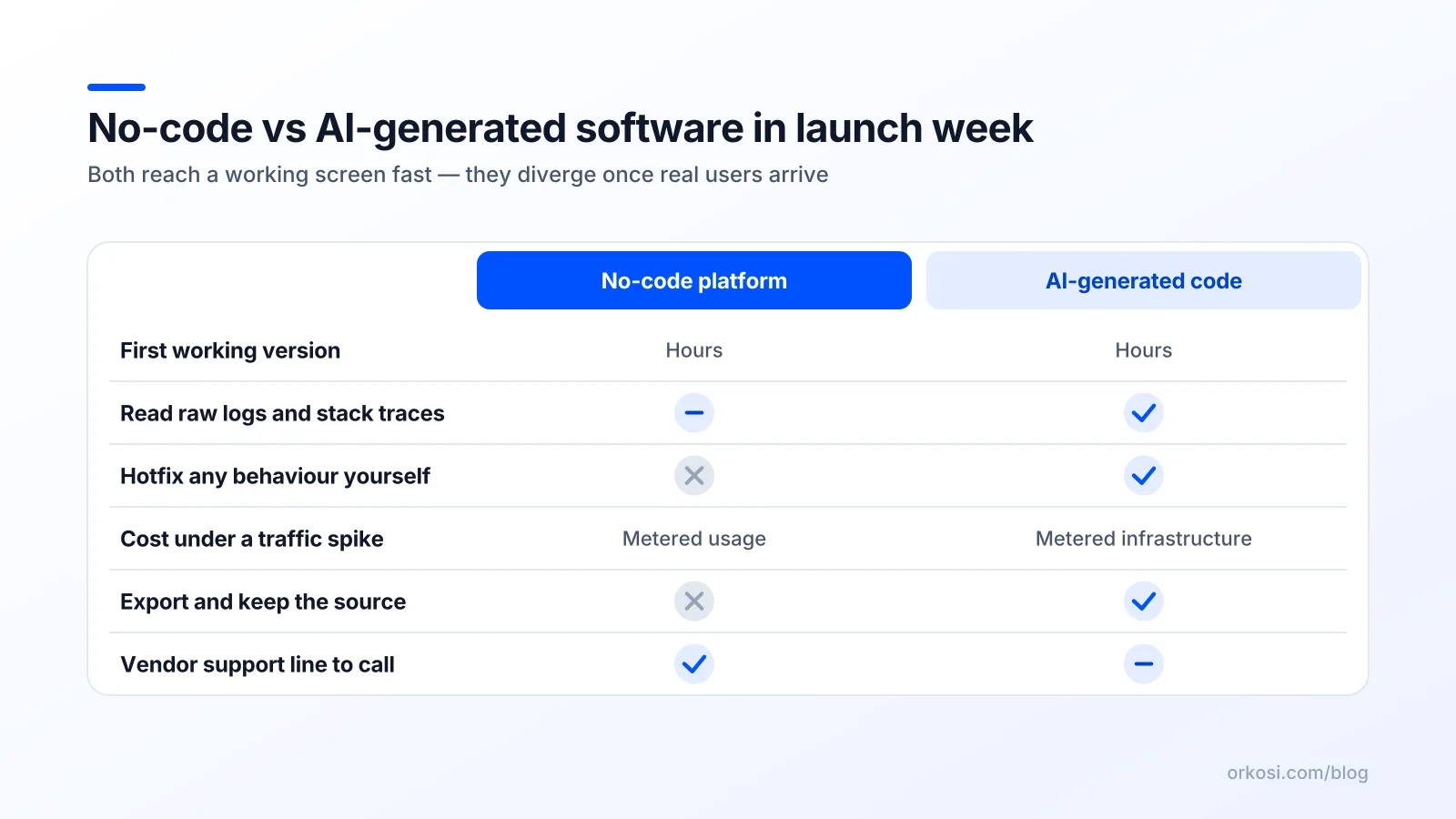
| Launch-week criterion | No-code platform | AI-generated code |
|---|---|---|
| Time to first working screen | Hours | Hours |
| Who can change copy and forms | Anyone | Whoever can ship code |
| Stack traces and raw logs | Vendor-filtered | Full access |
| Arbitrary hotfix possible | Only within primitives | Yes, any line |
| Cost behaviour under a spike | Metered, can throttle | Infra cost, scales with config |
| Rollback | Platform version history | Git revert and redeploy |
| Support when stuck | Vendor ticket queue | You, or whoever you hire |
| Migration later | Rebuild | Move the repo |
Any fix is reachable
With generated source code you get a repo, a git history, real logs, and stack traces that name the file and the line. If the app runs on infrastructure you control, you get metrics and alarms as a first-class feature: CloudWatch collects logs, metrics and events and lets you alarm on them (AWS docs).
That combination is exactly what launch week demands. "Reproduce from a vague bug report, find the line, change it, redeploy, revert if it was wrong" is a loop you can run in fifteen minutes. On Orkosi the generated code deploys to AWS and each follow-up fix is filed as a task for the agents, which means the loop does not depend on you personally knowing the framework, though it does depend on you describing the bug accurately. The docs cover how tasks and deploys fit together.
Scaling a no-code app means waiting for a plan tier. Scaling code you own means changing a number in a config file or adding an index, which is less glamorous and much faster.
The honest downsides: you now own an unfamiliar codebase
This is the part comparison posts skip. Generated code means:
- No vendor support line for your application. AWS will not debug your checkout flow.
- Tests you probably did not write. Coverage of your specific edge cases is whatever the agent chose plus whatever you asked for.
- Infrastructure and secrets are yours. API keys, environment variables, database backups, domain and certificate renewal.
- The risk of patching code you do not understand. A confident one-line "fix" to a payment handler can create the duplicate charge it was supposed to prevent.
The billing path is where this bites hardest. Correct generated code has to verify webhook signatures, handle retries idempotently, and use idempotency keys on charge creation. Agents frequently get this right. "Frequently" is not "verifiably", and the verification is on you. Read the Stripe docs linked above and walk the code yourself, or have someone do it.
The decision rule I'd actually use
Choose a no-code platform when the product's behaviour fits the platform's primitives without creative workarounds, and your launch is to fewer than roughly 100 known users you can email individually when something breaks.
Choose AI-generated code when any of these are true: you charge money, you store customer data you would be embarrassed to leak, or you expect a public spike you cannot predict the size of.
Switch now, not later
If you are already on a builder and any of these appear, migrate before launch rather than after:
- Custom billing logic: usage pricing, seats, proration, trials with cards on file.
- Data export that customers ask for in a specific format.
- A second product surface, such as a mobile app or a public API, sharing the same data.
- Integrations that need retries, queues or webhooks you define.
- Compliance questions from a buyer, especially anything touching data residency or audit logs.
Each of these is cheaper to handle before you have paying users than after. Migration after launch is a rebuild with a live audience, which is the worst possible time. Orkosi's app templates exist partly for this case: SaaS, store, website, mobile and desktop starting points that produce real code rather than a configuration you cannot take with you. The trade-off is that you are responsible for reviewing what the agents produce, and reviewing code is a skill not every founder has.
A launch-week readiness checklist that works for either route
Route-agnostic. Do all of it regardless of which side of the no-code vs AI-generated software question you landed on.
Before you post the link
- Buy your own product with a real card. Not a test card. A real one, on a real browser, then refund it. Confirm you received access, a receipt and a welcome email.
- Force a webhook failure. Point the endpoint somewhere broken, trigger a payment, fix the endpoint, confirm the retry lands and the account activates. If retries do not work, nothing else matters.
- Know where your logs live. Write the URL on a sticky note. Open it once. If you cannot answer "where would I see a 500 error" in under ten seconds, you are not ready.
- Set exactly one alert. Error rate, or failed payments. One alert you will act on beats twelve you will mute.
- Keep a rollback. A known-good version you can restore in under five minutes, whether that is platform version history or a git tag.
- Write the status message in advance. Two sentences, saved as a draft. Writing it calmly beats writing it during an outage.
- Test on a real iPhone and a real Android. Not a device emulator. The signup button specifically.
The first 72 hours
Watch failed payments and signup completion rates, not visitor counts. Reply to every bug report within an hour even if the reply is "reproducing this now". Batch non-urgent fixes into one daily deploy rather than shipping six times a day with no tests.
On Orkosi, those fixes go in as tasks against the running app, which keeps the loop short without you touching the pipeline. It is one option among several, and credits are consumed per task, so the honest trade-off is that a chaotic launch week costs more credits than a quiet one. See pricing for how plans and credits work, and features for what is included alongside hosting.
FAQ
Is AI-generated code production-ready?
For a first launch, usually yes, with one condition: you verify the money and auth paths yourself. Generated code gets routine CRUD, routing and UI right at a high rate, and it gives you logs and stack traces so failures are diagnosable. The risk concentrates in correctness details like webhook signature verification and idempotency keys, which look fine until a retry arrives. Read those files before you launch, or pay someone an hour to.
Can I migrate off a no-code platform after launch?
You can export your data, but not your application. The logic lives in the vendor's visual format, so migrating means rebuilding the behaviour in code while the old version keeps serving customers. Budget weeks, not days, and expect the rebuild to surface undocumented behaviour nobody remembers configuring. This is why the switch signals above are worth acting on before launch rather than after.
Which is cheaper for a first launch?
At tiny scale, no-code usually wins on headline price and definitely wins on setup effort. The crossover comes from usage metering: workload units and API rate limits mean a spike costs money or gets throttled, while code you own costs mostly fixed infrastructure. For AI-generated software the cost is credits for build and fix tasks plus hosting; see Orkosi pricing for current plans rather than relying on a number in a blog post.
Do I still need a developer either way?
Eventually, yes, in both cases. No-code pushes the need later but makes it sharper, because the day you outgrow the primitives you need someone to rebuild everything. Generated code needs someone who can read a diff and sanity-check a payment handler, which can be a part-time contractor rather than a hire. Neither route removes the need for technical judgement; they change when you pay for it.
Pick the route that matches what you are actually launching, then spend the time you saved on the checklist above. If you want to see what generated code looks like for your idea, start free and check pricing before you commit to a plan.