Cost of Running a SaaS on AWS: The Free Tier Cliff
Orkosi Team · · 11 min read

Most founders budget for the wrong number. They look at a $0.00 AWS invoice in month two, extrapolate, and build a pricing model on top of it. The real cost of running a SaaS on AWS does not show up until the promotional credits expire, and by then the architecture that produced the bill is already in production with customers on it. The gap between those two numbers is where a lot of small SaaS businesses quietly stop being businesses.

The free tier is a sales funnel, not a hosting plan
AWS free credits are customer acquisition spend. That is not a criticism, it is just what they are: a discount designed to move you past the point where switching providers is cheaper than staying. Every cloud does it, and it works, because infrastructure decisions calcify fast.
The mistake is treating the subsidised period as your baseline. If your unit economics only clear at $0 infrastructure cost, you do not have a business model, you have a grace period. The useful question is not "how long is AWS free?" but "what does my stack cost at steady state with 200 paying users, and does my price support that?"
Answering that takes about an hour with the AWS Pricing Calculator before you write any code. Almost nobody does it, which is why the first unsubsidised invoice reads as a shock rather than a forecast.
What actually changed: credits replaced the old 12-month tier
AWS restructured its free offering in July 2025. New accounts no longer get twelve months of per-service free allowances. They get a credit balance with an expiry date, plus a smaller set of always-free allowances. The distinction matters more than it sounds.
The old model: 12 months of free allowances per service
Under the legacy structure, each service had its own free quota for twelve months from signup: a set number of EC2 instance hours, a set amount of RDS usage, a set volume of S3 storage. The allowances reset monthly. If you stayed inside them, you paid nothing in month eleven for the same reason you paid nothing in month one.
That model was predictable and forgiving. It also let founders run a demo app for a year without ever learning what their stack cost.
The new model: a credit balance with an expiry date
The current free plan gives new accounts a credit balance at signup plus additional credits for completing onboarding activities, valid for a fixed window (check the AWS Free Tier page for current amounts and duration, since AWS adjusts them). Credits burn down against real usage at real prices.
| Old 12-month tier | Current credit-based plan | |
|---|---|---|
| Shape of benefit | Per-service monthly allowance | Single pooled credit balance |
| Runs out when | Month 13 arrives | Credits are spent or the window closes, whichever is first |
| Predictability | Flat, resets monthly | Accelerates as usage grows |
| What it teaches you | Nothing about real cost | Your actual burn rate, in dollars |
The behavioural difference is the important part. A pooled balance depletes faster the more you build. A founder who spins up a NAT gateway, an RDS instance and an Application Load Balancer in week one can exhaust months of credit before launch, because RDS bills per instance hour whether or not anyone queries the database. AWS free tier expiration is no longer a calendar event you can mark in advance. It is a usage event you have to monitor.
What's still always-free (and why it misleads founders)
Several allowances are genuinely perpetual: a monthly quota of Lambda requests and compute, a DynamoDB storage and capacity allowance, CloudWatch metrics and alarms up to a limit. These are real and useful.
They mislead because they cover the cheap layer. Compute for a low-traffic app is almost never the expensive part of the bill. The always-free list does not include NAT gateways, load balancers, managed relational databases, public IPv4 addresses or data transfer out, and those are exactly the line items that make the AWS bill after free tier credits land badly.
Three ways founders get surprised at the cliff
Services that were never free in the first place
The classic one is the NAT gateway. You put your application subnets in a private VPC because that is the responsible pattern, your containers need outbound internet access, so you add a NAT gateway. It bills per hour it exists plus per gigabyte processed, every hour, forever, at zero traffic.
Application Load Balancers bill the same way: an hourly charge plus capacity units. Since February 2024, every public IPv4 address attached to your account carries an hourly charge too. A standard three-tier VPC with a load balancer, a NAT gateway and a Multi-AZ database has a meaningful monthly floor before a single user signs up.
The always-free allowances you quietly outgrew
CloudWatch Logs is the usual offender. Default log retention is "never expire", so every application log, load balancer access log and Lambda invocation record accumulates in storage you keep paying for. Ingestion is charged per gigabyte, storage per gigabyte-month, and nobody notices until the line item is the third largest on the invoice.
S3 behaves similarly for apps that store user uploads. The free allowance is small, and image-heavy products cross it in weeks. Setting a log retention policy of 14 or 30 days and an S3 lifecycle rule on day one costs nothing and removes an entire category of surprise.
Costs that scale with time, not with traffic
This is the structural point. A large share of a typical SaaS infrastructure cost model is time-based, not demand-based: instance hours, allocated storage, provisioned IOPS, gateway hours, hosted zones, secrets, snapshots. Your traffic can be zero all month and the number barely moves.
That is why the first real bill is rarely about compute. It is about the plumbing that exists so compute can run, and about resources idling at 3am. A product with 40 users and a 24/7 architecture pays close to what a product with 4,000 users pays, until the variable layer finally starts to matter.
The real cost of running a SaaS on AWS: how to price month 13 before you ship month 1
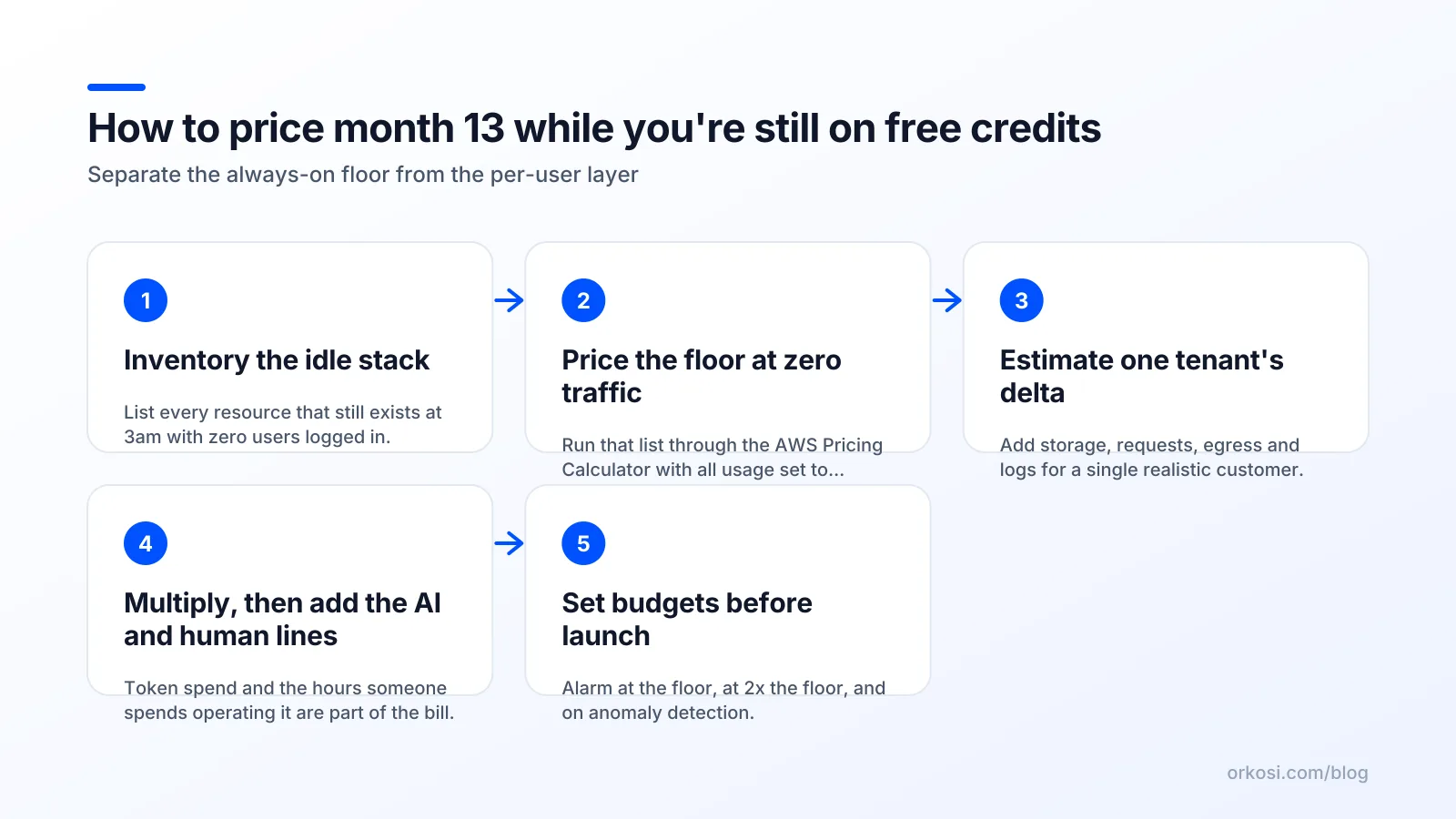
List every resource that exists when nobody is logged in
Open your architecture diagram and mark every box that bills by the hour. VPC endpoints, NAT gateways, load balancers, database instances, read replicas, EBS volumes, Elastic IPs, ElastiCache nodes, Fargate tasks with a minimum count above zero, scheduled jobs.
That list is your fixed floor. Write it down as a table with a quantity column. Most founders are surprised by how many rows it has, and surprised again that three or four rows account for most of the total.
Price the fixed floor, then the per-user delta
Put the floor into the AWS Pricing Calculator with zero traffic: zero requests, zero data transfer out, minimum storage. The number it returns is what you pay in a month where your product does nothing. That is the number to compare against your monthly recurring revenue, because it is the one that does not improve if growth stalls.
Then model the variable layer separately. Estimate per active user per month: requests, average response size, database reads and writes, stored objects, egress. Multiply by a realistic user count, then by 3 for the pessimistic case. The ratio between floor and variable layer tells you what kind of business you are running.
| Layer | Examples | Behaves like |
|---|---|---|
| Fixed floor | NAT gateway, ALB, RDS instance hours, EBS, IPv4 addresses | Rent |
| Variable layer | Lambda invocations, data transfer out, S3 storage growth, log ingestion | Cost of goods sold |
| Step changes | Multi-AZ, read replicas, larger instance class, WAF | Capex-like jumps |
Add the AI token line and the human line
If your product calls an LLM, model tokens per user action and price them at the provider's published rate, with a cap. AI inference is the one variable cost that can plausibly exceed your AWS bill, and unlike bandwidth it scales with engagement rather than file size.
Then add the line almost every forecast omits: your time. Patching, certificate renewals, dependency upgrades, incident response and IAM archaeology are real costs even when they do not appear on an invoice. A managed platform like Orkosi, Vercel or Render is partly a bet that this line is bigger than the margin you pay.
My opinion: optimise the architecture, not the invoice
Why Savings Plans are premature for a pre-revenue SaaS
Reserved Instances and Savings Plans trade flexibility for a discount, typically over one or three years. They are excellent for workloads whose shape you already understand. A pre-revenue SaaS does not have a shape yet.
Committing to a compute baseline before you know whether your product is read-heavy, write-heavy, bursty or batch means you will hold a discount on the wrong thing. Buy commitments after you have six months of steady-state data, not before.
The two architectural decisions that matter most
First: does your stack scale to near-zero when idle, or does it have a rent-like floor? Lambda plus DynamoDB plus an HTTP API gateway can cost single-digit dollars at low traffic. ECS behind an ALB in a private subnet with RDS Multi-AZ cannot, no matter how little you use it.
Second: do you actually need a NAT gateway? VPC endpoints for the specific AWS services you call, or tasks in public subnets with tight security groups, can eliminate one of the largest fixed line items on a small account.
The trade-offs are real. Serverless brings cold starts, execution time limits, awkward local development and a sharper learning curve for relational workloads. Managed containers are more familiar and easier to hire for. The honest framing is that serverless defers cost until you have revenue, and containers give you operational comfort you pay for monthly.
When it is genuinely worth re-platforming
Rarely, and almost never before product-market fit. It is worth it when a single architectural line item exceeds roughly a fifth of your infrastructure spend and has a one-for-one replacement, or when scaling has made your floor grow faster than your revenue. Migrating to save $40 a month while your roadmap stalls for three weeks is a bad trade.
The guardrails to set up on day one

Budgets, billing alarms and anomaly detection
Set an AWS Budget with alerts at 50%, 80% and 100% of your expected monthly spend, plus a forecasted-spend alert. Add a CloudWatch billing alarm on estimated charges as a second, independent trip wire. Turn on Cost Anomaly Detection, which catches the step changes a static threshold misses.
Be clear about what these do: they are lagging indicators. By the time a budget alert fires, the money is largely spent, because AWS bills in arrears. Alarms limit the size of the surprise, they do not prevent it.
Tagging so you can answer 'which feature costs this?'
Apply a consistent tag scheme from the first resource: environment, service, feature, customer tier. Activate those tags as cost allocation tags in Billing so Cost Explorer can group by them. Untagged accounts produce invoices you can read but not explain, and an unexplainable bill cannot be reduced on purpose.
A monthly 15-minute cost review ritual
Open Cost Explorer, group by service, compare month over month, and ask one question about the largest increase. Fifteen minutes, same day each month. This single habit catches forgotten staging environments, runaway log retention and orphaned volumes faster than any tooling.
Where a managed platform changes the maths
If your reason for being on raw AWS is that you want to own the infrastructure decisions, keep owning them and use the guardrails above. If your reason is that you did not know there was an alternative, the maths looks different.
Orkosi bundles hosting, deploys and ongoing iteration into a credit-based plan: Starter is $25/month for 2,000 credits, Pro is $100/month for 6,000 credits, with 1 credit equal to $0.01. Agents write the code, deploy it on AWS, and keep working through tasks you file. You own the code and it runs on AWS infrastructure, so this is not a walled garden you cannot leave. See the full plan breakdown on the pricing page and the docs for how deployment and iteration work.
The honest trade-off: a predictable monthly line is not automatically cheaper than raw AWS pricing you manage yourself. A technical founder who is comfortable with VPCs, keeps a tight serverless architecture and enjoys the operational work will often run a small app for less, in dollars. What a managed plan buys is a known number and the elimination of the cliff, paid for by giving up some low-level control. To compare the shape of that trade against other builders, the comparison page lays it out, and the showcase shows what the templates actually produce.
FAQ
How long does the AWS free tier actually last?
For accounts created since July 2025, the free plan runs until your signup credits are exhausted or the promotional window closes, whichever comes first, rather than for a fixed twelve months. Always-free allowances such as Lambda requests and DynamoDB storage continue indefinitely, but they cover only part of a typical stack. Check the AWS Free Tier page for current credit amounts and duration, since AWS revises them.
What happens to my app when my free credits run out?
Nothing breaks automatically if you have a valid payment method on file: AWS simply starts charging the standard rate for everything you are using, and the first full-price invoice arrives at the end of that billing cycle. If you are on the free plan without upgrading to a paid plan, AWS can suspend resources once credits are gone, which does take your app offline. Either outcome is avoidable with a budget alert set well before the balance hits zero.
What's a realistic monthly AWS bill for a small SaaS with a few hundred users?
It depends almost entirely on your fixed floor, not your user count. A near-serverless stack with no NAT gateway, no load balancer and a serverless database can run in the low tens of dollars; a conventional VPC with an ALB, a NAT gateway and a Multi-AZ RDS instance typically starts in the low hundreds before any traffic. Model both in the AWS Pricing Calculator rather than trusting a benchmark, because two apps with identical traffic can differ by a factor of ten.
Should I use the AWS Pricing Calculator or just launch and watch the bill?
Use the calculator for the fixed floor and watch the bill for the variable layer. The floor is fully knowable in advance and is the part that sinks small products, so there is no excuse for guessing it. Real usage is hard to predict accurately, which is what budgets, tagging and the monthly review are for.
Price your month-13 bill this week, then decide whether you want to own that forecast or outsource it. If outsourcing sounds better, start a free trial and compare the numbers against Orkosi's plans.