Custom App for Small Business: Will Your Staff Use It?
Orkosi Team · · 13 min read
The hardest part of a custom app for small business is no longer writing it. Agents and modern tooling have pushed the cost of a working internal tool down to something a six-person company can absorb. The hard part is that on a Saturday with a queue at the counter, your most experienced staff member will reach for the clipboard, because the clipboard has never once asked her to log in.

The failure mode nobody budgets for
Adoption risk now exceeds build risk. Ten years ago, a small business commissioning custom software faced a real chance it would never ship, or would ship broken and over budget. That risk has shrunk. The human side has not moved at all, so the money and attention are now in the wrong place. Owners still plan as if launch is the milestone, then discover three weeks later that the app holds 14 records and the shared spreadsheet holds 400.
Working software, empty database
A cleaning company I spoke to built a job-logging app: addresses, arrival time, checklist, photos. It worked. Six weeks after launch, the supervisor was still receiving job completions as WhatsApp voice notes and typing them into the app himself at 9pm.
That is the classic signature of failed internal tool adoption: the software runs, the data is real, and exactly one person is generating it. The tool did not replace a process. It added a transcription step and hid it inside one person's evening.
Why 'the app is done' is not the finish line
Here is the claim the rest of this article defends: a custom app survives only if it is the path of least resistance for the busiest person on the worst day of the month. Not the average day. The worst one, when the oven is broken, two people called in sick, and a customer is arguing about an invoice.
On that day, people revert to whatever has the fewest steps and the least chance of blocking them. If that is a paper sheet or a WhatsApp group, the app loses — and it keeps losing, because the worst days set the habits.
Five reasons staff quietly abandon a custom app
Nobody announces that they have stopped using the app. They just stop. These five patterns account for most of it.
It adds data entry instead of removing it
A dental practice built a treatment-notes app that sat alongside the practice management system. Nurses now entered the appointment in one place and the notes in another.
Diagnosis: the app creates work rather than absorbing it. Fix: every new screen must retire an old step, a paper form, or a message thread. If you cannot name what it kills, do not ship it.
Two sources of truth now exist
The moment both the spreadsheet and the app hold stock levels, staff trust neither. They check one, check the other, then ask someone.
Diagnosis: coexistence without a rule about which wins. Fix: name one system of record per data type, in writing, and make the other read-only or delete it.
It was built for a desk, used on a counter
A trades business got a beautiful admin dashboard with a 12-column job table. The electricians using it had wet gloves, one hand free, and a phone in portrait orientation.
Diagnosis: the build environment was a laptop; the use environment is not. Fix: design the primary workflow on a phone screen first and let the desk version inherit from it.
It breaks when the Wi-Fi does
Stockrooms, vans, basements and industrial estates all have dead zones. An app that loses a form submission once will not get a second chance from the person it happened to.
Diagnosis: no handling for intermittent connectivity. Fix: at minimum, keep form state locally and tell the user clearly what saved and what did not. Nielsen's heuristics call this visibility of system status, and it matters more on a loading dock than anywhere else.
Nobody owns it after launch
The owner commissioned it, the agent or agency built it, and everyone went back to their day job. A field is wrong, nobody fixes it, and within a month the app is a museum.
Diagnosis: no named owner and no visible change path. Fix: one person owns the backlog, and staff can see requests get resolved within days.
Design for the busiest person on the worst day
Feature lists do not predict adoption. Interaction cost does. Before you build anything, count how many taps and seconds the current process takes, then refuse to ship anything slower.
Count the taps, not the features
Write the comparison down. It is uncomfortable and it is the most honest planning document you will produce.
| Task | Current process | Taps / time now | App target |
|---|---|---|---|
| Log a completed job | WhatsApp voice note | 3 taps, ~20s | ≤5 taps, ≤30s |
| Record stock received | Paper sheet, typed up later | 1 write, ~15s (+ 2 min later) | ≤6 taps, ≤40s, no retyping |
| Flag a customer complaint | Shout across the shop | 0 taps | ≤4 taps, ≤25s |
If your app needs 11 taps and a login to record something that currently takes a pen stroke, the answer is not staff training for new software. The answer is a shorter form.
Default, prefill, and pick lists beat free text
Free text fields are where internal tools go to die. They require the user to remember the right vocabulary, they produce unusable data, and they are slow to type on a phone with cold hands.
Nielsen's heuristics argue for recognition rather than recall: show the options, don't make people remember them. Practically, prefill the date, the logged-in user, the current site and the most recent customer; offer a pick list of the eight things that actually happen; reserve free text for the genuine exception.
A good rule: any field that can be inferred from context should not be a field. Three fields that are always filled in correctly are worth more than twelve that are half-empty.

Run a one-week pilot with one person
Before you roll a custom app out to a whole team, run it with one person, on one workflow, for one week. It is the cheapest insurance available and almost nobody does it.
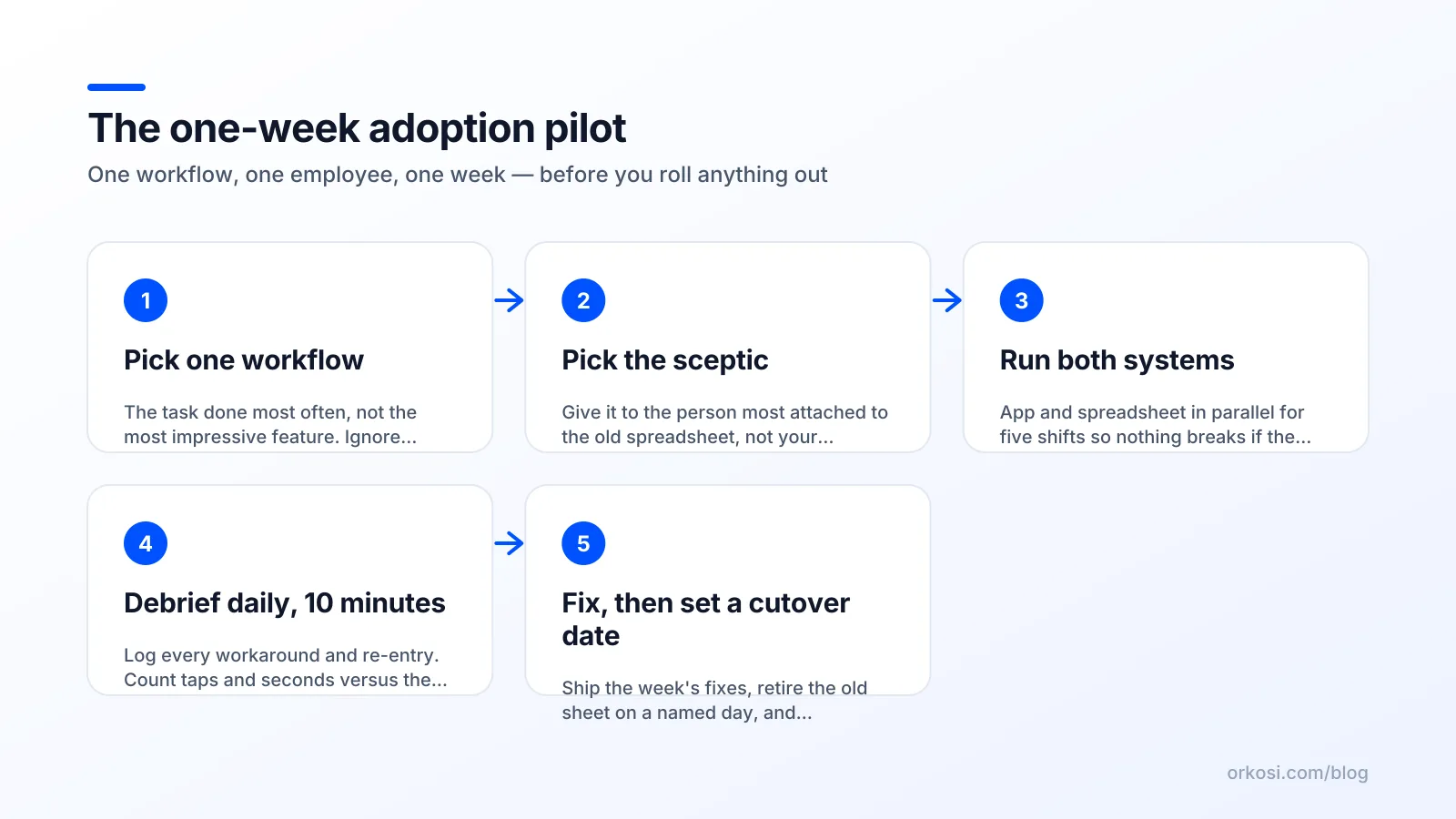
The structure:
- One workflow. Not the whole app. The single most frequent task, usually the one done twenty times a day.
- One user. A real member of staff doing real work, not you demonstrating it.
- One week. Long enough to include a bad day.
- Both systems running. They keep the spreadsheet or the paper, so a failure costs nothing.
- Ten minutes at the end of each shift. What was annoying, what did you skip, what did you do on paper anyway.
Small samples work. The Nielsen Norman Group's finding that you only need to test with five users to surface most usability problems applies even more strongly inside a small business, where the whole user base might be five people. The GOV.UK Service Manual's user research guidance adds the related point: watch real users doing real tasks, before and after launch, rather than asking them what they think.
Pick the sceptic, not the champion
Give the pilot to the person most likely to hate it. Champions work around flaws out of goodwill and tell you it is great; you learn nothing, then roll out a broken app to people with no goodwill at all.
The sceptic has usually been doing the job longest and knows the edge cases: the customer who pays in cash, the job cancelled halfway, the order that arrives in two deliveries. If the app survives that person's week, small business app adoption across the rest of the team is largely a formality.
What to watch, what to ignore
Watch what they do, not what they say. Count the records created in the app versus outside it. Note every moment of hesitation and every time they pick up the phone to ask a question.
Ignore colour preferences, logo placement and requests for a dashboard. Those are real, but they are not why people abandon tools. Hesitation and workarounds are.
Then make the old path harder — carefully
Parallel running past the pilot guarantees failure. If the spreadsheet still works, under pressure people use the spreadsheet, and the app never accumulates enough data to become useful — which proves the sceptics right.
Cutover beats coexistence
Pick a date. Announce it two weeks out. On that date, the old sheet becomes read-only or moves to an archive folder, and the app is the only way to record the thing.
This is change management, not software. The ADKAR model breaks adoption into awareness, desire, knowledge, ability and reinforcement. The useful insight for a small business is that knowledge — training — is only one of five, and rarely the binding constraint. People generally know how to use the app. They need a reason, a capability on the worst day, and reinforcement afterwards.
When keeping the spreadsheet is the right call
Forcing cutover on an app that cannot do the job destroys trust permanently, and you get one shot. Wait if any of these are true:
- The app cannot handle a known edge case that occurs weekly or more.
- Connectivity in the work environment is unreliable and the app has no offline handling.
- Historical data has not been imported, so staff would need both systems to answer a customer question.
- The person who owns changes is on holiday for the cutover fortnight.
A delayed cutover costs you a month. A failed cutover costs you the project. When you decide to wait, say so publicly and give a new date, because silence reads as abandonment.
Build these five things or adoption decays
Adoption is mostly a build decision made before anyone trains anyone. For a first iteration of custom software for small business, these five items do more for usage than any feature on the original wish list.
Import, not retyping
If launch day requires someone to retype 300 customers, launch day will not happen. CSV import of existing customers, products, sites and open jobs is the difference between a tool that answers questions and one that cannot.
Roles and permissions
Staff behave differently when they can see everyone's pay rate or delete a year of records by accident. Two or three roles — owner, manager, staff — prevent both the anxiety and the accident.
An audit trail and an undo
People hesitate when they fear being blamed. A visible record of who changed what, plus the ability to reverse a mistake, converts hesitation into speed. This is Nielsen's error prevention and user control in practical form.
Mobile-first screens
If the core task happens away from a desk, the phone layout is the product and the desktop view is the report. Build in that order. Orkosi's app templates cover both web apps and native mobile builds, which helps when you are not yet sure which one the work needs.
A way to ask for changes
This is the one that converts complainers into users. A visible channel for change requests, with a turnaround measured in days, tells staff the thing is alive and that their field-level frustrations are worth reporting. The first time a nurse says "this dropdown is missing an option" and it appears the next morning, the relationship with the tool changes. No training session achieves that.
Instrument it, or you're guessing
You cannot manage adoption you cannot see. Owners routinely believe a tool is being used because nobody has complained, when in fact two of seven people have logged in this month.
Three numbers worth tracking
| Metric | What it tells you | Healthy signal |
|---|---|---|
| Share of records created in the app vs outside it | Whether the app is the system of record | Rising toward 95%+ after cutover |
| Weekly active users ÷ headcount who should use it | Whether adoption is broad or carried by one person | Stable at or near 100% of expected users |
| Median time to complete the core task | Whether the app is actually faster than the old way | Flat or falling, under your pre-build benchmark |
Any product analytics tool with event tracking gives you the second and third; PostHog's product analytics docs are a reasonable starting point for defining events and funnels for an internal tool. The first number comes from comparing record counts against the shadow process, which you find by asking, not by querying.
Weekly task loop instead of a rebuild
The traditional response to low adoption is a rebuild in twelve months. The better response is ten small changes in six weeks: remove a field, widen a button, add a default, fix the one dropdown that is wrong.
This is where agent-based platforms change the calculus. On Orkosi you file tasks and agents implement and redeploy them, which makes a Tuesday change in response to Monday's feedback economically sane. Credit-based plans mean iteration has a visible cost per change rather than a renegotiated contract; see Orkosi pricing for how plans and credits work, and the docs for how the task loop runs in practice.
Where AI agents help — and where they can't
Cheap iteration changes the economics
Agents compress the build-and-change cycle from weeks to hours. That matters less because it is cheaper and more because it changes what feedback is worth collecting. When a screen takes a day to change, you batch complaints and defer them; when it takes an hour, you can redesign a form after a single shift of observation.
Platforms like Orkosi also take the infrastructure question off the table by handling code, AWS hosting and deployment, which for a 10-person business is often the real blocker. Lovable, Replit and conventional dev shops solve overlapping parts of this. You can see what Orkosi includes and judge the overlap honestly.
Judgement, training and politics stay yours
No agent will run the kickoff meeting, decide which spreadsheet dies, or tell the supervisor whose job description changes. No agent knows that your longest-serving employee will decide, informally, whether the team uses this thing.
The decisions that determine adoption are: which workflow to start with, who pilots it, when to cut over, what to do when someone refuses, and whether to wait. Those are management decisions, and they are the ones most likely to be skipped because the software side now moves so fast. Treat the build as the easy half.
FAQ
How long should staff training take for a custom app?
If the core workflow needs more than 15 minutes of training, the app is too complicated. Expect a 10-minute walkthrough at a shift handover plus a one-page reference card, then answer questions in situ for the first week. Long training sessions are a symptom, not a solution: they usually mean too many fields, unclear labels or a workflow that does not match how the job is actually done.
What if one employee refuses to use the new app?
First assume the refusal is information. Sit with them for one shift and watch the task; in most cases they have hit a genuine edge case, a speed problem or a trust issue the app does not handle. If the tool genuinely works and the refusal persists after a fixed deadline, it becomes a performance conversation like any other process requirement, handled privately. Do not let one holdout keep the old spreadsheet alive, because that quietly reopens the exit for everyone.
Should I build a mobile app or a mobile-friendly web app?
Start with a mobile-friendly web app unless you need camera, offline storage, push notifications or background location. Web apps deploy instantly, need no app store review, and update for everyone at once, which matters when you are iterating weekly. Move to a native mobile build when a specific device capability or offline reliability becomes the blocker, not before. Orkosi supports both as separate templates, so this is a sequencing decision rather than a permanent one.
How do I know when the pilot has passed?
The pilot passes when your sceptic completes the core task entirely in the app for three consecutive days without falling back to paper or messages, and reports no blocking issues in the daily debrief. Time per task should be at or below the old process. Open cosmetic requests are fine; open workflow gaps are not. If the pilot user still asks "can I just do this one on the sheet?", you are not ready to cut over.
Pick one workflow, build it, and hand it to your most sceptical employee for a week. You can start free on Orkosi and see what the plans cost before you commit to anything beyond that first pilot.