Launch a SaaS Product Checklist: Do It In This Order
Orkosi Team · · 11 min read

Most launch failures are not failures of effort. They are failures of order. A launch a SaaS product checklist that looks complete on paper still costs you weeks if you do branding before the data model, run ads before email authentication, or publish a marketing site before auth exists. Every item on the list is valid. Only one sequence lets you do each item once.
Define launch precisely before you plan it: a stranger can find your product, sign up, pay, and get value without you in the loop. Anything that doesn't move that sentence closer to true is not a launch task. It's a nice-to-have wearing a launch costume.

A checklist is not a list, it's a dependency graph
Checklists imply independence. Aviation checklists work because each item can be verified in isolation: flaps set, fuel on, doors closed. A SaaS launch is not like that. Choosing a multi-tenant data model changes the shape of every table. Changing your domain invalidates every indexed URL, every OAuth callback, every webhook endpoint, and every TLS certificate.
So treat the list as a graph with edges. Some tasks are cheap to redo (a headline, a button colour). Some are expensive to redo and touch everything downstream (tenancy, pricing model, domain, sending identity). The rule is simple: do the expensive-to-redo, widely-depended-on work first, even when it feels less like progress than shipping a landing page.
The founder pain here is not laziness. The cheap, visible work is more satisfying, and nobody tells you that a logo chosen in week one is fine while a domain chosen in week six is a migration project.
The order that actually works: six gates for your launch a SaaS product checklist
Six gates, each with one exit criterion you can test. Do not open gate N+1 until gate N passes. If you are tempted to skip ahead, the skip is almost always into gate 6, because gate 6 is the fun one.
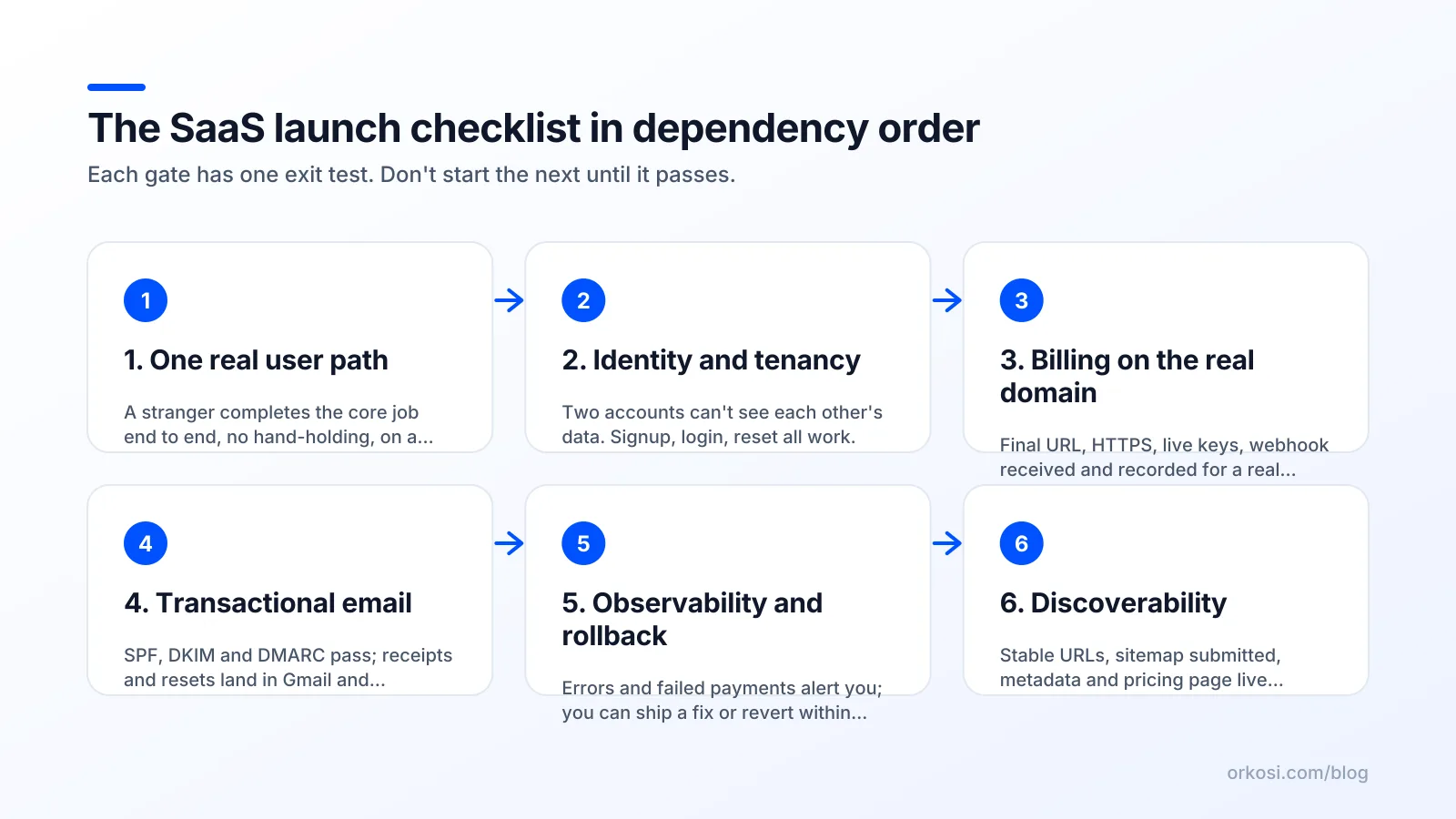
| Gate | Focus | Exit criterion |
|---|---|---|
| 1 | One real user path | A user who isn't you completes the core job once |
| 2 | Identity and tenancy | Two accounts cannot see each other's data |
| 3 | Billing on a real domain | A live card charges, webhook arrives, access changes |
| 4 | Transactional email | Signup and receipt emails reach Gmail and Outlook inboxes |
| 5 | Observability and rollback | You can detect an error and ship a fix in under an hour |
| 6 | Discoverability and copy | Canonical URLs stable, sitemap submitted, pricing page live |
Gate 1: one real user path end to end
Build the single path that delivers the value you will charge for, with nothing around it. No settings page, no team management, no onboarding tour. Fake what you can: CSV upload instead of integrations, one hardcoded template instead of a gallery.
This comes first because everything downstream is shaped by it — billing granularity, tenancy, and email triggers all depend on what the product actually does. Exit criterion: someone outside your company completes the core job start to finish and can describe what they got.
Gate 2: identity and tenancy
Now add auth, accounts, and the tenancy model: does a user belong to one workspace, many, or none? Is data scoped by user ID or organisation ID? This decision propagates into every table, query and permission check.
Retrofitting organisations onto a user-scoped schema after launch is the most common rewrite I see, and it usually arrives disguised as a feature request: "can my colleague see this too?" Exit criterion: create two accounts, put data in each, and confirm neither can read, update, or enumerate the other's records by ID.
Gate 3: billing on a real domain
Billing comes third, with the final domain attached. The reason is mechanical: payment providers separate test and live environments, with distinct API keys and webhook endpoints, and live webhooks must point at a stable HTTPS URL (Stripe's testing docs cover test cards, simulated failures, and the test/live separation). Point a live webhook at a preview deployment URL and it will 404 the moment that deployment is replaced.
HTTPS on your real domain is a prerequisite, not a polish step. DNS-validated certificates need the domain settled first (AWS Certificate Manager uses DNS validation, which means control of the zone), and auth callbacks and webhook URLs are baked into provider dashboards. Exit criterion: a real card on the live domain produces a charge, a received webhook, and an upgraded account, verified in logs.
Gate 4: transactional email and deliverability
A SaaS product without reliable email is one where nobody can confirm an address, reset a password, or prove they paid. Deliverability is infrastructure, and it depends on the DNS zone you just settled: SPF, DKIM and DMARC records on your sending domain. Google's email sender guidelines spell out the authentication requirements, and bulk senders without them get filtered.
Sending reputation also needs time. A domain that has sent nine emails and then sends four hundred on launch day looks exactly like a spam cannon. Start sending low volume a week or two early. Exit criterion: signup confirmation and payment receipt both land in the inbox (not spam) on a fresh Gmail account and a fresh Outlook account.
Gate 5: observability and rollback
Before any traffic, you need to know when something breaks and be able to undo it. Minimum viable: error tracking with alerts somewhere you actually look, searchable request logs, uptime checks on the signup and checkout routes, and a deploy process with a one-command rollback.
This precedes marketing because marketing converts unknown bugs into lost customers at scale. Exit criterion: deliberately break a route in staging, confirm you get alerted within five minutes, and roll back.
Gate 6: discoverability and launch copy
Now, and only now, do the marketing site, pricing page, metadata, sitemap and launch posts. Search indexing attaches value to specific URLs, so the URL structure has to be final first. Google's guidance on building and submitting a sitemap assumes you are listing canonical URLs you intend to keep.
Exit criterion: every page has a title, description and canonical URL; the sitemap is submitted; the pricing page matches what billing actually charges.
Why the order is non-obvious: four expensive inversions
Pricing page before pricing model
Writing the pricing page first feels productive because it forces clarity. It also quietly commits you to metering you haven't built. Publish "$29 per seat" before deciding that tenancy is user-scoped and you have promised a seat concept that doesn't exist in the schema.
Rework cost: a tenancy migration plus a billing rebuild, typically one to three weeks, plus whatever you have to tell early customers about their changed plan.
Custom domain after SEO setup
Launching on a default platform hostname, publishing content, getting a few links, then moving to your real domain means every indexed URL changes. Redirects preserve some of it. They do not preserve all of it, and they add a permanent layer of 301 chains you will be debugging a year later.
Rework cost: weeks of lost ranking plus certificate, callback and webhook reconfiguration across every third-party dashboard.
Ads before deliverability
The expensive version: a launch day sends 1,400 visitors, 190 sign up, and the confirmation email has no DKIM signature on a two-day-old domain. Gmail junks most of them. You get 23 activated users out of 190 and conclude the product has a positioning problem.
Rework cost: the entire launch. You cannot re-run a launch day, and you cannot tell afterwards which half was the product and which half was the spam folder.
Brand kit before the core flow
Brand work is the most reversible item on the list and the one founders start with, because it's visible and feels like identity. A logo, palette and voice applied to a flow that later changes shape has to be reapplied. Worse, three weeks on brand is three weeks not spent discovering that the core job takes eleven clicks.
Rework cost: usually low in money, high in opportunity. Do brand in parallel with gate 5 or 6, never before gate 2.
What AI agents reorder for you, and what they won't
Agents are genuinely good at the mechanical middle of this sequence: scaffolding auth with sessions and password reset, wiring a payment provider including webhook handlers and plan gating, provisioning hosting and DNS, requesting certificates, generating sitemaps and metadata, writing transactional email templates. It is well-specified, heavily documented work with clear correctness tests. Orkosi runs this model, with agents building and deploying on AWS and then iterating through tasks, so gates 1 to 5 compress from months into days.
What agents will not do, and you should be suspicious of any platform claiming otherwise:
- Decide your pricing. Agents can implement $29 per seat or usage-based metering. They cannot tell you which one your buyers will accept.
- Choose your tenancy model. This is a product decision about who shares what, dressed as a schema decision.
- Warm a sending domain. Reputation is earned over calendar time by real recipients engaging. No amount of compute shortens it.
- Tell you the product is worth paying for. Only strangers with cards do that.
The honest trade-off: delegating gates 1 to 5 means you will understand parts of your own stack less deeply than if you had typed every line. That matters more for regulated data or unusual performance needs than for most products. The compensating benefit is that your scarce hours move to deciding what to build and what to charge, and to gate 6, selling it. The app templates cover SaaS, store, site, mobile and desktop, and the features overview shows what ships with each. Credit consumption varies with how much iteration you do, so check current plans and credits rather than budgeting from a guess.
The pre-launch smoke test: 30 minutes, incognito window
The highest-return half hour before any announcement. Fresh browser profile, a new email address you have never used with your product, and a real card. Do not substitute test mode: test mode validates your code, this validates your configuration.
- Open the marketing page in incognito. Note the load time.
- Sign up with the new address. Confirm the verification email arrives in the inbox, not spam.
- Complete the core job. Time it.
- Upgrade with a real card. Charge yourself, then refund it afterwards.
- Check the webhook fired and the account's plan actually changed in your database, not just in the provider dashboard.
- Confirm the receipt and welcome email arrive, and open them in both Gmail and Outlook.
- Log out. Reset the password. Log back in.
- Invite a teammate from a second address. Accept the invite.
- Create a second, unrelated account. Try to access the first account's records by URL and by API with the ID.
- Cancel the subscription. Confirm access downgrades on the right date, not immediately or never.
- Load the marketing page on a throttled 4G connection, on a phone.
Write down what broke. Two to four of these typically fail on a first run, and the failures cluster at the configuration seams: webhook URLs, email records, and cancellation handling. The Orkosi docs and your provider's dashboards are where you verify, but the signal you want is the behaviour, not the config screen.
Launch day itself: three numbers and one switch
Launch day is an operations shift, not a marketing event. The marketing happened when you wrote the copy. Today you watch three numbers and stay ready to act.
Signup-to-activation rate. What fraction of signups complete the core job? If it drops below roughly half of what your smoke test suggested, something is broken, not unpopular.
Failed payments and webhook errors. Any webhook 4xx or 5xx is a customer who paid and did not get access. Treat each one as a page, not a log line.
p95 page load. Watch the 95th percentile, not the average, and anchor it to Core Web Vitals thresholds: Largest Contentful Paint under 2.5 seconds for a good experience. Slow pages cost conversion on the day and search visibility afterwards.
The one switch: a tested way to roll back or ship a fix within the hour. If your deploy takes 40 minutes and has never been rolled back, you do not have this. With an agent workflow, the equivalent is a task queue you can push a hotfix into and a deployment you can revert.

Week one to week four: the checklist most founders never write
Week 1: first churn conversation. Someone will cancel within days. Email them personally and ask one question: what did you expect that you didn't get? This is the highest-density product information you will ever receive.
Week 1: first payment dispute or failed renewal. Decide your policy now, while the stakes are one customer, not forty. Who gets a refund, how fast, and does access end immediately?
Week 2: first support request that is actually a feature. Log it. Do not build it yet. Wait for the third occurrence before it earns a task.
Week 2 or 3: cost review against real traffic. Pre-launch estimates are always wrong, usually because of data transfer, logs, or something left running. Look at actual spend per active user and decide whether your price covers it.
Weeks 1 to 4: a weekly task cadence. One fix, one conversion improvement, one piece of content per week. With agents, this is literally a task queue: file three tasks on Monday, review the diffs and deployments as they land. The discipline is in refusing to file ten.
FAQ
What should be on a launch a SaaS product checklist at minimum?
Six things, in order: a working core user path, auth with proven data isolation between accounts, live billing on your final domain with verified webhooks, authenticated transactional email reaching real inboxes, error alerting plus a tested rollback, and stable URLs with a submitted sitemap and an accurate pricing page. Everything else is optional at launch.
How long does a SaaS launch checklist take with AI agents?
The mechanical gates (auth, billing, hosting, DNS, email templates, metadata) compress from weeks to days, because they are well-specified work. Two constraints do not compress: deciding your pricing and tenancy model, and warming a sending domain's reputation. Plan for days of building and one to two weeks of email warm-up running in parallel.
Do I need a custom domain before launch?
Yes, and earlier than most founders expect: before billing, not after. Webhook endpoints, OAuth callbacks, TLS certificate validation and indexed URLs all bind to a specific hostname. Changing it later means reconfiguring every third-party integration and redirecting every indexed page. A domain costs around ten dollars a year; moving one costs weeks.
Should I launch without a pricing page?
Only if you are running a design-partner phase with hand-negotiated deals. For self-serve, a missing pricing page shifts qualification work onto sales calls you do not have time for. Publish a page that matches exactly what your billing system charges, including the trial terms, and change it when you learn something.
Pick a template, describe the product, and let agents work through gates 1 to 5 while you handle the deciding and the selling: start free and see how far one evening gets you. Credits and plan details are on the pricing page.