Custom App for Small Business: Start With the Spreadsheet
Orkosi Team · · 11 min read

The best first custom app for small business is almost never the one you dream up on a blank page. It is the spreadsheet you already run the business on, rebuilt as software. That sheet has something no brief can fake: daily usage, settled columns, a workflow people have already argued about and agreed on, and a known cost when it breaks. Converting it is a translation job, not an invention job, which is exactly why it tends to succeed.

The spreadsheet is the spec, and the only demand proof you need
Why a blank-page app brief fails
"Imagine the perfect system for your business" produces a wishlist, and wishlists produce software nobody opens. The brief grows a dashboard, a customer portal, notifications, an AI assistant, and a mobile version, none of which anyone has asked for in practice. Three weeks after launch the team is still updating the sheet, because the sheet is where the work actually lives.
The failure is not technical. It is that the brief describes a future workflow instead of the current one, so every field is a guess and every guess needs a decision from you mid-build.
What a live spreadsheet already proves
A sheet that three people touch every morning has already answered the questions that normally stall a build. Which fields matter, in what order, with what names people actually say out loud. Which statuses exist. Who needs to see what. What the exceptions are, visible in the ugly manual overrides at the bottom.
It also proves demand, which is the rarer thing. Nobody maintains a tedious tracker for eight months unless the information in it has value. When you turn a spreadsheet into an app, you inherit that proof. Adoption stops being a marketing problem and becomes a migration problem, which is far easier to solve.
Five symptoms that mean your sheet has become a liability
Two people editing the same row
A stock-count sheet where the warehouse adjusts quantities while the office takes orders against them is a race condition with a human cost. Google Sheets handles concurrent editing gracefully at the cell level and terribly at the business level: both edits land, neither is wrong, and the number is now fiction. Shared Excel files on a network drive are worse, producing "Copy of Copy of Stock FINAL v3".
Copy-paste as a business process
If completing a job means copying a row from "Scheduled" to "Completed", then pasting the client name into an invoice template, you have a process that is one distraction away from an error. Every manual transfer is a place where data diverges.
Formulas only one person understands
Nested INDEX/MATCH wrapped in IFERROR, referencing a hidden tab, written by the office manager who left in March. This is the single most common reason small businesses finally commission an internal tool: the logic is real and valuable, and exactly one person could explain it.
Sharing means sharing everything
Spreadsheet permissions are per-file, or per-tab if you are disciplined. If a subcontractor needs to see their own jobs, your options are to share the whole sheet, maintain a separate copy for them, or say no. Most businesses say no, and the sheet becomes a bottleneck routed through one inbox.
Nobody knows who changed what
Version history exists, but reconstructing "who changed this price on the 14th and why" from it during a customer dispute is an archaeology project.
The hard ceiling exists too, it is just further away than people think. A Google Sheets file caps at 10 million cells or 18,278 columns, and an Excel worksheet at 1,048,576 rows by 16,384 columns. Almost no small business hits those. What they hit is the people ceiling: the sheet gets slow and fragile at a few tens of thousands of rows with heavy formulas, and unusable the moment a fourth person needs write access. The Google Sheets limitations business owners actually feel are concurrency, permissions and auditability, not cell counts.
How to read a spreadsheet as a data model
This is the part you should do yourself, on paper, before any code is written. A data model is just a list of the things your business tracks and the facts you record about each one.
| In the spreadsheet | In the app | Why |
|---|---|---|
| A tab | A table (entity) | Each tab is usually one kind of thing: jobs, clients, staff |
| A column | A field with a type | Types prevent "12/01" meaning two different dates |
| A repeated text column (client name typed on 40 rows) | A relationship to another table | Stops "Acme Ltd" and "ACME ltd" becoming two customers |
VLOOKUP / XLOOKUP to another tab |
A foreign key | The lookup becomes a permanent link, not a formula that breaks on sort |
| Conditional formatting (green = done, red = overdue) | A status field with fixed options | Colour is not data; a status enum is queryable |
| A named filter view or saved filter | A screen in the app | "Today's jobs" and "Unpaid invoices" are already your navigation |
| The notes column everyone abuses | One or two real fields plus a comment thread | Mine it for the fields you forgot to design |
| A hidden calculations tab | Business logic on the server | Formulas become rules, written once |
Worked example: a contractor's jobs sheet
A plumbing firm runs one file with four tabs: Jobs, Clients, Lads (their word for the engineers), and Rates. The Jobs tab has columns for date, client name, address, description, assigned engineer, parts cost, hours, status colour, and a Total column with a formula pulling an hourly rate from Rates.
Read as a model, that is six entities: Client, Site (because large clients have several addresses), Job, Engineer, Rate, and JobLine for parts and labour. Status becomes an enum: quoted, scheduled, in_progress, awaiting_parts, complete, invoiced. The Total formula becomes a server-side calculation. The three saved filters, "This week", "Awaiting parts" and "Not invoiced", become the three screens the office actually needs.
That paragraph is a usable spec. It took twenty minutes and no engineer.
The conversion sequence: five steps, roughly a week
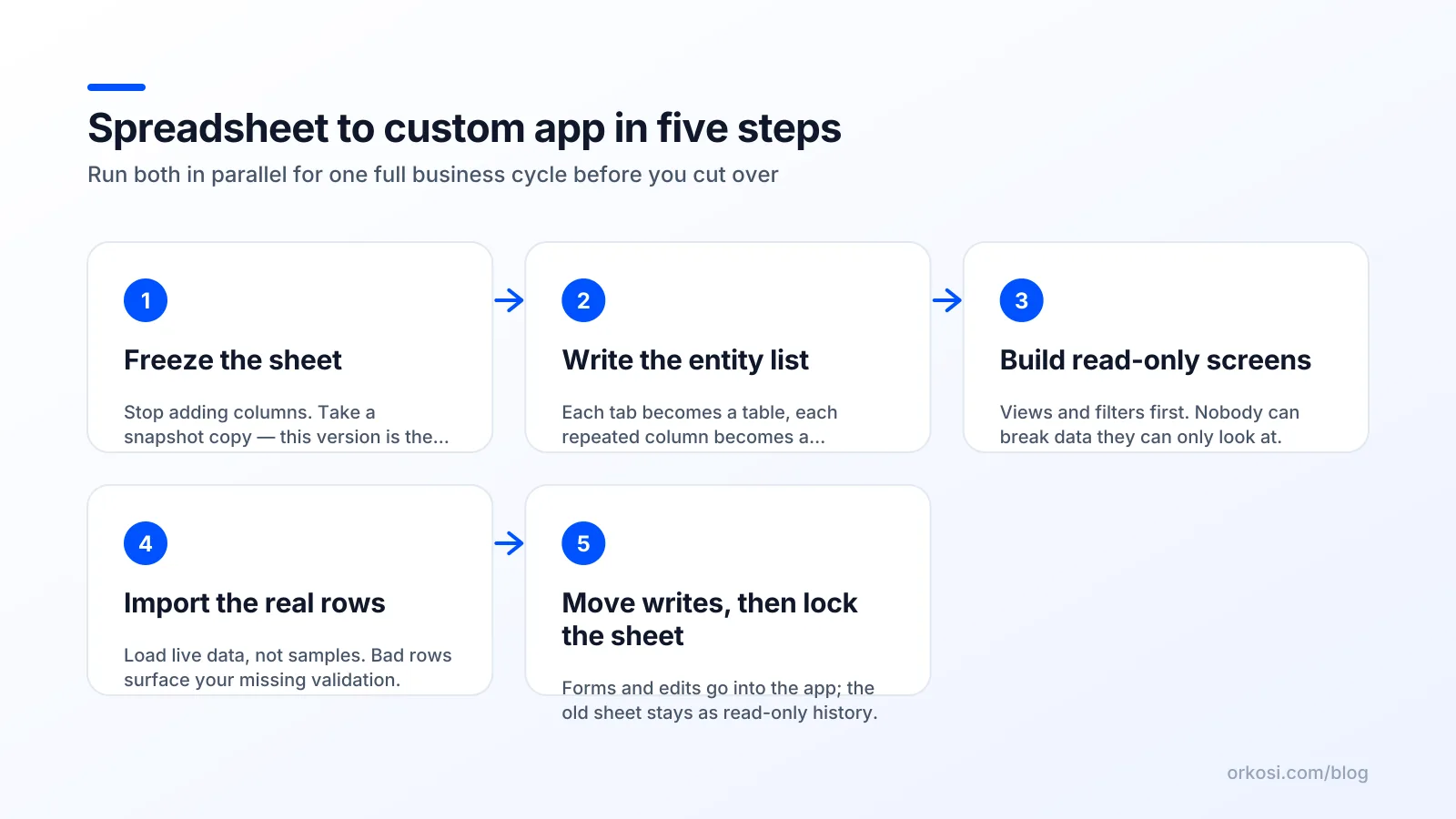
- Freeze the shape of the sheet. Not the data, the structure. Stop adding columns for one week. If you cannot manage that, the workflow is still in flux and you are not ready to convert it.
- Write the entity list. Tabs to tables, lookups to relationships, colours to statuses, filters to screens. One page. This is the spec, and it is your job, whether a developer or an AI agent builds from it.
- Build read-only first. Import the data and render the three or four views people check daily. No editing. This catches modelling errors cheaply, because nobody loses work when a read-only screen is wrong.
- Import real data, not sample data. Your messy real rows will expose every type assumption: blank dates, "TBC" in a number column, two clients with the same name. Fix the model, re-import, repeat.
- Switch writes over, one screen at a time. Start with the screen that causes the most conflicts, usually the one two people edit simultaneously.
Run the app and the sheet in parallel for exactly one full business cycle: a week for scheduling, a month for invoicing, one delivery round or one pay run. Double entry is annoying for five days and it is the cheapest insurance available.
The cut-over rule: the sheet becomes read-only, not deleted. Keep it visible, keep it accessible, and do not let anyone edit it. Deleting it triggers a panic that sends people back to a copy in their downloads folder.
Three things your spreadsheet never had, and your app must
A conversion that only reproduces the sheet is a downgrade. You will have swapped a flexible tool everyone knows for a rigid tool nobody knows, and gained nothing. The justification for building an internal tool for small business use is the three capabilities a spreadsheet structurally cannot provide.
Real permissions, not link sharing
Each user sees and edits only what their role allows, enforced on the server. Broken access control is the number one category in the OWASP Top 10, and the most common form in small internal apps is a page that hides a button in the interface while the underlying endpoint still accepts the request. Get roles defined before the build, not after: subcontractor sees own jobs, office sees everything, apprentice sees schedule but not rates. Trade-off: every additional role multiplies the screens that need testing.
Validation at the database, not the cell
Data validation in a spreadsheet is a suggestion. In a real app, constraints live in the schema, where nothing can bypass them. PostgreSQL offers not-null, unique, check and foreign-key constraints precisely so that "a job must have a client that exists" and "hours must be positive" are facts about your data rather than hopes about your forms. Trade-off: strict constraints will reject some of your historical rows, and you will spend an afternoon deciding what to do with them.
An audit trail
Append-only history: who changed which field, from what, to what, and when. It pays for itself the first time a client disputes a price or an engineer swears the job was marked complete. Trade-off: it adds a table, a write path, and a screen, so expect it to add real build time rather than being free.
If you replace Excel with a web app and skip all three, keep the spreadsheet.
When you should keep the spreadsheet (the honest counter-case)

Keep the sheet when the sheet is the right tool:
- Ad-hoc analysis. Pivot tables, what-if columns, pasting a CSV from the bank to see where the money went. Spreadsheets are superb at this and apps are terrible at it.
- One-off financial modelling. A pricing model you build once for a decision is not a workflow. Do not harden it.
- Fewer than two regular users. One person with a system they understand does not need software. The concurrency and permission arguments evaporate.
- Sheets that change shape weekly. If you add a column most weeks, the workflow is still being designed. Keep designing it in the cheap medium.
- Anything off-the-shelf already does well. Payroll, bookkeeping, email marketing, basic appointment booking. Buy it.
There is a middle route: Airtable-style databases give you types, relationships, views and per-user permissions without a build. The trade-off is per-seat pricing, roughly $20 per user per month on Airtable's Team tier at the time of writing (current pricing), which is excellent for four users and uncomfortable for twenty, plus limits on logic that eventually push you back out.
Rule of thumb: convert workflows, not analyses. The taped-up, coffee-stained schedule by the till is the candidate. The margin model in your downloads folder is not.
What a custom app for small business actually costs with AI agents
Split the cost honestly. The specification work is yours and it is not optional: the entity list, the statuses, the roles, the decisions about messy historical rows. Budget half a day of real thinking. The build is now cheap in a way it was not three years ago.
The loop when you build an app with AI agents looks like this. You describe the sheet and its rules in plain language, including the formulas and who may see what. Agents write the code and deploy it, on AWS in Orkosi's case, and you get a working URL. Then every change is a task: "add an awaiting-parts status", "let engineers upload a photo", "email the client when a job is invoiced". The app templates give you a starting point, with SaaS / Web App being the usual fit for an internal tool.
Orkosi starts with a free trial, and Starter is $20 per month; the current credit allowances and what a typical task consumes are on the pricing page rather than here, because those are the numbers worth checking yourself. The important budgeting point: the first build is not the real line item. Ongoing iteration is. A converted spreadsheet generates change requests for months, because now that the data is structured, people want reports, notifications and a view for the person who was previously emailed a screenshot. Plan for a steady monthly spend on changes, not a one-off project fee.
Honest trade-offs: an agent-built app is yours to maintain conceptually even if you never read the code, you still need to make the hard modelling decisions, and a platform like Orkosi makes opinionated choices about hosting and stack that you inherit. Compared with hiring a developer for a four-week internal tool, the economics are hard to argue with. Compared with doing nothing, it only wins if the sheet is genuinely costing you. See the docs for how tasks and deployments work before committing.
FAQ
Can AI turn my Excel or Google Sheets file into a working app?
Yes, with one caveat: the file alone is not enough. AI agents can read your tabs, columns and formulas and generate a working database-backed app, but they cannot see the rules in your head, such as which statuses matter, who is allowed to change prices, or which columns are abandoned experiments. Write a one-page entity list first: tables, fields, statuses, relationships and roles. With that, a conversion is straightforward work for agents on a platform like Orkosi or for a developer.
How long does it take to replace a spreadsheet with a custom app?
For a single-sheet workflow with five to ten entities, expect a working read-only version in a day or two, writeable screens within a week, and a parallel-running period of one full business cycle after that. The build is rarely the slow part. The slow parts are cleaning historical data and deciding edge cases, like what to do with rows that lack a client or a date.
Should I use Airtable instead of building a custom app?
Use Airtable if you have under roughly six users, your logic is simple, and you value configuring over specifying. It is faster to start and needs no deployment. Build a custom app when per-seat costs grow, when you need logic the platform cannot express, when external users need restricted access, or when the tool must integrate deeply with your site, billing or customer-facing flows. Many businesses start on a database tool and convert later, which is a reasonable path.
What happens to my historical spreadsheet data?
Import what the app needs to function and archive the rest. Typically the last one to two years of operational records go into the database, cleaned to satisfy the new constraints, while older rows stay in the frozen read-only sheet. Keep that sheet accessible rather than deleted, since a disputed invoice from three years ago is easier to settle from the original file than from a migration log.
Pick the sheet people argue over most and write its entity list this week. Then start free and check the pricing page before you commit to a plan.