Cost of Running a SaaS on AWS: Plumbing, Not Compute
Orkosi Team · · 11 min read

The short answer: you're paying for pipes, not processors
For a small, low-traffic product, the cost of running a SaaS on AWS is dominated by networking, logging and managed-database baseline, not by compute. A container big enough to serve your first few hundred users costs single-digit dollars a month. A single NAT gateway costs roughly four times that before it moves a byte, and an Application Load Balancer bills by the hour whether anyone visits or not.
That produces a fixed cost floor: the amount you pay at zero traffic. Optimise the floor first, per-request cost second. Founders spend weekends shaving instance sizes while a forgotten staging environment, a "never expire" log group and a NAT gateway in every availability zone quietly set the real number.

Why compute is the cheapest thing you'll buy
A small app genuinely fits in a small container
Most pre-product-market-fit SaaS apps serve a handful of requests per second at peak. On EC2 on-demand pricing, a Graviton t4g.small in us-east-1 lists at $0.0168 per hour — about $12 a month running continuously. A t4g.micro is half that.
Fargate is similar. The smallest practical task, 0.25 vCPU and 0.5 GB of memory, works out to roughly $9 a month at list rates for 24/7 operation. That is your application server. All of it.
Serverless makes the compute line almost disappear
Lambda's always-free allowance covers 1 million requests and 400,000 GB-seconds per month, and beyond that it bills at $0.20 per million requests plus a fraction of a cent per GB-second. A product with 50,000 monthly requests and 200 ms execution times often lands at literally zero on the compute line.
That is not a trick. AWS is genuinely cheap at the processor. It is expensive at the perimeter.
Which is exactly why it stops being the thing to optimise
If your compute is $9 and your bill is $90, halving the instance saves $4.50 — an afternoon spent moving 5% of the bill, while the networking and observability line items you did not touch account for most of the rest.
This is the single most common mistake in reducing an AWS bill as a startup: optimising the item you understand best instead of the item that is largest.
The five line items that actually drain the budget
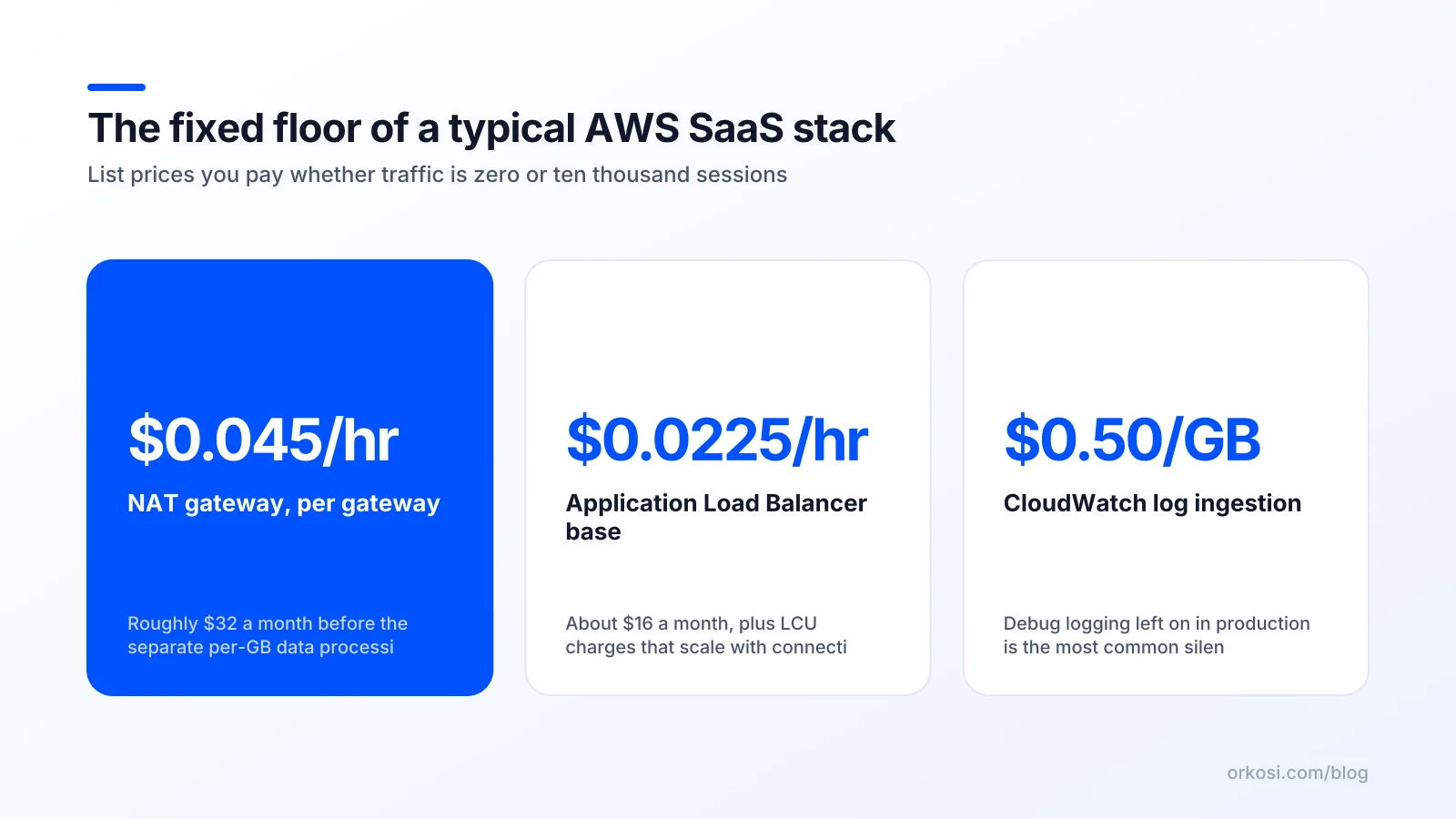
NAT gateway: an hourly charge plus a fee on every byte
A NAT (Network Address Translation) gateway lets resources in a private subnet reach the internet without being reachable from it. Per Amazon VPC pricing, it lists at $0.045 per hour in us-east-1 plus $0.045 per GB processed. The hourly charge alone is around $32 a month.
It becomes the largest line on many small bills for two reasons. Default reference architectures place one NAT gateway in each availability zone for resilience, so a two-AZ deployment starts at roughly $65 a month at idle. And every container image pull, package install and S3 request from a private subnet is metered per gigabyte on the way through.
The fix is usually not "remove NAT" but replacing the traffic that does not need it. Gateway VPC endpoints for S3 and DynamoDB cost nothing per hour, and interface endpoints list at $0.01 per AZ per hour plus $0.01 per GB, which beats NAT for anything chatty. For a single-container app with no compliance requirement for private subnets, running the task in a public subnet with a security group that allows no inbound traffic removes the charge entirely.
Load balancers: a base hourly rate before a single visitor arrives
An Application Load Balancer bills $0.0225 per hour in us-east-1, about $16 a month, plus Load Balancer Capacity Units for actual traffic. See Elastic Load Balancing pricing for current LCU dimensions.
At low volume you pay one LCU-hour minimum and effectively nothing for traffic, so treat the ALB as a flat $16 to $18 addition to your floor. The founder mistake is one load balancer per environment: production, staging and a demo instance means roughly $50 a month of load balancing for a product with eleven users. Host staging behind the same ALB on a different hostname, or do not give staging a load balancer at all.
CloudWatch logs: ingestion, storage and forgotten retention settings
CloudWatch pricing charges for log ingestion per GB (the Standard log class lists at $0.50 per GB in us-east-1), then storage per GB-month, then again for queries and custom metrics. It catches people out because it is invisible until it is not.
Two mistakes dominate. First, debug-level logging left on in production: one verbose request logger writing 2 KB per request at a million requests a month is 2 GB ingested, which is fine — but the same logger behind a health check firing every 10 seconds across three containers is a different number entirely. Second, retention set to "Never expire," the default for log groups created by hand, which means paying storage on logs from the product you pivoted away from last year.
Set retention to 7, 14 or 30 days on every log group. Keep a longer window only for the audit trail you actually need.
Data transfer out: cheap per gigabyte, expensive per careless design
Data transfer out to the internet includes 100 GB per month free per account, then prices at $0.09 per GB for the next tier in us-east-1. For a text-heavy SaaS that is almost nothing.
AWS data transfer costs become real in three situations: serving images or video directly from EC2 instead of through CloudFront, cross-AZ chatter between an application and its database measured per GB in both directions, and shipping logs or metrics to a third-party observability vendor over the public internet. A single misconfigured nightly backup job writing to an off-AWS bucket can out-earn your entire compute line.
Managed databases, snapshots and the environments you forgot to delete
An RDS db.t4g.micro PostgreSQL instance in single-AZ configuration runs in the low teens of dollars per month, plus storage per GB-month and backup storage beyond your allocated amount. Multi-AZ doubles the instance charge — often the right call for a product with paying customers and the wrong call for a prototype.
The expensive part is duplication. Staging with its own RDS instance, ALB and NAT gateway is not a cheap copy of production, it is a second production bill. So are the snapshots of databases you deleted, which keep billing until you delete them too.
My position: choose an architecture by its fixed floor, not its benchmark
Floor-first thinking for pre-revenue products
Before product-market fit, the correct architecture is the one whose idle cost is closest to zero, even when its performance ceiling is lower. You do not know your traffic shape yet. You do know you will spend 6 to 18 months at low volume, paying the floor every month.
A design that costs $8 at idle and falls over at 500 requests per second is a better bet than one that costs $140 at idle and handles 50,000. You can migrate when you have the traffic. You cannot un-spend the $132 a month.
Three shapes: one small VM, container + ALB, fully serverless
| Shape | Typical fixed floor | Scales to | Main risk |
|---|---|---|---|
| One small EC2 instance, app and Postgres on the box, Caddy or nginx for TLS | Lowest: instance plus EBS plus a hosted zone | Thousands of daily users with care | No redundancy, manual patching, you own backups |
| Container on Fargate or EC2 behind an ALB, managed RDS, private subnets with NAT or VPC endpoints | Highest of the three: ALB plus NAT plus RDS baseline | Comfortably into real traffic | NAT and ALB bill at idle; easy to over-provision environments |
| API Gateway or Lambda function URLs, Lambda, DynamoDB or Aurora Serverless | Near zero at idle | Very high, non-linearly | Cold starts, vendor-specific code, harder local testing |
The honest trade-offs of each
The single-VM route is the cheapest and the most fragile. If your SLA is "we try hard" and your customers are a few dozen businesses, it is defensible for longer than architecture blog posts admit — but it stops being defensible the moment you sell to enterprises asking for an uptime commitment.
Serverless has near-zero idle cost and real ergonomic costs: cold starts on a low-traffic endpoint can add hundreds of milliseconds, and the code you write is harder to move. Fully managed containers with multi-AZ RDS cost the most at idle and are the right answer once you have revenue, a compliance questionnaire, or a customer whose outage would cost you the account.
The pricier floor is worth it when downtime has a price tag. Until then it is insurance on an asset you have not built yet.
A worked example: one small SaaS, bill broken down
A realistic stack: one containerised web app, a managed Postgres database, an ALB for TLS and health checks, S3 for user uploads, CloudWatch for logs, Route 53 for DNS, ACM for certificates, and a staging environment.
| Line item | Metering | Fixed or usage | Share of a small bill |
|---|---|---|---|
| Fargate task, 0.25 vCPU / 0.5 GB | per vCPU-hour and GB-hour | Fixed while running | ~10% |
RDS db.t4g.micro, single-AZ, 20 GB gp3 |
per instance-hour plus per GB-month | Fixed | ~20% |
| Application Load Balancer | per ALB-hour plus LCU-hours | Fixed with small usage component | ~20% |
| NAT gateway (one AZ) | per hour plus per GB processed | Fixed with usage component | ~35% |
| CloudWatch logs | per GB ingested plus per GB stored | Usage, but drifts upward | ~8% |
| S3 storage and requests | per GB-month plus per 1,000 requests | Usage | ~2% |
| Data transfer out | free tier then per GB | Usage | ~1% |
| Route 53 hosted zone, ACM certificates | $0.50 per zone per month; ACM public certs free | Fixed | ~1% |
Notice the shape: around 85% of that bill is fixed or near-fixed, and the two largest items, NAT and the load balancer, do no application work at all. Replace NAT with VPC endpoints and a public subnet, drop staging to an on-demand environment you spin up when needed, and the floor falls by a third without touching a line of application code.
I am deliberately not quoting a single total, because region, storage, Multi-AZ and backup retention move it substantially. Check the VPC, ELB, CloudWatch and EC2 pricing pages for your region, or compare against bundled hosting on the Orkosi pricing page.
How to audit your AWS bill in an afternoon

Work in this order. It takes about three hours and you will find the problem in the first one.
- Turn on cost allocation tags. In Billing, activate the
Environment,Projectandaws:createdBytags. They only apply going forward, so do this before anything else. - Group Cost Explorer by service, then by usage type. Service tells you it is "EC2-Other." Usage type tells you it is
NatGateway-Hours. The Cost Explorer documentation covers the grouping and filtering controls. - Write down your top three usage types. Those three will usually be 60 to 80% of the bill. Everything else is noise until they are fixed.
- Set an AWS Budgets alert at your current spend plus 20%, delivered to email. This is the cheapest insurance you will ever buy.
- Apply the fixes in order of size. Replace NAT traffic with gateway and interface VPC endpoints, or move workloads that need no inbound access into public subnets with locked-down security groups. Set log retention on every group. Delete idle environments, orphaned snapshots, unattached EBS volumes and old load balancers. Right-size the database last, because it is the change most likely to hurt.
- Consider Savings Plans only once the shape is stable. Committing to a one-year plan on an architecture you will replace in three months is how you turn a saving into a loss.
The trade-off nobody prices: your hours versus the bill
A $40 per month saving is a bad trade if it costs you a weekend every month to maintain. At any reasonable valuation of founder time, you have paid several hundred dollars to save forty. The true cost of running a SaaS on AWS includes the person who keeps the pipes clean, and that person is usually the one who should be talking to customers.
This is the honest case for a managed route. Orkosi takes a different split: you describe the product, agents write the code, deploy it on AWS and keep iterating through tasks, with hosting bundled into the subscription rather than arriving as a separate bill you have to audit. Starter is $20 a month for 2,000 credits, where 1 credit is $0.01, and the full breakdown including Pro and Enterprise is on the pricing page.
Be clear about what you give up. A managed platform trades fine-grained control for predictability: you are not hand-tuning subnet layouts or choosing your own NAT strategy, and if your product needs an unusual network topology or a specific compliance posture, raw AWS plus an engineer who knows it is the right answer. What you get instead is a bill that does not surprise you. If that trade suits where you are, the app templates and docs show the shapes available, from SaaS web apps to online stores.
FAQ
What is the minimum realistic monthly AWS cost for a live SaaS?
With a single small instance, EBS storage, a Route 53 hosted zone and free ACM certificates, a production-ready SaaS can run in the region of $10 to $20 a month at list prices. Adding an Application Load Balancer and a NAT gateway, per ELB and VPC pricing, pushes the floor toward $50 to $70 before a managed database.
Is a NAT gateway really necessary for a small app?
Often not. A NAT gateway exists so private resources can make outbound internet connections, but at around $0.045 per hour plus $0.045 per GB, it is expensive for a single container. Gateway VPC endpoints for S3 and DynamoDB are free of hourly charges, and a public subnet with no inbound security group rules removes the need entirely for many workloads. Check VPC pricing.
Does the AWS free tier cover a production SaaS?
Partially, and only for the first year on most services. Some allowances are always free, notably Lambda's 1 million monthly requests and the first 100 GB of monthly data transfer out. But NAT gateway hours, load balancer hours and CloudWatch log ingestion above the free allowance all bill from day one, so plan for a real floor rather than zero.
At what point does AWS get cheaper than a managed platform?
Raw AWS usually wins on unit cost once traffic is substantial and the architecture has stopped changing, because you can commit to Savings Plans and amortise fixed costs across many users. Below that, the managed route often wins on total cost because it absorbs the engineering hours. Compare your current bill plus your time against the Orkosi plans.
Pick the architecture with the lowest idle cost you can live with, then audit the three largest usage types every quarter. If you would rather not run the audit at all, start free and compare the bundled hosting on pricing against the floor you are paying now.