Custom App for Small Business: Integrate, Don't Replace
Orkosi Team · · 12 min read

A custom app for small business earns its keep when it connects the tools you already pay for, not when it tries to replace them. The most expensive failure I see is not bad code. It is a well-built app that quietly becomes the twelfth place your customer list lives, maintained by an office manager with a second browser tab open. The argument here is a split: build the 10% that encodes how your business actually works, integrate the other 90%, and write the brief so that split is explicit from day one.

The failure mode nobody warns you about: the twelfth data island
A nine-van plumbing company commissions a job management app. It is genuinely good software: customer list, job calendar, invoice table, payments screen. Everyone is pleased at the demo.
Three months later the office manager is copying every completed job into QuickBooks by hand, because the accountant files VAT from there. Engineers still check Google Calendar on their phones, because that is where their personal appointments sit. Deposits are taken on a card terminal, so the app's payment status is permanently wrong.
The app did not fail technically. It failed because it claimed ownership of four records that already had owners.
What a data island looks like in practice
A data island is any record your new app stores and edits that also exists, separately edited, somewhere else. The symptom is a human being acting as the integration layer.
Look for the tells. Someone exports a CSV weekly. Two systems show different totals and staff know which one to "believe". A new customer has to be created twice before anything works. Each of those is a recurring cost measured in hours per week, forever.
Why staff quietly stop using it
Staff do not file a ticket saying "this app duplicates QuickBooks". They route around it. They update the system that pays them, settles accounts or shows up on their phone, and treat the custom app as a reporting screen they fill in on Friday afternoon.
Once an app becomes read-only in practice, its data decays, and decayed data kills trust faster than bugs do. The second-order effect is worse: the business concludes that custom software does not work, when what did not work was duplicating a system of record.
My position: build the 10% that is actually your business, integrate the other 90%
A system of record is the single place a given fact lives and is edited. If a customer's email address changes, there is exactly one screen where someone changes it, and everything else reads from there. When two systems both allow editing, you do not have two systems of record. You have a reconciliation problem with a nice interface.
For almost every small business, those systems already exist and were chosen years ago: Stripe or a card terminal for payments, QuickBooks or Xero for accounting, Google Workspace for email and calendar, Shopify for the catalogue. Your accountant, your bank and your staff all have habits built around them. A custom app should read from and write to those systems, not own them.
The honest counter-argument is that integrations add fragility. Tokens expire, webhooks arrive twice, vendors change APIs. That is true, and I deal with it properly below rather than pretending the choice is free. The short version: integrated apps have more moving parts, and non-integrated apps have more manual parts. Manual parts fail more often and cost more per failure.
What you should almost never build custom
Every layer in this list has a vendor with a dedicated compliance team, a published API and a decade of edge cases already handled. Rebuilding any of them is a maintenance line item you carry forever in exchange for zero differentiation.
Payments and subscriptions
Card data has regulatory exposure you do not want on your balance sheet. Dunning, failed-payment retries, refunds, proration, tax on digital goods and chargeback evidence are each their own small project. The Stripe API reference covers all of it, and your app's job is to hold a customer ID and a subscription ID, not a ledger of card transactions.
Accounting and tax records
Your accountant does not want a login to your app. Invoices, credit notes, chart of accounts and tax codes belong where the filing happens, and the QuickBooks Online Accounting API lets a custom app create invoices and payments directly in the incumbent system. Writing an invoice into QuickBooks is a few hundred lines of integration. Owning invoices yourself is a product.
Calendar, email and notifications
Staff already have a calendar on their phone, with their dentist appointment in it. Pushing jobs into it via the Google Calendar API means adoption is automatic. A separate in-app calendar is a second thing to check, which means it gets checked less, which means missed jobs.
Auth and identity
Use Google, Microsoft or a managed auth provider. Password reset flows, session handling, MFA and account lockout are solved problems with real security consequences when they are solved badly in-house.
Catalogue and checkout
If you already sell on Shopify, your products, variants, inventory and tax rules live there. The Shopify Admin API exposes them, with documented rate limits you design around. A custom app that maintains a parallel product list will drift from the storefront within a fortnight.
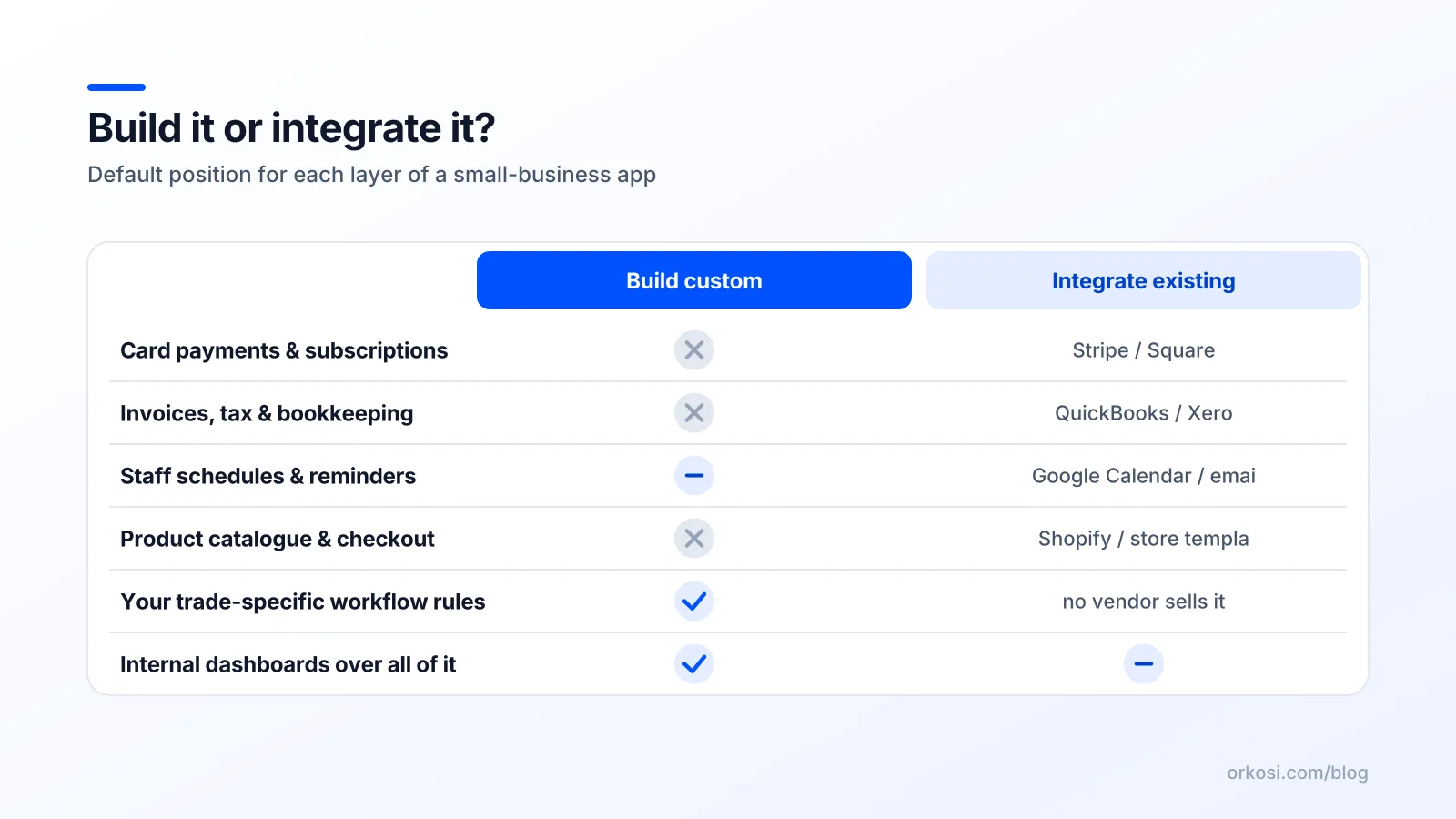
| Layer | Default | Why |
|---|---|---|
| Payments, subscriptions | Integrate (Stripe) | Compliance exposure, huge edge-case surface |
| Invoices, accounting | Integrate (QuickBooks, Xero) | Your accountant already works there |
| Calendar, scheduling display | Integrate (Google, Outlook) | Adoption is free when it is already on the phone |
| Auth and identity | Integrate (managed provider) | Security consequences, zero differentiation |
| Product catalogue, checkout | Integrate (Shopify) | Inventory drift is immediate and costly |
| Transactional email, SMS | Integrate (provider) | Deliverability is a specialism |
| Your core workflow | Build | No vendor encodes your rules |
| Your pricing or allocation logic | Build | This is the part competitors cannot copy |
What is actually worth building: the workflow nobody sells you
The build case is narrow and valuable. It is the operational logic that currently lives in a spreadsheet, a WhatsApp group and one person's head.
The three signals that a workflow is genuinely yours
First, you run it today in a spreadsheet plus a group chat, and someone owns that spreadsheet. Second, no vendor sells it, because it encodes a rule specific to your trade, geography or contracts. Third, getting it wrong costs money or trust: a double-booked asset, a missed aftercare call, a quote priced below cost.
If a workflow hits all three, build it. If it hits one, you are probably describing a feature of a product you could buy for less than a day of development.
Examples from real small businesses
A ceramics studio needs a kiln queue. Pieces have a clay body, a glaze temperature and a drying time, and a bisque firing cannot be mixed with a cone 10 reduction. No scheduling SaaS knows that. A queue that groups pieces by firing profile and gives members a realistic collection date is pure differentiation.
An equipment hire business needs a multi-day conflict checker: a scaffold tower out from Thursday to Monday blocks the weekend, with a half-day turnaround buffer for inspection. Generic booking tools model slots, not assets with maintenance windows.
A trades firm needs quote-to-job-sheet conversion with its own pricing rules: materials at trade plus a markup band, labour at different rates for weekend and emergency callouts, a survey fee waived above a certain job value. That logic is the business.
A clinic needs an aftercare sequence: day three check-in, day fourteen photo request, day thirty review prompt, skipped automatically if the patient has rebooked. Payments stay in Stripe, appointments stay in Google Calendar, and the sequence is the custom part.
Integration is not free: the trade-offs, stated honestly
Small business app integration introduces real failure modes. Naming them is how you budget for them.
Webhooks, retries and the duplicate-event problem
A webhook is a vendor calling your app to say something happened. Vendors retry when they do not get a clean response, so your app will sometimes receive the same event twice. Stripe's webhook documentation is explicit about this and about verifying signatures.
The fix is idempotency: store the event ID, and if you have already processed it, do nothing and return success. Without that, a retried invoice.paid event marks a job as paid twice and your reconciliation breaks silently.
Rate limits and sandbox vs live
Vendors cap how many API calls you can make per second. Shopify's limits mean a bulk product sync has to be paced and queued rather than fired in a loop. Build against a sandbox, then test the live switchover deliberately, because sandbox data is always tidier than reality.
OAuth tokens expire at the worst time
QuickBooks uses OAuth 2.0 with refresh tokens that themselves expire if unused. If nobody has synced an invoice for 100 days, the connection is dead and the first person to notice is the person running year-end. Build a connection health check and email the owner before expiry, not after.
Reconciliation: when two systems disagree
Four rules of thumb cover most of it. Treat the vendor as the source of truth for anything the vendor owns. Store the vendor ID on every local record so you can always re-match. Log every sync attempt with its outcome. Show a visible "last synced" timestamp in the UI, because staff trust data they can date.
A four-question test before you commission a custom app
Run this in ten minutes with whoever does the admin.
1. Who owns this record today and who edits it? If a named system and a named person already own it, integrate. If the answer is "a spreadsheet, and everyone", you have found a build candidate.
2. If this app disappeared on Friday, what breaks? If the answer is "we lose our scheduling logic", build it and back it up. If the answer is "we cannot take payments", you have put a system of record in the wrong place.
3. Does a vendor already sell 80% of this for under $50 a month? Then buy it and integrate. The 20% gap is usually cheaper to absorb as a process than to fund as software.
4. Can I describe the rule that makes my version different in one sentence? If yes, that sentence is your spec. If no, you are about to pay to rebuild a commodity.
Build vs integrate decisions get easier once you accept that the answer differs per entity, not per app.
How to write the spec so an AI agent builds the integrated version
Most briefs fail at the first paragraph. Compare these.
Before: "Build me a job management app for my plumbing business with customers, jobs, invoices and payments."
After: "Build me a job management app. Stripe is the system of record for payments; QuickBooks for invoices; Google Calendar for crew schedules. Jobs, crew availability and our quoting rules live in the app. Sync is one-way out to Calendar, two-way with Stripe via webhooks, and one-way out to QuickBooks when a job is marked complete. If a sync fails, show a banner on the job and queue a retry with backoff."
The second brief is roughly four times longer and removes about 80% of the rework.
Name the systems of record in the first paragraph
List every external tool and what it owns. Anything not on that list is owned by the app by default, and you should be able to justify each one.
Specify direction of sync per entity
Per entity, say one-way in, one-way out or two-way, and say which side wins on conflict. "Two-way" without a conflict rule is not a specification.

Describe the failure behaviour
Say what the user sees when the vendor is down, what gets retried and who gets emailed. On Orkosi you describe the product and agents write the code, deploy it on AWS and keep iterating through tasks, which makes it tempting to leave integration behaviour to a later bug report. Do not. Sync direction and failure handling are architecture, and architecture is cheapest to change in the brief. Browse what people have built for a sense of how detailed a working brief looks, and compare the approach with other builders before committing.
Staging the build so you can stop at any point
Sequence the work so every stage is independently useful and you can stop when the value curve flattens.
- Ship the unique workflow with manual export. The kiln queue, the conflict checker, the pricing rules. CSV export is a perfectly good integration layer for the first month, and it tells you whether people use the thing at all.
- Add read-only integration. Pull Stripe payment status and QuickBooks invoice numbers in so staff see vendor data in context. Low risk, because nothing is being written.
- Add write-back for the single most repeated action. Usually invoice or calendar event creation. One write path, idempotent, logged.
- Automate the rest only if usage justifies it. Most businesses stop at stage three and are right to.
Pacing matters financially. Orkosi bills in credits where 1 credit = $0.01, with Starter at $25 a month for 2,000 credits and Pro at $100 a month for 6,000, so a staged sequence of small tasks spreads cost across months instead of concentrating it in one speculative rebuild. See current plan details on the pricing page. The trade-off is real: iterating through tasks means living with a partial product for a while. In my experience the partial product that is in daily use beats the complete one that arrives in month six.
FAQ
Should a custom app replace QuickBooks?
No. Keep QuickBooks as the system of record for invoices and tax records, and have your app create invoices in it through the Accounting API when a job completes. Your accountant already works there, your filing history is there, and the migration risk of moving financial records into bespoke software is out of proportion to any benefit. Integrate QuickBooks with a custom app that owns the operational workflow and writes the financial outcome outward.
How much of a small business software stack should be custom?
As a working rule, 10% to 20%: the workflow that is specific to your trade and currently lives in spreadsheets and chat threads. Payments, accounting, calendar, email, auth and catalogue should come from vendors with published APIs. If more than a quarter of your planned app duplicates something a vendor sells for under $50 a month, the scope is wrong and maintenance costs will prove it within a year.
What is a system of record and why does it matter?
A system of record is the one place a given fact lives and is edited, so everything else reads from it rather than keeping its own copy. It matters because duplicated, separately editable records create silent disagreements that humans then resolve by hand. Choosing a single owner per entity, storing the vendor's ID on your local record, and showing a "last synced" timestamp is what makes integration trustworthy to the staff who use it.
Are integrations more fragile than building everything in one app?
They have more moving parts: expiring OAuth tokens, rate limits, duplicate webhook deliveries. Those are engineering problems with known fixes such as idempotent event handling, retry queues and connection health checks. A self-contained app has fewer moving parts but more manual parts, meaning someone re-keys data every week. Manual parts fail more frequently, fail invisibly, and cost staff hours forever, so the comparison favours integration once you count labour.
Describe your workflow, name your systems of record, and start building free to see what the integrated version looks like before you commit budget. Plan details and credit allowances are on the pricing page.